 PluginStats
Askia QeXML Generator installs statistics
By Askia · VS Code Marketplace · Programming Languages
Convert plain text questionnaires to Askia Compliant XML
Askia QeXML Generator has 1,297,494 recorded installs on VS Code Marketplace, ranking #463 of 2,502 tracked listings.
Rating: 5.00 / 5 from 2 ratings
About Askia QeXML Generator
Askia QeXML Generator
Description
This extension allows you to transform plain text questionnaires into Askia Compliant XML.
Content
Commands
There is a total of twelve commands to help you tranform your plain text questionnaire into XML to be used in Askia Design.
Settings
Description
As you know each question tag no matter its type has a certain number of attributes.
The extension.defaultSettings command allows you to change the default value of these attributes:
| Attributes | Default values |
|---|---|
| Anonymity | true |
| AllowDK | true |
| Decimals | 0 |
You may also modify the save location which default value is %userprofile%\Documents.
All these values are stored in settings.json file, along with the path to AskiaDesign executable file.
NOTE: You do not have to set the path to AskiaDesign executable file yourself as it is automaticaly done. See Export to AskiaDesign for additional information.
Use
You can either execute this command via the Command palette (<kbd>Ctrl</kbd>+<kbd>Shift</kbd>+<kbd>P</kbd>), searching for Askia QeXML Generator: Modify default settings, or you can use the keyboard shortcut <kbd>Ctrl</kbd>+<kbd>Shift</kbd>+<kbd>S</kbd>.
Then a pop-up will appear with the different modifyable attributes.
Modalities
Description
The extension.modalityToXml command converts plain text modalities into XML :
- Bla
- Blabla
- Blablabla

1. Bla
2. Blabla
3. Blablabla
Into
<Modalities>
    <Modality ID="1">
        <ShortCaption>Bla</ShortCaption>
    </Modality>
    <Modality ID="2">
        <ShortCaption>Blabla</ShortCaption>
    </Modality>
    <Modality ID="3">
        <ShortCaption>Blablabla</ShortCaption>
    </Modality>
</Modalities>
Use
First you have to select (highlight) all the responses of the question you are dealing with. Then you can either execute the command via the Command palette (<kbd>Ctrl</kbd>+<kbd>Shift</kbd>+<kbd>P</kbd>), searching for Askia QeXML Generator: Convert to modalities, or you can use the keyboard shortcut <kbd>Ctrl</kbd>+<kbd>Alt</kbd>+<kbd>A</kbd>.
Single coded closed question
Description
extension.closedSingleToXml converts plain text single coded closed question caption into XML, setting the MaxResponse attribute to 1:
    This is a question caption.

    Q1 This is a question caption.

    Q1. This is a question caption.

    1. This is a question caption.
Into
<Question ID="1" Shortcut="Q1" Order="" ElementType="question" QuestionType="closed" Anonymity="1" AllowDK="1" MinResponse="1" MaxResponse="1" Translated="0">
    <LongCaption>This is a question caption.</LongCaption>
    <Modalities>
        ...
    </Modalities>
    <Routings>
    </Routings>
</Question>
NOTE: The attribute
Orderis not set yet, as for all the different types of question. See Final step for additional information.
Use
To use this functionality, you first have to convert the responses of the closed question into modalities.
You have to select (highlight) all the modalities and the question caption. Then you can either execute the command via the Command palette (<kbd>Ctrl</kbd>+<kbd>Shift</kbd>+<kbd>P</kbd>), searching for Askia QeXML Generator: Convert to single-coded closed question, or you can use the keyboard shortcut <kbd>Ctrl</kbd>+<kbd>Alt</kbd>+<kbd>S</kbd>.
Multi coded closed question
Description
Same description as above.
The difference with extension.closedSingleToXml is that extension.closedMultiToXml sets the MaxResponse attribute to the number of modalities in the question.
Use
To use this functionality, you first have to convert the responses of the closed question into modalities.
You have to select (highlight) all the modalities and the question caption. Then you can either execute the command via the Command palette (<kbd>Ctrl</kbd>+<kbd>Shift</kbd>+<kbd>P</kbd>), searching for Askia QeXML Generator: Convert to multi-coded closed question, or you can use the keyboard shortcut <kbd>Ctrl</kbd>+<kbd>Alt</kbd>+<kbd>M</kbd>.
Open question
Description
The extension.openToXml command converts a plain text open question caption into XML:
    This is a question caption.

    Q1 This is a question caption.

    Q1. This is a question caption.

    1. This is a question caption.
Into
<Question ID="1" Shortcut="Q1" Order="" ElementType="question" QuestionType="open" Anonymity="1" AllowDK="1" Translated="0" >
    <LongCaption>This is a question caption.</LongCaption>
    <Routings>
    </Routings>
</Question>
Use
First you can either select (highlight) the whole caption or just place the cursor on the line containing the caption.
Then you can either execute the command via the Command palette (<kbd>Ctrl</kbd>+<kbd>Shift</kbd>+<kbd>P</kbd>), searching for Askia QeXML Generator: Convert to open question, or you can use the keyboard shortcut <kbd>Ctrl</kbd>+<kbd>Alt</kbd>+<kbd>O</kbd>.
Numeric question
Description…
Description from the VS Code Marketplace listing.
- keybindings
- xml
README badge
Show your rank in a README or on your website. The badge updates automatically.
Charts
Images: 30d · 1y · all time · 1600×900 dark


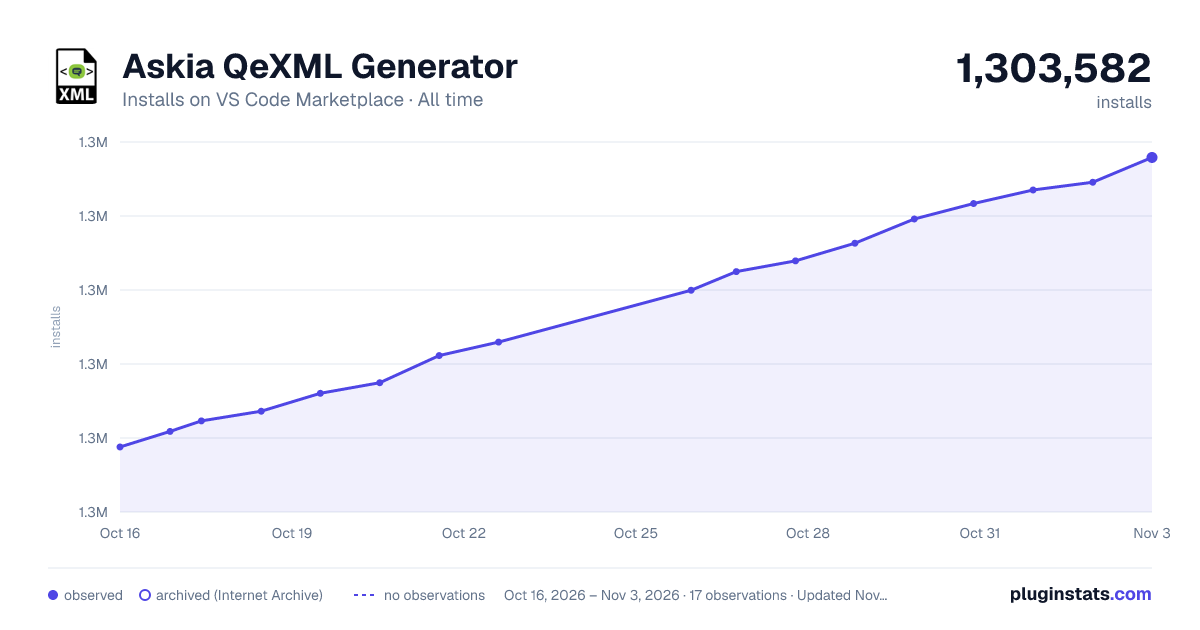

Adoption over time
7/30/90-day growth
Ranking history
Ratings over time
Listing placement
Listing placement
Listing placement
Listing placement
Filled points are observed values; hollow points come from Internet Archive snapshots of the listing page. Dashed segments span periods with no observations — values between points are not interpolated.
Each band is one page of 20. Installs on a linear scale. Placement is projected from installs, so it can differ from the marketplace's own sort order. Hover a dot to see the listing.
Recent observations
Full history (6)Similar VS Code Marketplace Programming Languages plugins
All 20 Askia QeXML Generator alternativesData source
Install counts, average rating, and rating counts come from the public Visual Studio Marketplace gallery API. Installs are cumulative and exclude updates.
Listing: https://marketplace.visualstudio.com/items?itemName=Askia.askia-qexml-generator-extension. First seen Oct 16, 2026; last successful collection Oct 21, 2026. See the methodology.