 PluginStats
MDX installs statistics
By unified · VS Code Marketplace · Programming Languages
Language support for MDX
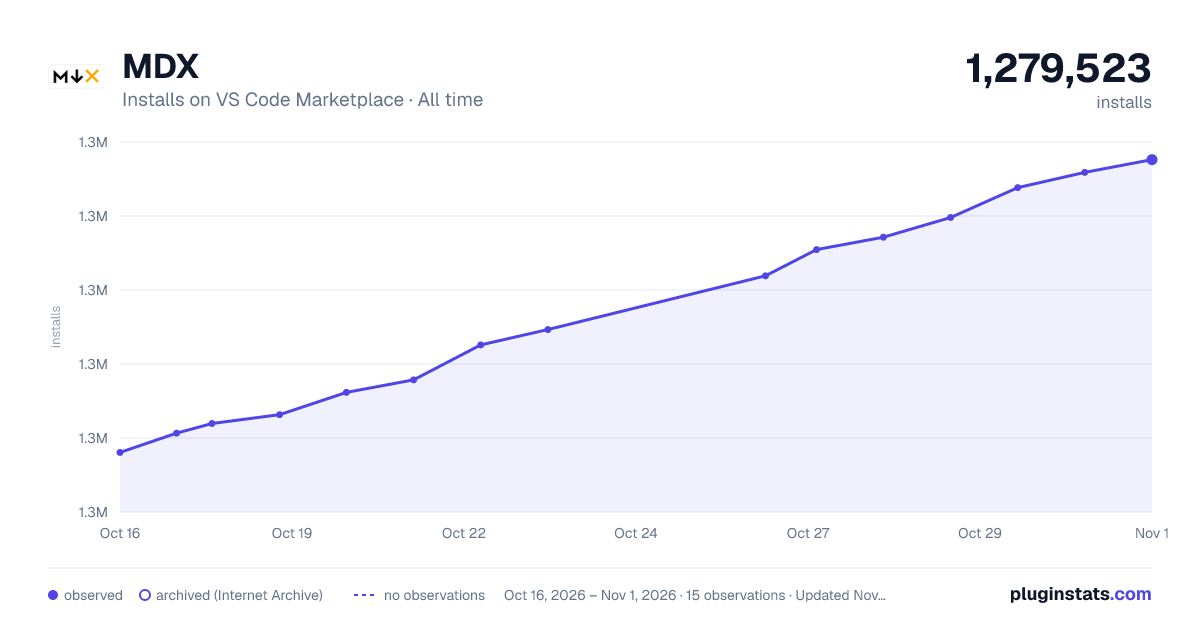
MDX has 1,273,233 recorded installs on VS Code Marketplace, ranking #470 of 2,501 tracked listings.
Rating: 4.56 / 5 from 9 ratings
About MDX
MDX for Visual Studio Code
[![Build][build-badge]][build] [![Coverage][coverage-badge]][coverage] [![Visual Studio Marketplace Downloads][marketplace-badge]][marketplace] [![Open VSX Downloads][openvsx-badge]][openvsx] [![Sponsors][sponsors-badge]][collective] [![Backers][backers-badge]][collective] [![Chat][chat-badge]][chat]
[Visual Studio Code][vscode] extension to add language support for [MDX][].
Contents
- Install
- Settings
- TypeScript
- Plugins
- Syntax highlighting
- ESLint
- Auto-close tags
- Prettier
- Sponsor
- Changelog
- License
Install
[Get it on the VS Code Marketplace][marketplace] or install it by using Quick Open (<kbd>Ctrl</kbd> + <kbd>P</kbd>) and running the following:
ext install unifiedjs.vscode-mdx
Settings
All [MDX language server configurations][] can be configured via [Visual Studio Code][vscode] settings. MDX for VSCode supports the following additional setting:
mdx.server.enable(boolean, default:true) — Enable the MDX language server.
TypeScript
This extension offers type safety for MDX files based on TypeScript’s [types in JSDoc][jsdoc]. For MDX specific details, see the TypeScript section of the repository readme.
Plugins
For information on plugin support, see the Plugins section of the repository readme.
Syntax highlighting
Syntax highlighting for MDX is based on the MDX TextMate grammar.
Custom Languages in Code Blocks
MDX for Visual Studio Code supports syntax highlighting for a number of well-known languages in code blocks. However, it’s impossible to support all languages within the MDX extension. Instead, if an extensions adds support for a language, it can add support for MDX code blocks.
The following example adds support for syntax highlighting MDX code blocks
tagged with mermaid.
You can use this example and replace mermaid with the appropriate values to
support your own language.
Save the file to syntaxes/mdx.mermaid.tmLanguage.json.
{
  "fileTypes": [],
  // This can be something else.
  "scopeName": "mdx.mermaid.codeblock",
  "injectionSelector": "L:source.mdx",
  "patterns": [
    {
      "begin": "(?:^|\\G)[\\t ]*(`{3,})(?:[\\t ]*((?i:(?:.*\\.)?mermaid))(?:[\\t ]+((?:[^\\n\\r`])+))?)(?:[\\t ]*$)",
      "beginCaptures": {
        "1": {
          "name": "string.other.begin.code.fenced.mdx"
        },
        "2": {
          "name": "entity.name.function.mdx"
        }
      },
      "contentName": "meta.embedded.mermaid",
      "end": "(\\1)(?:[\\t ]*$)",
      "endCaptures": {
        "1": {
          "name": "string.other.end.code.fenced.mdx"
        }
      },
      "name": "markup.code.mermaid.mdx",
      "patterns": [
        {
          "include": "source.mermaid"
        }
      ]
    },
    {
      "begin": "(?:^|\\G)[\\t ]*(~{3,})(?:[\\t ]*((?i:(?:.*\\.)?mermaid))(?:[\\t ]+((?:[^\\n\\r])+))?)(?:[\\t ]*$)",
      "beginCaptures": {
        "1": {
          "name": "string.other.begin.code.fenced.mdx"
        },
        "2": {
          "name": "entity.name.function.mdx"
        }
      },
      "contentName": "meta.embedded.mermaid",
      "end": "(\\1)(?:[\\t ]*$)",
      "endCaptures": {
        "1": {
          "name": "string.other.end.code.fenced.mdx"
        }
      },
      "name": "markup.code.mermaid.mdx",
      "patterns": [
        {
          "include": "source.mermaid"
        }
      ]
    }
  ]
}
In package.json, add the following section.
Replace mermaid with your actual language and remove comments.
{
  "contributes": {
    "grammars": [
      {
        // This must match the scopeName in the tmLanguage file.
        "scopeName": "mdx.mermaid.codeblock",
        "path": "./syntaxes/mdx.mermaid.tmLanguage.json",
        "injectTo": [
          "source.mdx"
        ],
        "embeddedLanguages": {
          "source.mermaid": "mermaid",
        }
      }
    ]
  }
}
ESLint
You can lint MDX with [ESLint][] using [eslint-plugin-mdx][eslint-plugin-mdx].
To integrate ESLint in Visual Studio Code, install the
[VS Code ESLint extension][vscode-eslint].
Auto-close tags
If you want VS Code to automatically close tags while you type, install
[Auto Close Tag][] and configure it to also include the mdx language:
{
  "auto-close-tag.activationOnLanguage": [
    // …
    "mdx"
  ]
}
Prettier
[Prettier][] supports MDX 1, but MDX 2 and 3
[are not officially supported][prettier issue] yet.
We recommend against formatting MDX files with Prettier.
To opt out, add the following line to your .prettierignore file:
*.mdx
Sponsor
See [§ Sponsor][sponsor] on our site for how to help financially.…
Description from the VS Code Marketplace listing.
- javascript
- javascriptreact
- json
- keybindings
- Markdown
- mdx
- typescript
- typescriptreact
README badge
Show your rank in a README or on your website. The badge updates automatically.
Charts
Images: 30d · 1y · all time · 1600×900 dark



Adoption over time
7/30/90-day growth
Ranking history
Ratings over time
Listing placement
Listing placement
Filled points are observed values; hollow points come from Internet Archive snapshots of the listing page. Dashed segments span periods with no observations — values between points are not interpolated.
Each band is one page of 20. Installs on a linear scale. Placement is projected from installs, so it can differ from the marketplace's own sort order. Hover a dot to see the listing.
Recent observations
Full history (5)Similar VS Code Marketplace Programming Languages plugins
All 20 MDX alternativesMDX on other marketplaces
Data source
Install counts, average rating, and rating counts come from the public Visual Studio Marketplace gallery API. Installs are cumulative and exclude updates.
Listing: https://marketplace.visualstudio.com/items?itemName=unifiedjs.vscode-mdx. First seen Oct 16, 2026; last successful collection Oct 20, 2026. See the methodology.