 PluginStats
Jasmine Test Explorer installs statistics
By Holger Benl (4 listings) · VS Code Marketplace · Other
Run your Jasmine tests in the Sidebar of Visual Studio Code
Jasmine Test Explorer has 101,510 recorded installs on VS Code Marketplace, ranking #2346 of 2,501 tracked listings.
Rating: 3.92 / 5 from 12 ratings
About Jasmine Test Explorer
Jasmine Test Explorer for Visual Studio Code
Run your Jasmine tests in Node using the Test Explorer UI.

Features
- Shows a Test Explorer in the Test view in VS Code's sidebar with all detected tests and suites and their state
- Adds CodeLenses to your test files for starting and debugging tests
- Adds Gutter decorations to your test files showing the tests' state
- Adds line decorations to the source line where a test failed
- Shows a failed test's log when the test is selected in the explorer
- Lets you choose test suites or individual tests in the explorer that should be run automatically after each file change
- Forwards the console output from Jasmine to a VS Code output channel
Getting started
- Install the extension
- Restart VS Code and open the Test view
- Run / Debug your tests using the
 /
/  icons in the Test Explorer or the CodeLenses in your test file
Typescript support
If your tests are written in Typescript, install the ts-node npm package (if you haven't done so already) and set the jasmineExplorer.nodeArgv configuration property to ["-r", "ts-node/register"].
This is equivalent to running Jasmine with the command line
node -r ts-node/register ./node_modules/.bin/jasmine
Note that breakpoints may not work initially (this is a known limitation when debugging with ts-node in VS Code), so you may have to use debugger statements instead.
Configuration
Custom debugger configuration
If you want to customize the configuration used for debugging your tests (e.g. to set sourceMapPathOverrides
or skipFiles), you can do so by creating a debugging configuration in your launch.json and setting
jasmineExplorer.debuggerConfig to the name of your debugging configuration.
Here's the default debugging configuration used by this adapter:
{
  "name": "Debug Jasmine Tests",
  "type": "pwa-node",
  "request": "attach",
  "port": 9229,
  "continueOnAttach": true,
  "autoAttachChildProcesses": false,
  "skipFiles": [
    "<node_internals>/**"
  ]
}
Other options
| Property | Description |
|---|---|
jasmineExplorer.cwd | The working directory where Jasmine is run (relative to the workspace folder). Note that the path to the Jasmine config file and the paths within that file are relative to this directory. |
jasmineExplorer.config | The location of the Jasmine config file (relative to the working directory) (default: "spec/support/jasmine.json") |
jasmineExplorer.env | Environment variables to be set when running the tests |
jasmineExplorer.nodePath | The path to the node executable to use. By default it will attempt to find it on your PATH, if it can't find it or if this option is set to null, it will use the one shipped with VS Code |
jasmineExplorer.nodeArgv | The arguments to the node executable to use |
jasmineExplorer.jasminePath | The path to the jasmine package to use (absolute or relative to the workspace folder). By default it looks for a directory node_modules/jasmine in your workspace and uses that if it exists, otherwise or if this option is set to null, it uses a bundled version of jasmine |
jasmineExplorer.debuggerPort | The port for running the debug sessions (default: 9229) |
jasmineExplorer.breakOnFirstLine | Setting to true injects a breakpoint at the first line of your test, (default: false) |
jasmineExplorer.debuggerSkipFiles | An array of glob patterns for files to skip when debugging (default: []) |
testExplorer.codeLens | Show a CodeLens above each test or suite for running or debugging the tests |
testExplorer.gutterDecoration | Show the state of each test in the editor using Gutter Decorations |
testExplorer.onStart | Retire or reset all test states whenever a test run is started |
testExplorer.onReload | Retire or reset all test states whenever the test tree is reloaded |
Commands
The following commands are available in VS Code's command palette, use the ID to add them to your keyboard shortcuts:
| ID | Command |
|---|---|
test-explorer.reload | Reload tests |
test-explorer.run-all | Run all tests |
test-explorer.run-file | Run tests in current file |
test-explorer.run-test-at-cursor | Run the test at the current cursor position |
test-explorer.cancel | Cancel running tests |
Troubleshooting
All console output from Jasmine is forwarded to a VS Code output channel called "Jasmine Tests", this is often useful in tracking down problems.
If the "Jasmine Tests" output channel doesn't show up, the Test view doesn't show your tests or anything else doesn't work as expected (and can't be explained from Jasmine's console output), you can turn on diagnostic logging using one of the following configuration options (note: in multi-root workspaces, these options are always taken from the first workspace folder):
jasmineExplorer.logpanel: Write diagnotic logs to an output panel called "Jasmine Explorer Log"jasmineExplorer.logfile: Write diagnostic logs to the given file
There is a bug in Node >= 10.6 that breaks this adapter.
If you're using a version of Node affected by this bug, add "jasmineExplorer.nodePath": null to your configuration as a workaround.…
Description from the VS Code Marketplace listing.
- jasmine
- test
- testing
README badge
Show your rank in a README or on your website. The badge updates automatically.
Charts
Images: 30d · 1y · all time · 1600×900 dark


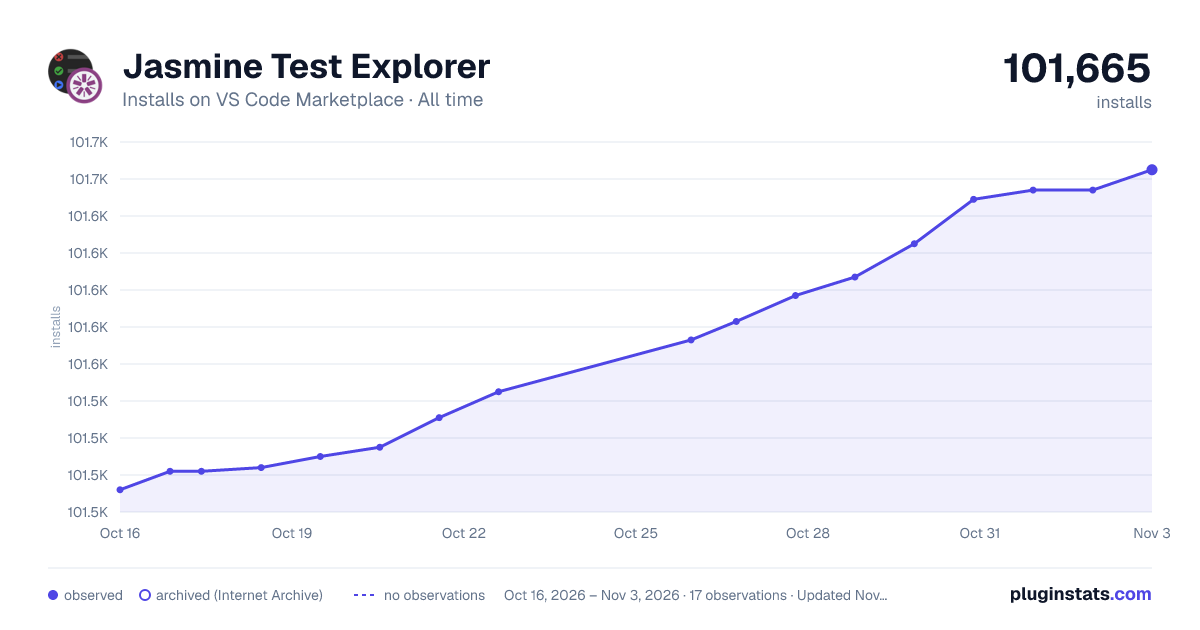

Adoption over time
7/30/90-day growth
Ranking history
Ratings over time
Listing placement
Listing placement
Filled points are observed values; hollow points come from Internet Archive snapshots of the listing page. Dashed segments span periods with no observations — values between points are not interpolated.
Each band is one page of 20. Installs on a linear scale. Placement is projected from installs, so it can differ from the marketplace's own sort order. Hover a dot to see the listing.
Recent observations
Full history (5)Similar VS Code Marketplace Other plugins
All 20 Jasmine Test Explorer alternativesData source
Install counts, average rating, and rating counts come from the public Visual Studio Marketplace gallery API. Installs are cumulative and exclude updates.
Listing: https://marketplace.visualstudio.com/items?itemName=hbenl.vscode-jasmine-test-adapter. First seen Oct 16, 2026; last successful collection Oct 20, 2026. See the methodology.