 PluginStats
Oracle SQL Developer for VSCode installs statistics
By Oracle Corporation (8 listings) · VS Code Marketplace · Programming Languages
Unified development of Oracle SQL, PL/SQL, and APEX
Oracle SQL Developer for VSCode has 1,030,311 recorded installs on VS Code Marketplace.
It ranks #530 of 2,501 tracked VS Code Marketplace listings by installs.
It is rated 3.5 out of 5 from 123 ratings.
PluginStats has 4 daily observations since Oct 16, 2026; the latest is from Oct 19, 2026.
Rating: 3.50 / 5 from 123 ratings
About Oracle SQL Developer for VSCode
Oracle SQL Developer for VS Code
About Oracle SQL Developer for VS Code
The de facto standard for Oracle Database development and administration tools is now fully integrated into Visual Studio Code.
Oracle SQL Developer for VS Code brings familiar SQL Developer workflows to experienced Oracle Database users who want to stay inside VS Code. Execute SQL queries and scripts, build and debug PL/SQL, manage schema objects, inspect performance, administer users and roles, and work with Oracle APEX application source from one workspace.
The extension also integrates with Oracle SQLcl, Oracle's command-line interface and MCP Server for Oracle Database. Use SQLcl from an integrated terminal, run SQL and PL/SQL from your editor, and make SQL Developer database connections available to GitHub Copilot and other MCP-compatible VS Code extensions.
Product updates are delivered quarterly, adding capabilities from SQL Developer Classic along with new features that take advantage of the VS Code platform.
Getting Started
Install SQL Developer for VS Code by clicking the Install button above.
Complete Feature List
• Oracle SQLcl MCP Server Integration • 🔥 APEXLang IDE Support • JSON Duality Views Support • Diagramming • 🔥 Connectivity • 🔥 DBA Panel • 🔥 Performance • 🔥 Security • Schema Navigation • SQL Worksheet • Data Grids • SQL Notebooks • PL/SQL Code Editor • PL/SQL Debugger • Post-Execution Debugging of MLE JavaScript Modules • Code Snippets • Integrated Command Line Interface via Oracle SQLcl • Useful Commands • Quick Start Examples • Start working • Worksheet • Auto-complete • SQL Snippets • SQL History • Working with database objects • JSON data and JSON duality views • Supported Locales • Bookmarks • Support • Data and Telemetry • License
Oracle SQLcl MCP Server Integration
When installed, the extension registers the Oracle SQLcl MCP Server for GitHub Copilot, making your SQL Developer database connections available for agentic chat requests, including running SQL and PL/SQL against your database.
Optionally, you can invoke the Configure Cline SQLcl MCP command palette operation to get a JSON snippet that registers SQLcl's MCP Server for any local AI agent. Cline is provided only as an example. Neither Cline nor Copilot is required.
In this Copilot session, a request for a list of managers from the HR database can use a database connection named HR, inspect the schema, identify the EMPLOYEES table, query the requested information, and return a summary report.
*Note regarding Oracle Database access via MCP and AI chat assistants*
• Apply least privilege: Use dedicated database users with minimal permissions for AI assistants and MCP integrations. • Segregate environments: Connect to sanitized development and test databases; restrict and monitor access to production systems. • Never auto-approve actions: Always review and approve actions requested by AI or Copilot integrations.
Oracle APEXLang IDE Support
APEXLang is a complete application specification language for Oracle APEX, with a documented grammar and compiler. APEXLang files are plain-text, human-readable, source-control friendly, and designed for diffing, merging, reviewing, and automation.
SQL Developer for VS Code includes native APEXLang support, providing a rich editing experience powered by the Language Server Protocol (LSP). Features include syntax highlighting, code completion, validation, diagnostics, formatting, and intelligent editing assistance. Export APEX applications from the database, manage them as source code, and import them back to create or update applications.
The extension simplifies AI-assisted development through its built-in SQLcl MCP Server. This enables AI agents to generate and work with APEXLang while securely connecting to your Oracle AI Database. Rather than producing arbitrary code, AI assistants generate structured application specifications that are validated and compiled through the same APEX compiler, governance, and security model used by developers.
By leveraging the integrated SQLcl MCP Server, AI-driven workflows operate with the same database identity, security policies, and audit controls as traditional development workflows, enabling secure and governed application development with Oracle APEX.
JSON Duality Views Support
With the JSON duality view builder, you can create, edit, and test JSON duality views. Duality views are treated as database objects and are available as a separate node in the Connections panel.
Diagramming
Right-click a connection and select Open Diagram to create an empty diagram. Select tables and views, then drag and drop them onto the diagram.
NOTE: Hold Shift while the cursor is over the diagram. Hold Alt/Option while releasing the mouse button to add objects with dependencies defined by foreign key constraints.
Drag a connection folder to a diagram to add all tables, views, and duality views from the connection schema.
To add all tables and views to a diagram, select the table or view folders from the connected schema, or from schemas under the Other Users node.
Arrange objects on the diagram using Auto Layout, then fine-tune the layout manually. Save diagrams to the file system and reopen them later with the same connection, or with another connection that has access to the same objects.
Connectivity
Everything required to connect to your database is included in the extension. If you have a tnsnames.ora file, you can use it to define your database connections.
Create connections by entering EZConnect or Basic connection properties, referencing a TNS entry, using an Oracle Cloud Autonomous Database wallet ZIP file, or importing existing connections from the Oracle Cloud Infrastructure (OCI) Database Tools service.
You can also import existing connections you have previously defined in your Oracle Cloud Infrastructure (OCI) tenancy via the Database Tools service.…
Description from the VS Code Marketplace listing.
- APEX
- apexlang
- ci/cd
- command line
- data
- data mode
- database
- db
- dbms_output
- debuggers
- devops
- explain plan
- keybindings
- Oracle
- oracle-sql
- orcl
- PL/SQL
- plsql
- raptor
- schema browser
Where Oracle SQL Developer for VSCode sits in the listing
Each band is one page of 20. Installs on a log scale. Placement is projected from installs, so it can differ from the marketplace's own sort order. Hover a dot to see the listing.


Charts
Images: 30d · 1y · all time · 1600×900 dark


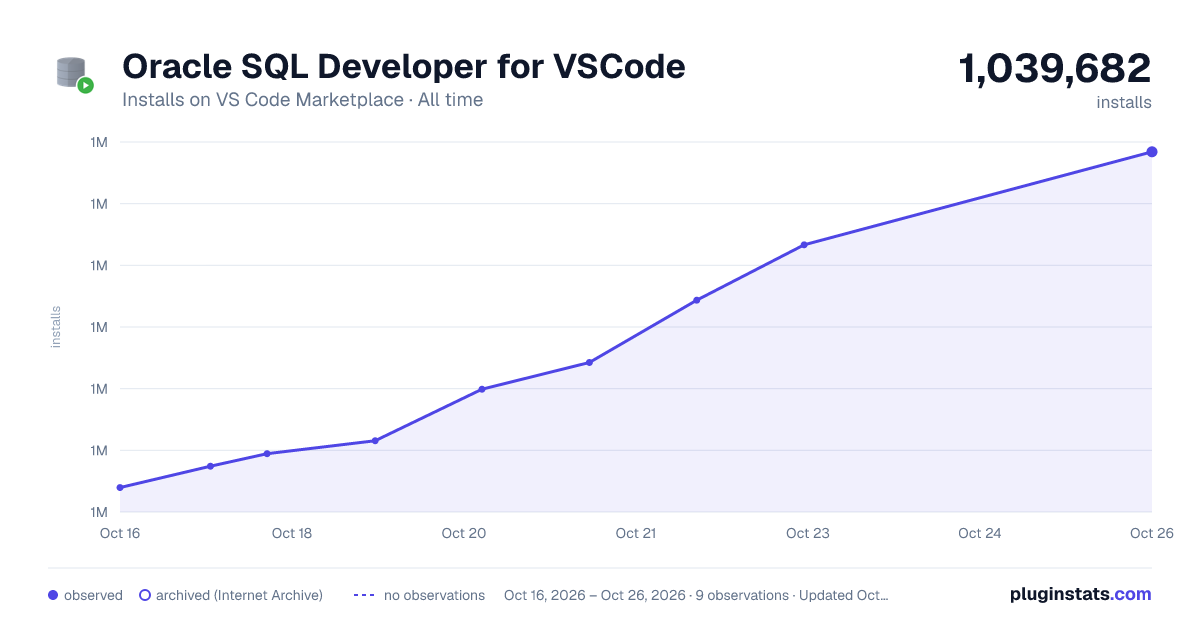

Adoption over time


7/30/90-day growth


Ranking history


Filled points are observed values; hollow points come from Internet Archive snapshots of the listing page. Dashed segments span periods with no observations — values between points are not interpolated.
Recent observations
Full history (4)Similar VS Code Marketplace Programming Languages plugins
Data source
Install counts, average rating, and rating counts come from the public Visual Studio Marketplace gallery API. Installs are cumulative and exclude updates.
Listing: https://marketplace.visualstudio.com/items?itemName=Oracle.sql-developer. First seen Oct 16, 2026; last successful collection Oct 19, 2026. See the methodology.