 PluginStats
Runtime Server Protocol UI installs statistics
By Red Hat (18 listings) · VS Code Marketplace · Other
Provides a unified UI to interact with runtimes and servers managed over the RSP protocol.
Runtime Server Protocol UI has 787,066 recorded installs on VS Code Marketplace, ranking #628 of 2,501 tracked listings.
Rating: 2.00 / 5 from 3 ratings
About Runtime Server Protocol UI
Runtime Server Protocol UI





A Visual Studio Code extension that provides a unified UI for any RSP (Runtime Server Protocol) provider to contribute their RSP implementation to.
Warning: Not a standalone extension
This extension on its own provides no support for any specific runtimes. If you install only this extension, the views and actions may appear not to function.
To be used properly, this extension requires other contributing extensions that provide implementations that start or stop specific RSP instances and are capable of managing specific server or runtime types.
Commands and features
This extension supports a number of commands for interacting with supported server adapters; these are accessible via the command menu (Cmd+Shift+P on macOS or Ctrl+Shift+P on Windows and Linux) and may be bound to keys in the normal way.
Available Commands
Add Server Location- Selects the path of the server location and display in the SERVERS Explorer stack.Start- From the list of servers present, select the server to start.Restart- From the list of servers present, select the server to restart.Stop- From the list of servers present, select the server to stop.Remove- From the list of servers present, select the server to be removed.Debug- From the list of servers present, select the server to run in Debug mode.Add Deployment to Server- Add a deployable file or folder to the server to be published.Remove Deployment from Server- Remove a deployment from the server.Publish Server (Full)- Publish the server, synchronizing the content of deployments from your workspace to the server.Show Output Channel- Select a particular server from the list to show its output channel in the editor.Edit Server- View a JSON representation of your server in an editor, and submit changes to properties back to the RSP.Download Runtime- Some server types may expose to the user methods to download a version of specific runtimes or frameworks, extract them, and set them up to be used by the RSP.Server Actions- Some server types may expose to the user arbitrary actions that the user may invoke, such as changing some configuration options, opening a web browser, or editing a configuration file. These server-contributed actions have few restrictions placed on them by the framework other than what may be done on the client-side.Run on Server- By selecting an application (e.g war file) directly from the explorer context view, the application will be deployed and the server started.Debug on Server- By selecting an application (e.g war file) directly from the explorer context view, the application will be deployed and the server started in Debug mode.
Extension Settings
This extension contributes the following settings:
vscodeAdapters.showChannelOnServerOutput: enable/disable the server output channel logsrsp-ui.rsp.java.home: Specifies the path to a full JDK (version 11 or newer) which will be used to launch the Runtime Server Protocol (RSP) Server, as well as be the default java to launch any Java-based runtimes that the RSP will control.<br>On Windows, backslashes must be escaped, i.e.<br>"rsp-ui.rsp.java.home":"C:\\Program Files\\Java\\jdk-11.0.13"rsp-ui.enableStartServerOnActivation: Specifies which RSP Server have to be automatically started during activation. If option is disabled, user will have to manually start the RSP Server through command palette or context menursp-ui.enableAsyncPublish: enable/disable async publishingrsp-ui.enableCustomServerLocation: when enabled, server definitions are stored in the path specified byrsp-ui.customServerLocationinstead of the RSP data directoryrsp-ui.customServerLocation: path where server definitions are stored whenrsp-ui.enableCustomServerLocationis enabled. If relative, resolved against the first workspace folder. If absolute, used as-is. Default:.rsp/servers
Server Parameters
To change Server Parameters, right-click on the server you want to edit and select Edit Server
Global Server Parameters
These settings are valid for all servers…
Description from the VS Code Marketplace listing.
- adapters
- plaintext
- RSP
- runtimes
- server
README badge
Show your rank in a README or on your website. The badge updates automatically.
Charts
Images: 30d · 1y · all time · 1600×900 dark


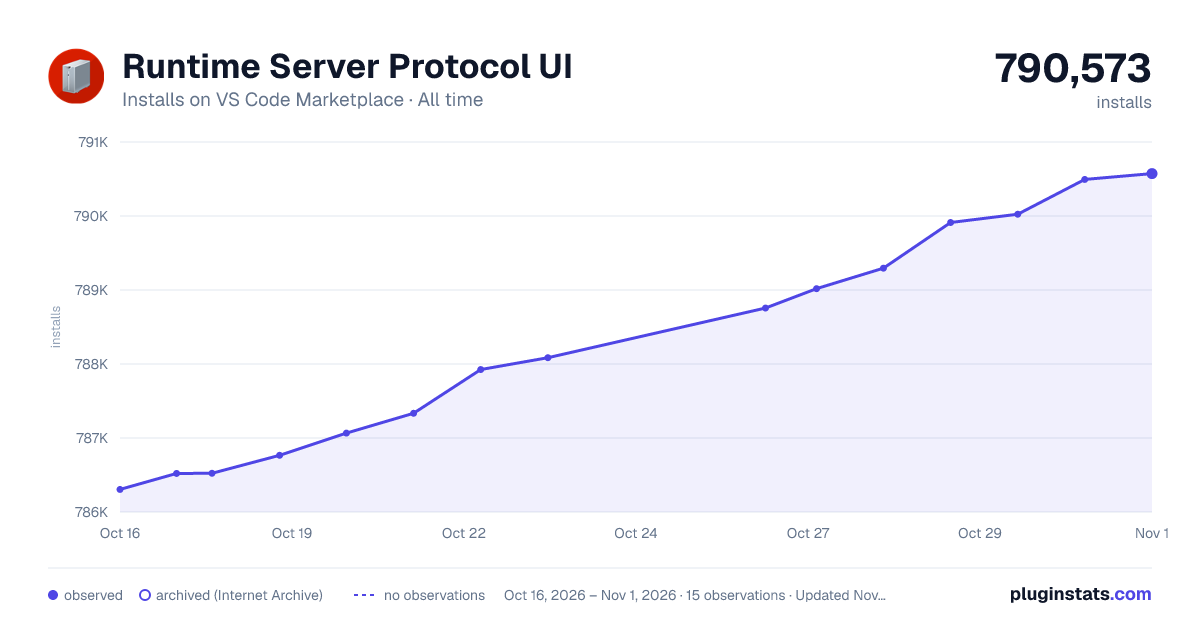

Adoption over time
7/30/90-day growth
Ranking history
Ratings over time
Listing placement
Listing placement
Filled points are observed values; hollow points come from Internet Archive snapshots of the listing page. Dashed segments span periods with no observations — values between points are not interpolated.
Each band is one page of 20. Installs on a linear scale. Placement is projected from installs, so it can differ from the marketplace's own sort order. Hover a dot to see the listing.
Recent observations
Full history (5)Similar VS Code Marketplace Other plugins
All 20 Runtime Server Protocol UI alternativesData source
Install counts, average rating, and rating counts come from the public Visual Studio Marketplace gallery API. Installs are cumulative and exclude updates.
Listing: https://marketplace.visualstudio.com/items?itemName=redhat.vscode-rsp-ui. First seen Oct 16, 2026; last successful collection Oct 20, 2026. See the methodology.