 PluginStats
Azure Tools installs statistics
By Microsoft (224 listings) · VS Code Marketplace · Extension Packs
Build, deploy, and manage Azure applications with support from Copilot all without leaving VS Code.
Azure Tools has 2,444,958 recorded installs on VS Code Marketplace, ranking #298 of 2,501 tracked listings.
Rating: 2.95 / 5 from 19 ratings
About Azure Tools
Azure Tools for Visual Studio Code
Build, deploy, and manage Azure applications without leaving VS Code. This extension pack combines the most popular Azure tools so you can create cloud apps faster and easier.
✅ Why Use the Azure Tools Extension Pack?
• All-in-One Solution – Install essential Azure extensions in one click. • Seamless Integration – Work with Azure services directly in Visual Studio Code. • Beginner-Friendly – Perfect for developers new to Azure or cloud computing. • Copilot Enabled – Leverage AI assistance for coding and cloud management. • Boost Productivity – No need to switch between the Azure Portal and your editor. • Cross-Platform – Works on Windows, macOS, and Linux.
📦 Included Azure Services
• Azure Resource Manager – View and manage your Azure resources in VS Code. • Azure MCP Server extension – Use MCP-powered Azure tooling and workflows directly from VS Code. • App Service – Deploy and manage web apps on Azure. • Functions – Build and debug serverless applications. • Container Apps – Develop, deploy, and manage containerized applications. • Cosmos DB – Work with your NoSQL (e.g., MongoDB) databases directly. • Static Web Apps – Develop and deploy static web apps with ease. • Virtual Machines – Manage your VMs without leaving your editor. • Storage – Access blobs, queues, and tables from VS Code.
Ready to Build on Azure?
👉 Sign up to get $200 in credits and start coding smarter, faster, and in the cloud!
Contributing
Got a suggestion for the Azure Tools extension? Submit a new issue or a PR with an updated package.json and README.md and we'll take a look!
Most contributions require you to agree to a Contributor License Agreement (CLA) declaring that you have the right to, and actually do, grant us the rights to use your contribution. For details, visit https://cla.microsoft.com.
When you submit a pull request, a CLA-bot will automatically determine whether you need to provide a CLA and decorate the PR appropriately (e.g., label, comment). Simply follow the instructions provided by the bot. You will only need to do this once across all repos using our CLA.
This project has adopted the Microsoft Open Source Code of Conduct. For more information see the Code of Conduct FAQ or contact opencode@microsoft.com with any additional questions or comments.
License
MIT
Description from the VS Code Marketplace listing.
- azure
- cloud
- hosting
README badge
Show your rank in a README or on your website. The badge updates automatically.
Charts
Images: 30d · 1y · all time · 1600×900 dark


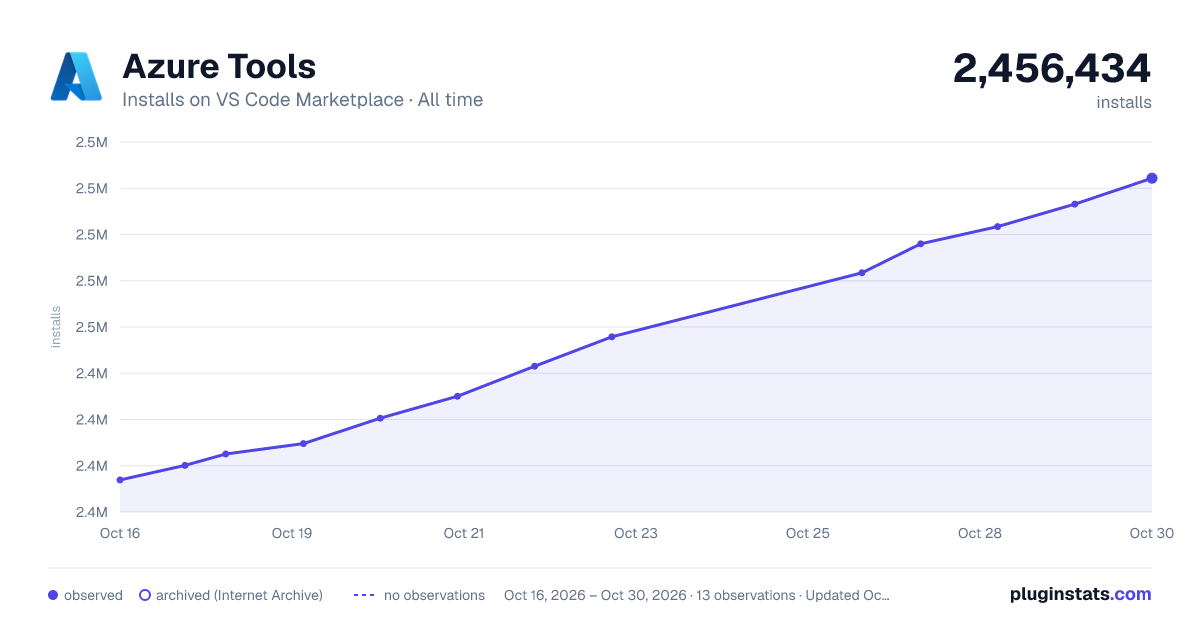

Adoption over time
7/30/90-day growth
Ranking history
Ratings over time
Listing placement
Listing placement
Listing placement
Filled points are observed values; hollow points come from Internet Archive snapshots of the listing page. Dashed segments span periods with no observations — values between points are not interpolated.
Each band is one page of 20. Installs on a linear scale. Placement is projected from installs, so it can differ from the marketplace's own sort order. Hover a dot to see the listing.
Recent observations
Full history (4)Similar VS Code Marketplace Extension Packs plugins
All 20 Azure Tools alternativesData source
Install counts, average rating, and rating counts come from the public Visual Studio Marketplace gallery API. Installs are cumulative and exclude updates.
Listing: https://marketplace.visualstudio.com/items?itemName=ms-vscode.vscode-node-azure-pack. First seen Oct 16, 2026; last successful collection Oct 19, 2026. See the methodology.