 PluginStats
Javadoc Tools installs statistics
By Madhav Dhingra · VS Code Marketplace · Programming Languages
This extension provides tools to the user for creating Javadocs for classes.
Javadoc Tools has 118,460 recorded installs on VS Code Marketplace, ranking #2153 of 2,502 tracked listings.
Rating: 3.67 / 5 from 3 ratings
About Javadoc Tools
Javadoc Tools for Visual Studio Code
A powerful extension to generate, preview, and export Javadoc comments for your Java projects in Visual Studio Code.
✨ New & Improved in v1.8.0
- Javadoc Preview Panel: Live Markdown/HTML preview of Javadoc comments in the Explorer sidebar, with Shiki-powered syntax highlighting and dynamic theme support.
🚀 Features
Javadoc Generation
- Generate for Workspace: Add Javadoc comments to all classes in your workspace. (Manual save required after generation.)
- Generate for Open File: Quickly add Javadoc comments to the currently open Java file.
- Generate for Selected Methods: Choose specific methods to document via a QuickPick menu.
- Context Menu Integration: Right-click on a Java class or file to generate Javadoc comments instantly.
Export Javadoc
- Export HTML Javadoc: Export your project's Javadoc as HTML using the
Export Javadoccommand. Multi-root workspaces supported. - Customizable: Configure source/target folders, visibility, and shell options via settings.
Live Preview
- Explorer Sidebar Panel: See a live, syntax-highlighted preview of your Javadoc as you edit.
- Theme-Aware: Preview always matches your VS Code color theme, including dynamic switching.
🛠️ Usage
Commands
Javadoc Tools: Generate Javadoc Comments for WorkspaceJavadoc Tools: Generate Javadoc Comments for Open FileJavadoc Tools: Generate Comments for Select MethodsJavadoc Tools: Export JavadocJavadoc Tools: Show Javadoc Preview
Access these via the Command Palette (Cmd+Shift+P/Ctrl+Shift+P) or right-click context menus.
Settings
javadoc-tools.generateJavadoc.workspaceSourceFolder: Default source folder (default:src)javadoc-tools.generateJavadoc.targetFolder: Output folder for exported Javadoc (default:${WorkspaceRoot}/javadoc)javadoc-tools.generateJavadoc.runMode: Javadoc visibility (-public,-protected, etc.)javadoc-tools.generateJavadoc.isUsingPwsh: Set totrueif using PowerShell
📸 Screenshots
Javadoc Preview in Explorer Sidebar

Javadoc Preview in Panel

Export Javadoc for Workspace

Generate Comments for Select Methods

Generate Javadoc from Context Menu

Generate Comments for Open File/Workspace

⚠️ Notes & Warnings
- Workspace-wide Javadoc generation can be slow on large projects. You will be prompted with a full warning before proceeding.
- Generated comments are not auto-saved. Review and save your files after generation.
🐞 Issues & Feedback
For bugs, feature requests, or feedback, please open an issue on GitHub.
📦 Requirements
📜 Changelog
After each update, the changelog will open automatically in a dedicated tab. You can also view it here.
📝 Most Recent Release Notes
V1.8.1
- Fixed README.md
V1.8.0
- New Javadoc Preview webview added to the Explorer sidebar. The preview panel has syntax highlighting and live Markdown rendering, updating as the cursor moves. The preview always matches the current VS Code color theme, including dynamic theme switching. [Issue #31](https://github.com/madhavd1/vscode-javadoc-tools/issues/31).
- [Issue #24](https://github.com/madhavd1/vscode-javadoc-tools/issues/24) Added explicit check to ensure either "java.home" setting or "JAVA_HOME" env variable is present before preparting the export command.
- [Issue #25](https://github.com/madhavd1/vscode-javadoc-tools/issues/25) Added a new dialog box will allows you to choose which submodules to include in export. Also ignores hidden folders now.
For complete version history, see the changelog.
Description from the VS Code Marketplace listing.
- java
- javadoc
README badge
Show your rank in a README or on your website. The badge updates automatically.
Charts
Images: 30d · 1y · all time · 1600×900 dark


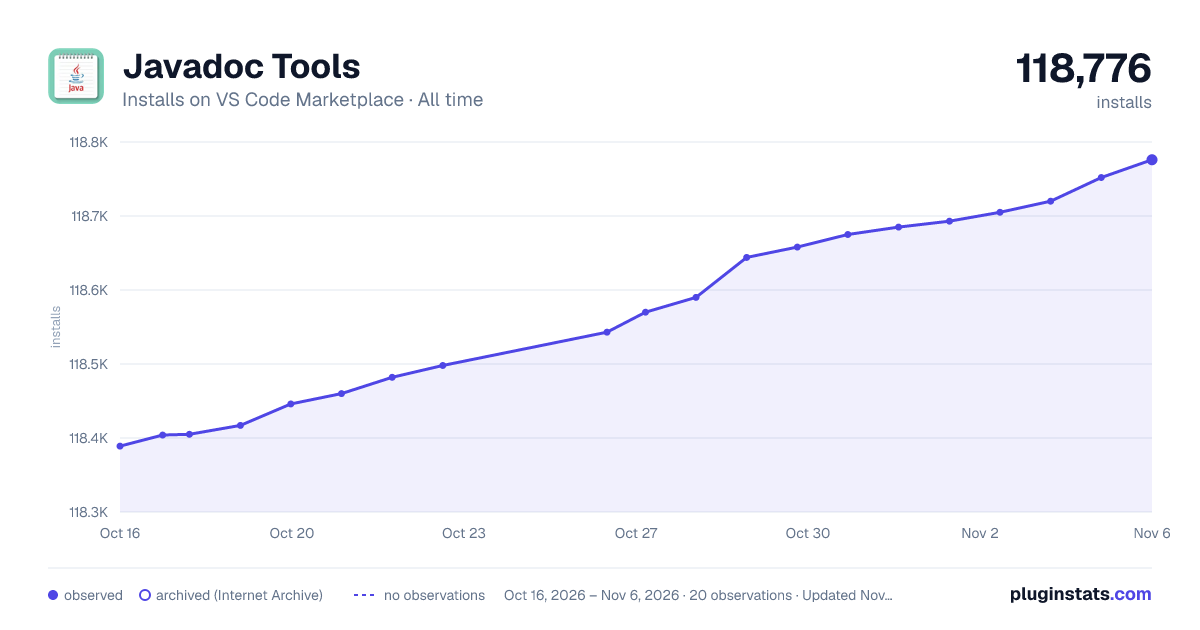

Adoption over time
7/30/90-day growth
Ranking history
Ratings over time
Listing placement
Listing placement
Listing placement
Filled points are observed values; hollow points come from Internet Archive snapshots of the listing page. Dashed segments span periods with no observations — values between points are not interpolated.
Each band is one page of 20. Installs on a linear scale. Placement is projected from installs, so it can differ from the marketplace's own sort order. Hover a dot to see the listing.
Recent observations
Full history (6)Similar VS Code Marketplace Programming Languages plugins
All 20 Javadoc Tools alternativesData source
Install counts, average rating, and rating counts come from the public Visual Studio Marketplace gallery API. Installs are cumulative and exclude updates.
Listing: https://marketplace.visualstudio.com/items?itemName=madhavd1.javadoc-tools. First seen Oct 16, 2026; last successful collection Oct 21, 2026. See the methodology.