 PluginStats
Prettier - JavaScript formatter installs statistics
By Bastian Kistner · VS Code Marketplace · Formatters
VS Code plugin for jlongster/prettier with tabs support
Prettier - JavaScript formatter has 201,067 recorded installs on VS Code Marketplace, ranking #1504 of 2,501 tracked listings.
Rating: 5.00 / 5 from 1 ratings
About Prettier - JavaScript formatter
Prettier formatter for Visual Studio Code with tabs support
VS Code package to format your Javascript using Prettier. Based on Esben Petersen's extension
Installation
Install through VS Code extensions. Search for Prettier - JavaScript formatter
Visual Studio Code Market Place: Prettier - JavaScript formatter
Can also be installed using
ext install prettier-vscode
Usage
Using Command Palette (CMD + Shift + P)
1. CMD + Shift + P -> Format Document
OR
1. Select the text you want to Prettify
2. CMD + Shift + P -> Format Selection
Format On Save
Respects editor.formatOnSave setting.
Settings
printWidth (default: 120)
Fit code within this line limit
tabWidth (default: 4)
Number of spaces it should use per tab
useFlowParser (default: false)
Use the flow parser instead of babylon. Deprecated use parser: 'flow' instead
singleQuote (default: true)
If true, will use single instead of double quotes
trailingComma (default: 'es5')
Controls the printing of trailing commas wherever possible. Valid options:
- "none" - No trailing commas
- "es5" - Trailing commas where valid in ES5 (objects, arrays, etc)
- "all" - Trailing commas wherever possible (function arguments)
bracketSpacing (default: true)
Controls the printing of spaces inside object literals
jsxBracketSameLine (default: false)
If true, puts the > of a multi-line jsx element at the end of the last line instead of being alone on the next line
parser (default: 'babylon')
Which parser to use. Valid options are 'flow' and 'babylon'
useTabs (default: 'true')
Use tabs instead of spaces
Contribute
This is my first Visual Studio Extension so I probably made some terrible choices. Feel free to open issue or PRs!
Description from the VS Code Marketplace listing.
- javascript
- javascriptreact
README badge
Show your rank in a README or on your website. The badge updates automatically.
Charts
Images: 30d · 1y · all time · 1600×900 dark


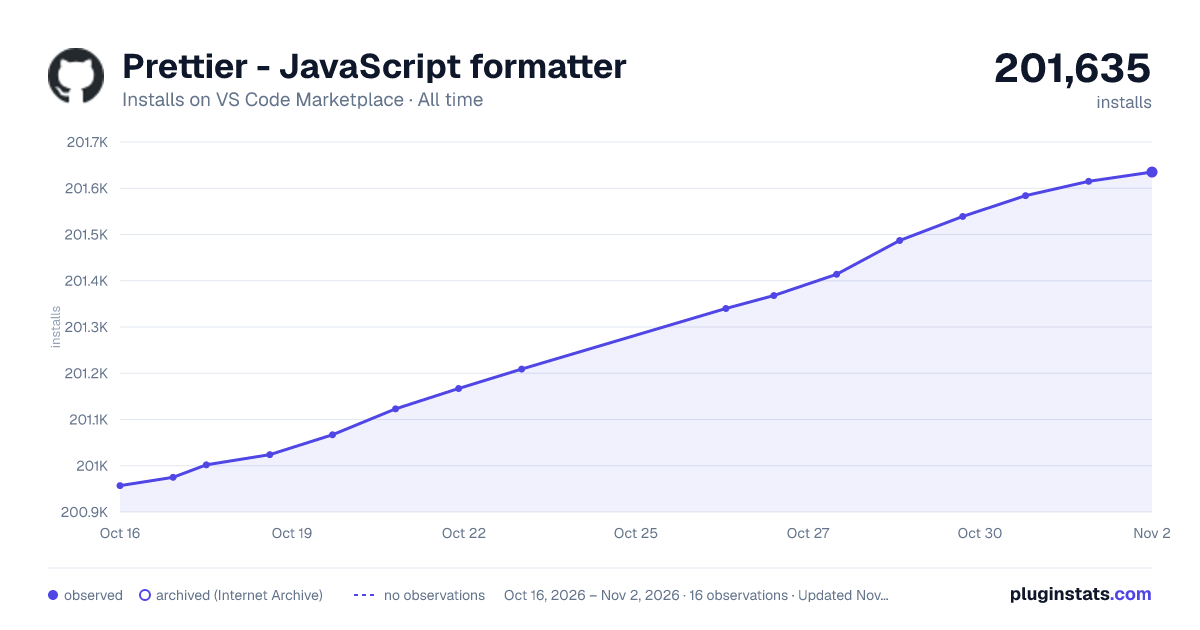

Adoption over time
7/30/90-day growth
Ranking history
Ratings over time
Listing placement
Listing placement
Filled points are observed values; hollow points come from Internet Archive snapshots of the listing page. Dashed segments span periods with no observations — values between points are not interpolated.
Each band is one page of 20. Installs on a linear scale. Placement is projected from installs, so it can differ from the marketplace's own sort order. Hover a dot to see the listing.
Recent observations
Full history (5)Similar VS Code Marketplace Formatters plugins
All 20 Prettier - JavaScript formatter alternativesData source
Install counts, average rating, and rating counts come from the public Visual Studio Marketplace gallery API. Installs are cumulative and exclude updates.
Listing: https://marketplace.visualstudio.com/items?itemName=passionkind.prettier-vscode-with-tabs. First seen Oct 16, 2026; last successful collection Oct 20, 2026. See the methodology.