 PluginStats
MongoDB for VS Code installs statistics
By MongoDB (4 listings) · VS Code Marketplace · Programming Languages
Connect to MongoDB and Atlas directly from your VS Code environment, navigate your databases and collections, inspect your schema and use playgrounds to prototype queries and aggregations.
MongoDB for VS Code has 3,217,625 recorded installs on VS Code Marketplace, ranking #238 of 2,501 tracked listings.
Rating: 4.42 / 5 from 43 ratings
About MongoDB for VS Code
MongoDB for VS Code
MongoDB for VS Code makes it easy to work with your data in MongoDB directly from your VS Code environment. MongoDB for VS Code is the perfect companion for MongoDB Atlas, but you can also use it with your self-managed MongoDB instances.
<p align="center"> <a title="Watch the MongoDB for VS Code demo video" href="https://mdb.link/vs-code-demo-video"> <img src="https://github.com/mongodb-js/vscode/raw/main/resources/screenshots/get-started.png" width="700" alt="MongoDB for VS Code demo video call to action"> </a> </p>Features
Navigate your MongoDB Data
- Navigate your databases, collections, and read-only views
- See the documents in your collections
- Edit documents and save changes to the database
- Get a quick overview of your schema and your indexes
Read more about this functionality in the online documentation.

MongoDB Playgrounds
MongoDB Playgrounds are the most convenient way to prototype and execute CRUD operations and other MongoDB commands directly inside VS Code.
- Prototype your queries, aggregations, and MongoDB commands with convenient syntax highlighting and intelligent autocomplete for MongoDB Shell API, BSON types, MongoDB Query API, system variables, and for database, collection, and field names.
- Run your playgrounds and see the results instantly. Click the play button in the tab bar to see the output.
- Edit documents returned by your playground.
- Save your playground together with your application code to always have a place where all your queries are documented and can be tested just with one click.

Note: Make sure you are connected to a server or cluster before using a playground. You can't run a playground and you won't get intelligent completions if you are not connected.
Document Editing
Editing documents with MongoDB for VS Code is as natural as editing any file in the code editor. Open a document in an editor tab, edit it, and save the changes back to MongoDB.

Quick access to the MongoDB Shell
Launch the MongoDB Shell from the command palette to quickly connect to the same cluster you have active in VS Code.

Note: The mongosh binary needs to be in your $PATH. You can download the mongosh from the MongoDB Download Center.
Terraform snippet for MongoDB Atlas
If you use Terraform to manage your infrastructure, MongoDB for VS Code helps you get started with the MongoDB Atlas Provider. Just open a Terraform file, type atlas and you are good to go.

Atlas Stream Processing
Connect to Atlas Stream Processing instances and develop stream processors using playgrounds.

MongoDB MCP Server
MongoDB for VS Code registers a built-in MongoDB MCP server with VS Code, so AI agents such as GitHub Copilot's agent mode can query your data, inspect schemas and indexes, and manage Atlas resources through the connection you already have active in the extension.
Start the server from the command palette with MongoDB: Start MCP Server, then pick the mongodb server in your agent's tool picker. Use MongoDB: Get MCP Server Config to get the configuration for other MCP clients and MongoDB: Stop MCP Server to shut it down.
Behavior is controlled by the mdb.mcp.* settings — most notably mdb.mcp.readOnly to restrict the server to read-only tools, mdb.mcp.disabledTools to disable individual tools or whole categories, and mdb.mcp.apiClientId / mdb.mcp.apiClientSecret to enable the Atlas tools.
Note: Find more details about the MongoDB GenAI Features in the FAQ.
Extension Settings…
Description from the VS Code Marketplace listing.
- Database
- Databases
- javascript
- json
- keybindings
- MongoDB
- MongoDB Atlas
- MongoDBDocument
- mongodb-document
- MQL
- plaintext
- snippet
- terraform
README badge
Show your rank in a README or on your website. The badge updates automatically.
Charts
Images: 30d · 1y · all time · 1600×900 dark


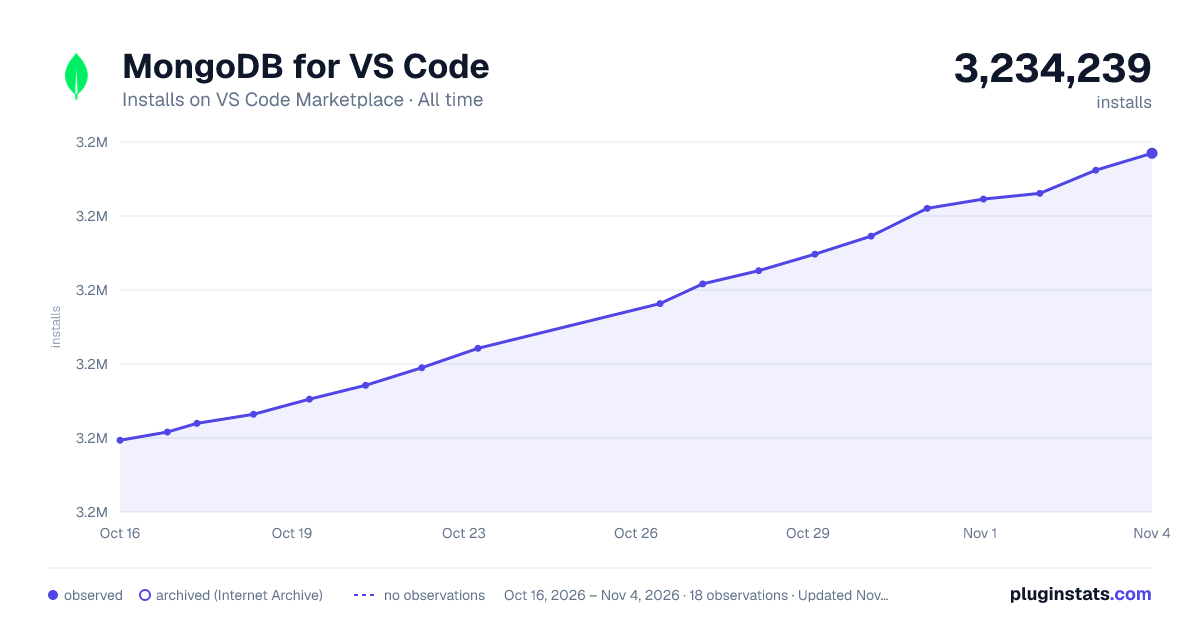

Adoption over time
7/30/90-day growth
Ranking history
Ratings over time
Listing placement
Listing placement
Listing placement
Listing placement
Filled points are observed values; hollow points come from Internet Archive snapshots of the listing page. Dashed segments span periods with no observations — values between points are not interpolated.
Each band is one page of 20. Installs on a linear scale. Placement is projected from installs, so it can differ from the marketplace's own sort order. Hover a dot to see the listing.
Recent observations
Full history (5)Similar VS Code Marketplace Programming Languages plugins
All 20 MongoDB for VS Code alternativesData source
Install counts, average rating, and rating counts come from the public Visual Studio Marketplace gallery API. Installs are cumulative and exclude updates.
Listing: https://marketplace.visualstudio.com/items?itemName=mongodb.mongodb-vscode. First seen Oct 16, 2026; last successful collection Oct 20, 2026. See the methodology.