 PluginStats
Remote Development installs statistics
By Microsoft (224 listings) · VS Code Marketplace · Extension Packs
An extension pack that lets you open any folder in a container, on a remote machine, or in WSL and take advantage of VS Code's full feature set.
Remote Development has 9,089,582 recorded installs on VS Code Marketplace.
It ranks #110 of 2,501 tracked VS Code Marketplace listings by installs.
It is rated 4.6 out of 5 from 119 ratings.
PluginStats has 4 daily observations since Oct 16, 2026; the latest is from Oct 19, 2026.
Rating: 4.61 / 5 from 119 ratings
About Remote Development
Visual Studio Code Remote Development Extension Pack
The Remote Development extension pack allows you to open any folder in a container, on a remote machine, or in the Windows Subsystem for Linux (WSL) and take advantage of VS Code's full feature set. Since this lets you set up a full-time development environment anywhere, you can:
• Develop on the same operating system you deploy to or use larger, faster, or more specialized hardware than your local machine. • Quickly swap between different, separate development environments and make updates without worrying about impacting your local machine. • Help new team members / contributors get productive quickly with easily spun up, consistent development containers. • Take advantage of a Linux based tool-chain right from the comfort of Windows from a full-featured development tool.
No source code needs to be on your local machine to gain these benefits since Remote Development runs commands and extensions directly on the remote machine.
This Remote Development extension pack includes four extensions:
• Remote - SSH - Work with source code in any location by opening folders on a remote machine/VM using SSH. Supports x86_64, ARMv7l (AArch32), and ARMv8l (AArch64) glibc-based Linux, Windows 10/Server (1803+), and macOS 10.14+ (Mojave) SSH hosts. • Remote - Tunnels - Work with source code in any location by opening folders on a remote machine/VM using a VS Code Tunnel (rather than SSH). • Dev Containers - Work with a separate toolchain or container based application by opening any folder mounted into or inside a container. • WSL - Get a Linux-powered development experience from the comfort of Windows by opening any folder in the Windows Subsystem for Linux.
The Remote SSH extension at work:
System Requirements
Local: See the minimum requirements for VS Code. For Windows, Remote - Containers requires Windows 10 Pro/Enterprise or Home 2004+ with WSL2 enabled due to Docker requirements. See installation steps for additional details for each extension.
Remote host / container / WSL support:
• x86_64 / ARMv8l (AArch64) / ARM7l (AArch32) Debian/Raspbian 9+, Ubuntu 16.04+, Ubuntu IoT 18.04+, CentOS / RHEL 7+ SSH hosts, containers, or WSL distributions. • x86_64 Alpine Linux 3.7+ containers or WSL distributions (no SSH support yet).
Additional SSH support:
• Windows 10 / Server 2016/2019 (1803+) using the official OpenSSH Server. • macOS 10.14+ (Mojave) SSH hosts with Remote Login enabled.
Other glibc based Linux SSH Hosts, containers, or WSL distributions may work if they have needed prerequisites.
Some extensions installed on ARMv7l (AArch32) and ARMv8l (AArch64) devices may not work due to the use of x86 native code in the extension. Similarly, extensions installed in Alpine Linux containers or the Alpine WSL distribution may not work due to glibc dependencies in native code inside the extension. See the Remote Development and Linux article for details.
Installation
1. Install VS Code or VS Code Insiders and this extension pack. On Windows, be sure to check Add to PATH when asked to Select Additional Tasks during installation.
2. Remote - SSH: Install an OpenSSH compatible SSH client.
3. WSL: Install the Windows Subsystem for Linux along with your preferred Linux distribution. (Note that WSL2 support is experimental.)
4. Dev Containers: Install and configure Docker for your operating system.
Windows / macOS: 1. Install Docker Desktop 2.0+ for Mac/Windows. Windows 10 Home (2004+) requires Docker Desktop 2.2+ and the WSL2 back-end. (Docker Toolbox is not supported.) 2. If not using WSL2 on Windows, right-click on the Docker task bar item, select Settings / Preferences and update Resources > File Sharing with any locations your source code is kept. See tips and tricks for troubleshooting. 3. To enable the Windows WSL2 back-end: Right-click on the Docker taskbar item and select Settings. Check Use the WSL2 based engine and verify your distribution is enabled under Resources > WSL Integration.
Linux: 1. Follow the official install instructions for Docker CE/EE 18.06+. If you use Docker Compose, follow the Docker Compose 1.21+ install directions. 2. Add your user to the docker group by using a terminal to run: sudo usermod -aG docker $USER Sign out and back in again so this setting takes effect.
Working with Git? Here are three tips to consider:
• If you are working with the same repository folder in Windows and WSL or a container, be sure to set up consistent line endings. See tips and tricks to learn how. • In WSL, you can also avoid passwords by configuring WSL to use the Windows Git credential manager. See tips and tricks to for details. • For containers, if you clone using a Git credential manager, your container should already have access to your credentials! If you use SSH keys, you can also opt-in to sharing them. See Sharing Git credentials with your container for details.
Getting started
Check out one of the following quick starts to get going.
• WSL: Tutorial • SSH: Tutorial • SSH: Getting started • Containers: Tutorial • Containers: Use a container as your full-time environment • Containers: Attach to a running container • Containers (Advanced): Use a remote Docker host
Available commands
Another way to learn what you can do with the Remote Development extensions is to browse the commands each of them provide. Press F1 to bring up the Command Palette and type in Remote- for a full list of commands.
You can also click on the Remote "Quick Access" status bar item in the lower left corner to get a list of the most common commands.
For more information, please see the extension pack documentation.
Release Notes
While an optional install, the Remote Development extensions release with VS Code. VS Code release notes include a summary of changes with a link to detailed release notes.…
Description from the VS Code Marketplace listing.
- containers
- dev container
- development container
- docker
- remote
- remote development
- ssh
- wsl
Charts
Images: 30d · 1y · all time · 1600×900 dark


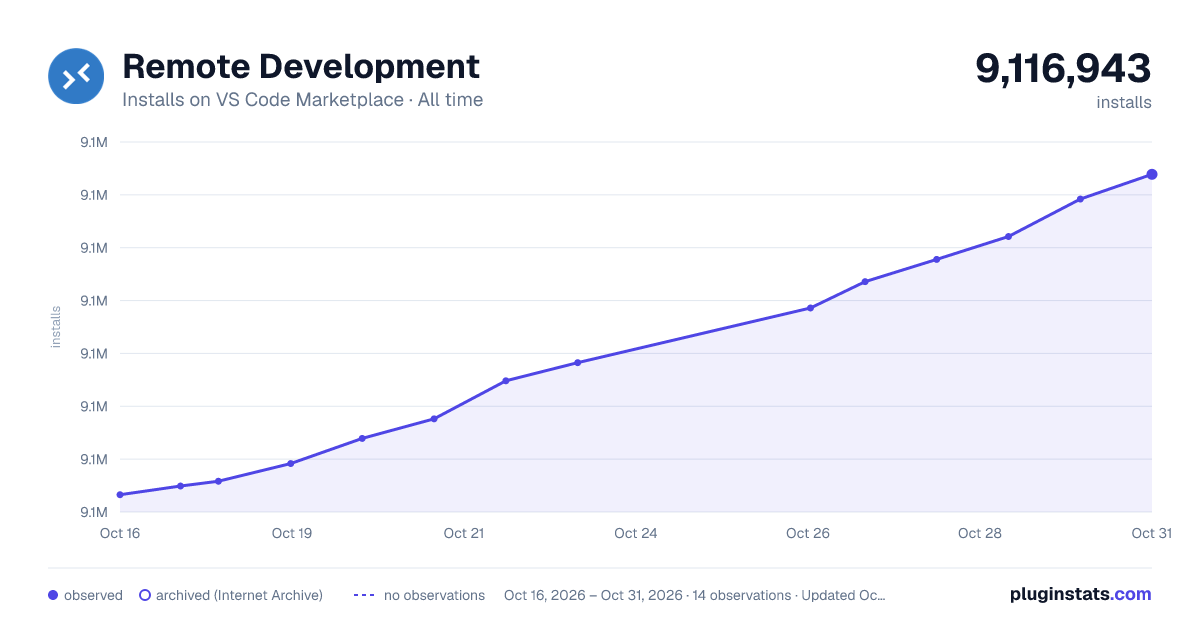

Adoption over time


7/30/90-day growth


Ranking history


Ratings over time


Listing placement


Filled points are observed values; hollow points come from Internet Archive snapshots of the listing page. Dashed segments span periods with no observations — values between points are not interpolated.
Each band is one page of 20. Installs on a log scale. Placement is projected from installs, so it can differ from the marketplace's own sort order. Hover a dot to see the listing.
Recent observations
Full history (4)Similar VS Code Marketplace Extension Packs plugins
All 20 Remote Development alternativesData source
Install counts, average rating, and rating counts come from the public Visual Studio Marketplace gallery API. Installs are cumulative and exclude updates.
Listing: https://marketplace.visualstudio.com/items?itemName=ms-vscode-remote.vscode-remote-extensionpack. First seen Oct 16, 2026; last successful collection Oct 19, 2026. See the methodology.