 PluginStats
Flutter Color installs statistics
By Nilesh Chavan · VS Code Marketplace · Other
This plugin help you to visualize the colors used in your project.
Flutter Color has 571,748 recorded installs on VS Code Marketplace, ranking #787 of 2,501 tracked listings.
Rating: 4.63 / 5 from 8 ratings
About Flutter Color




Welcome to Flutter Color VS Code Extension 🎨✨
A user-friendly plugin to help you visualize the colors used in your project. Initially developed for Flutter, it is now used in various programming languages. It automatically parses and converts your color code into a small color picker box, allowing you to see and change the color as desired. <br/> <br/>
🚀🌕 Celebrating Chandrayaan's Glorious Landing and a Promising Future! 🌌✨
<p align="center"> <img src="https://flutter-color.s3.ap-south-1.amazonaws.com/vikram-lander.webp"> </p> <br/>Dear All,<br/> Last year on celeberation of successfull landing of changrayaan 3, I decided to make few structural changes in the plugin, so that new features can be easily developed.Today, I’m excited to announce that these changes have been successfully implemented. Here’s what’s new:
- Implemented Telemetry & Crash Reporting 📊
- Added test cases ✅
- Refactored code 🔧
If you haven't tried this plugin yet, head over to VS Code -> Extensions -> search for "Flutter Color" -> Install and start using it! I’d love to hear your feedback.
Upcoming Features
- Enable users to convert color codes between various formats such as RGBA, HEX, RGB, ARGB, etc. For example, users can input a HEX code, and the plugin will convert it to the RGBA format.
- ______________________________________________
Feel free to add your thoughts as well. You can follow this link to share your ideas directly - Your Idea
Features

Gif by Maruf Hassan on Medium.
Without Flutter Color

With Flutter Color

Without Flutter Color (JSON file)

With Flutter Color (JSON file)
 Feel free to contribute. Any new ideas are accepted, if you want to contribute, submit a pull request
Configuration
Flutter Color provides customizable settings to match your coding style preferences. Access these settings in VS Code:
File > Preferences > Settings (or Code > Settings > Settings on macOS) → Search for "Flutter Color"
Available Settings
Hex Format (flutterColor.hexFormat)
Control the letter case for hexadecimal color values.
- Options:
"upper case"(default) - Display hex values in uppercase (e.g.,#FF5733)"lower case"- Display hex values in lowercase (e.g.,#ff5733)
Example Configuration:
{
  "flutterColor.hexFormat": "lower case"
}
Before (upper case):
Color(0xFF1A334D)
After (lower case):
Color(0xff1a334d)
Include Alpha Channel (flutterColor.includeAlpha)
Control whether to display the alpha (transparency) channel in color previews.
- Type: Boolean
- Default:
true - Effect: When
false, the alpha channel is omitted from displayed color values
Example Configuration:
{
  "flutterColor.includeAlpha": false
}
Before (includeAlpha: true):
Color(0xFF1A334D) // Shows full 8-digit hex with alpha (FF)
After (includeAlpha: false):
Color(0x1A334D) // Alpha channel omitted (6-digit hex)
Applying Settings to Your Workspace
You can configure these settings at different levels:
User Settings (applies globally):
{
  "flutterColor.hexFormat": "lower case",
  "flutterColor.includeAlpha": true
}
Workspace Settings (applies to current project only):
Create or edit .vscode/settings.json in your project root:
{
  "flutterColor.hexFormat": "upper case",
  "flutterColor.includeAlpha": false
}
Supported Color Formats
These settings apply to all supported color formats:
- Flutter/Dart:
Color(0xFF123456),Color.fromARGB(255, 18, 52, 86) - Hex:
#123456,#FF123456 - ARGB:
#AARRGGBB - JSON: Color values in
.jsonfiles - JavaScript/TypeScript: Color values in
.js,.tsfiles - Kotlin/Android: Color values in
.kt,.ktsfiles
What's new ?
-
Version 2.3.0 (12.06.2026)
- [New]
Added support for Kotlin files[[PR #88](https://github.com/neodisk17/vscode-ext-flutter-color-viewer/pull/88) - Thanks to nihaltp] - [Security]
Updated dependencies (webpack, minimatch, flatted, picomatch, fast-uri, uuid, nyc) to fix security vulnerabilities
- [New]
-
Version 2.2.0 (32.12.2025)…
Description from the VS Code Marketplace listing.
- android
- color
- dart
- futlter
- ios
- json
- yml
README badge
Show your rank in a README or on your website. The badge updates automatically.
Charts
Images: 30d · 1y · all time · 1600×900 dark


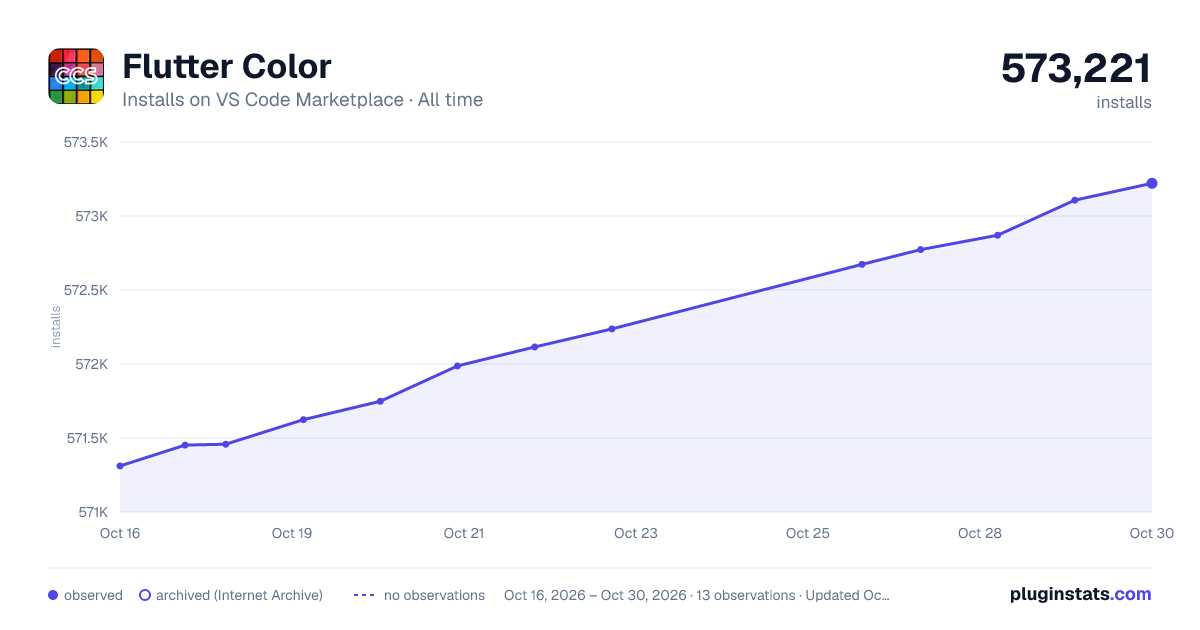

Adoption over time
7/30/90-day growth
Ranking history
Ratings over time
Listing placement
Listing placement
Filled points are observed values; hollow points come from Internet Archive snapshots of the listing page. Dashed segments span periods with no observations — values between points are not interpolated.
Each band is one page of 20. Installs on a linear scale. Placement is projected from installs, so it can differ from the marketplace's own sort order. Hover a dot to see the listing.
Recent observations
Full history (5)Similar VS Code Marketplace Other plugins
All 20 Flutter Color alternativesData source
Install counts, average rating, and rating counts come from the public Visual Studio Marketplace gallery API. Installs are cumulative and exclude updates.
Listing: https://marketplace.visualstudio.com/items?itemName=circlecodesolution.ccs-flutter-color. First seen Oct 16, 2026; last successful collection Oct 20, 2026. See the methodology.