 PluginStats
favorites installs statistics
By Howard.Zuo (3 listings) · VS Code Marketplace · Other
Mark resources (files or folders, local and remote) as favorites, so they can be easily accessed.
favorites has 97,810 recorded installs on VS Code Marketplace, ranking #2396 of 2,502 tracked listings.
Rating: 4.62 / 5 from 39 ratings
About favorites
vscode-favorites




An extension that lets the developer mark resources (files or folders) as favorites, so they can be easily accessed.
Install
Launch VS Code Quick Open (cmd/ctrl + p), paste the following command, and press Enter.
ext install howardzuo.vscode-favorites
Usage
Add to Favorites
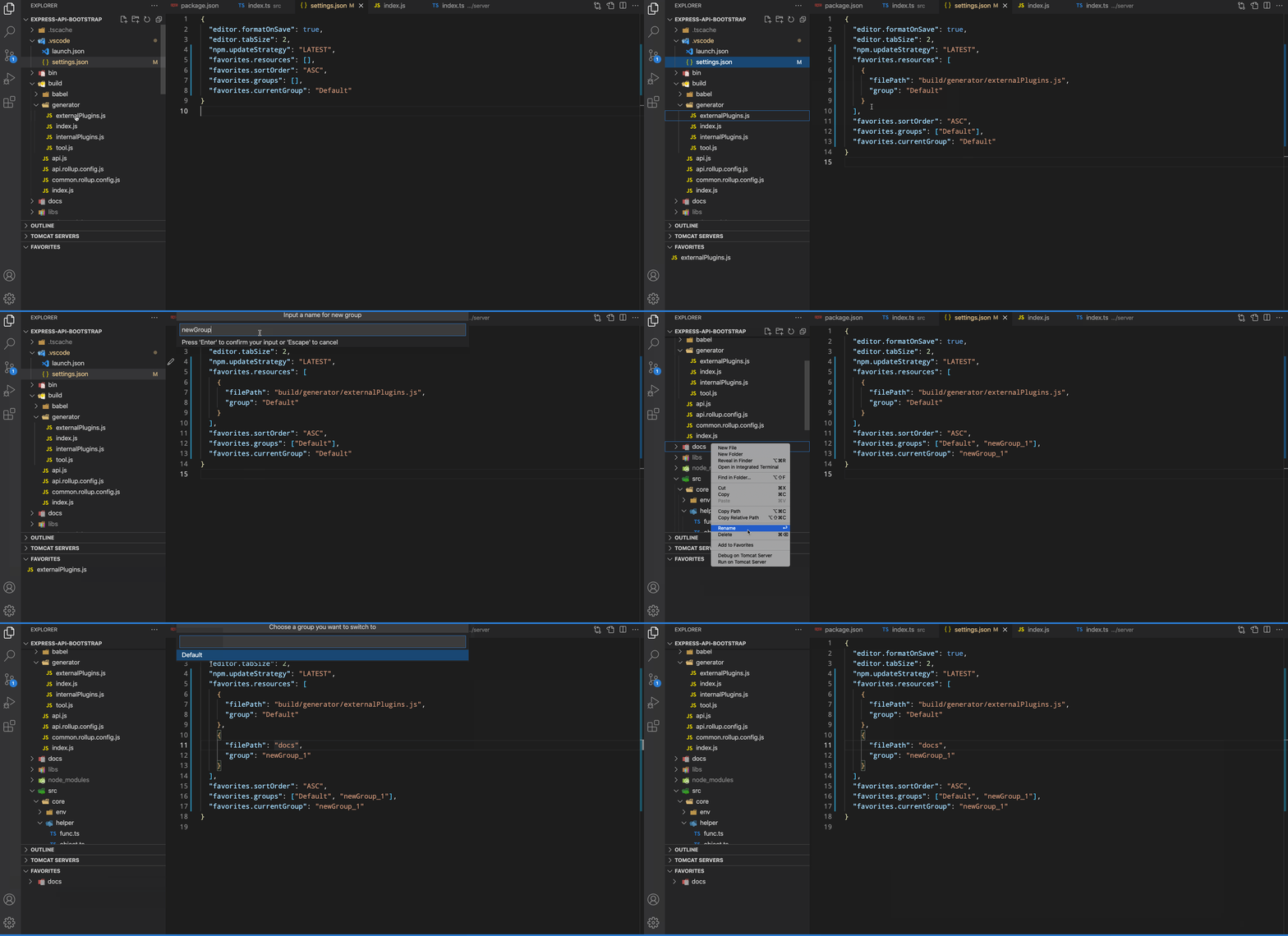
An Add to Favorites command in Explorer's context menu saves links to your favorite files or folders into your XYZ.code-workspace file if you are using one, else into the .vscode/settings.json file of your root folder.
Toggle Favorite for Active File
Use the Toggle Favorite command from the Command Palette (cmd/ctrl + shift + p) to quickly add or remove the currently active file from your favorites.
Toggle Folder Favorite for Active File
Use the Toggle Folder of Active File command from the Command Palette (cmd/ctrl + shift + p) to quickly add or remove the folder containing the currently active file from your favorites.
Drag and Drop Support
Reordering Favorites
You can reorder favorites within the favorites panel by dragging and dropping them to your desired position. The sort order will automatically switch to "MANUAL" when you start dragging.
Adding Files via Drag and Drop
You can also add files to your favorites by dragging them from:
- Editor tabs: Drag the tab of an open file directly into the favorites panel
- Explorer: Drag files or folders from the Explorer view into the favorites panel
Your favorites are listed in a separate view and can be quickly accessed from there.
Configuration
{
    "favorites.resources": [], // resources path you prefer to mark
    "favorites.sortOrder": "ASC", // DESC, MANUAL
    "favorites.saveSeparated": false // whether to use an extra config file
    "favorites.groups": ["Default"], // the groups you have created
    "favorites.currentGroup": "Default" // determine the current using group
}
You normally don't need to modify this config manually. Use context menus instead.
Changelog
LICENSE
Development
Environment Setup
-
Clone the repository:
git clone https://github.com/leftstick/vscode-favorites.git cd vscode-favorites -
Install dependencies:
pnpm install -
Run development server:
pnpm run watch -
Launch extension:
- Press
F5in VS Code - This will open a new VS Code window with the extension loaded
- Press
Build and Test
-
Build the extension:
pnpm run build -
Run tests:
pnpm run test -
Package the extension:
pnpm run package
Contribution Guidelines
- Fork the repository
- Create a feature branch:
git checkout -b feature/your-feature-name - Make your changes
- Run tests to ensure your changes don't break existing functionality
- Commit your changes with a descriptive commit message
- Push to your fork
- Create a pull request
Code Style
- Follow TypeScript best practices
- Use
async/awaitfor asynchronous operations - Add appropriate error handling
- Write clear and concise comments
- Maintain consistent code formatting
Development Tools
- TypeScript: For type-safe code
- esbuild: For fast builds
- Mocha: For unit tests
- VS Code Test: For extension integration tests
Description from the VS Code Marketplace listing.
README badge
Show your rank in a README or on your website. The badge updates automatically.
Charts
Images: 30d · 1y · all time · 1600×900 dark


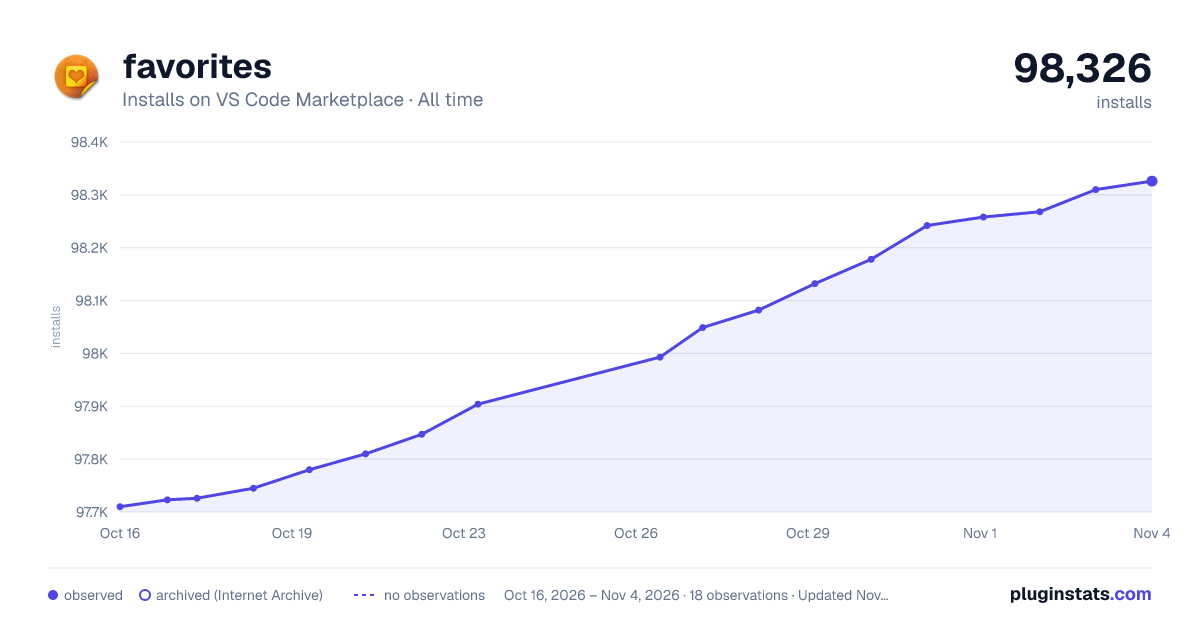

Adoption over time
7/30/90-day growth
Ranking history
Ratings over time
Listing placement
Listing placement
Filled points are observed values; hollow points come from Internet Archive snapshots of the listing page. Dashed segments span periods with no observations — values between points are not interpolated.
Each band is one page of 20. Installs on a linear scale. Placement is projected from installs, so it can differ from the marketplace's own sort order. Hover a dot to see the listing.
Recent observations
Full history (6)Similar VS Code Marketplace Other plugins
All 20 favorites alternativesData source
Install counts, average rating, and rating counts come from the public Visual Studio Marketplace gallery API. Installs are cumulative and exclude updates.
Listing: https://marketplace.visualstudio.com/items?itemName=howardzuo.vscode-favorites. First seen Oct 16, 2026; last successful collection Oct 21, 2026. See the methodology.