 PluginStats
Python Essentials installs statistics
By Jill M. Nolan · VS Code Marketplace · Extension Packs
Python Essentials Extension Pack for VSCode
Python Essentials has 108,955 recorded installs on VS Code Marketplace, ranking #2252 of 2,502 tracked listings.
Rating: 3.67 / 5 from 3 ratings
About Python Essentials
Python Essentials, a Visual Studio Code extension package for Python Development
Introduction
Are you tired of reinstalling extensions on each of your computer(s)? How about when you have to reset computer entirely? Or, how about you're an instructor, a hobbyist, or just "getting your feet wet" in the fine craft of Python programming who does not know which extension(s) to select to get the job done both efficiently and effectively. Regardless, please do not waste time and energy on something so tedious as a process of installing extensions. Extensions are, in a word, awesome! Their premise is to extend the features and functionality of Visual Studio Code.
What extensions will I get by selecting this extension pack?
Glad, that you've asked! Please find the supervening extensions. Of course, I always love to hear your suggestions to improve this extension package. To do so, please create a new issue in the Issues Section. After all, the ultimate goal for this extension pack is convenience at the click of one button.
Recommended Theme for Python Development
- Chromodynamics Theme: A VSCode plugin extends Python programming in VSCode through a highly recommended (at least, from yours truly!) dark color scheme from MagicStack. Note: This works well with MagicPython, which is included below. :-)
Recommended Extensions for Python Development
-
AREPL for Python: A Visual Studio Code extension that automatically analyzes Python code in real-time as you code.
-
Better Comments: A Visual Studio Code extension whose premise is to categorize your comments (annotations) in your Python code, through:
-
Alerts
-
Queries
-
TODOs
-
Highlights
-
Commented out code can also be styled to make it clear the code shouldn't be there
-
Any other comment styles you'd like can be specified in the settings
-
-
Bracket Pair Colorizer 2: A Visual Studio Code extension that allows matching brackets to be identified with colors. Note: The user can define which tokens to match, and which colors to use.
-
Code Runner: A Visual Studio Code extension that allows for either code snippets or code files to be run in multiple programming languages, such as Python.
-
Code Spell Checker: A Visual Studio Code extension that serves as a basic spell checker that works well with camelCase code, thereby catching common spelling errors whilst keeping the number of false positives low.
-
Django: A VSCode plugin that provides "beautiful" syntax and scoped snippets.
-
EditorConfig for VS Code: A Visual Studio Code extension that attempts to override user/workspace settings with settings found in .editorconfig files. Note: No additional or vscode-specific files are required. Conversely, if root=true is not specified, EditorConfig will continue to look for an .editorconfig file outside of the project.
-
GitLens — Git supercharged: A Visual Studio Code extension "supercharges the Git capabilities" out-of-the-box. Note: GitLens "helps you to visualize code authorship at a glance via Git blame annotations and code lens, seamlessly navigate and explore Git repositories, gain valuable insights via powerful comparison commands."
-
Guides: A Visual Studio Code extension that "add various indentation guide lines."
-
Jinja: A VSCode plugin that supports Jinja template language support, including language colorization support, including but not limited to type annotations, f-strings, and regular expressions.
-
Kite Autocomplete for Python and JavaScript: A Visual Studio Code extension that offers "AI powered autocomplete, code snippets, code signatures, and cursor-following documentation."
-
Live Share Extension Pack: An official VSCode extension pack that enable real-time collaborative development, including integrated audio and text chat, which supports various use cases.
-
MagicPython: A VSCode plugin that supports preferences and syntax highlighter for "cutting edge" Python 3, whereby serving as a drop-in replacement for the default Python package.
-
Markdown All in One: A Visual Studio Code extension that offers an all-in-one solution for utilizing Markdown, as the name suggests. :)…
Description from the VS Code Marketplace listing.
- python
README badge
Show your rank in a README or on your website. The badge updates automatically.
Charts
Images: 30d · 1y · all time · 1600×900 dark


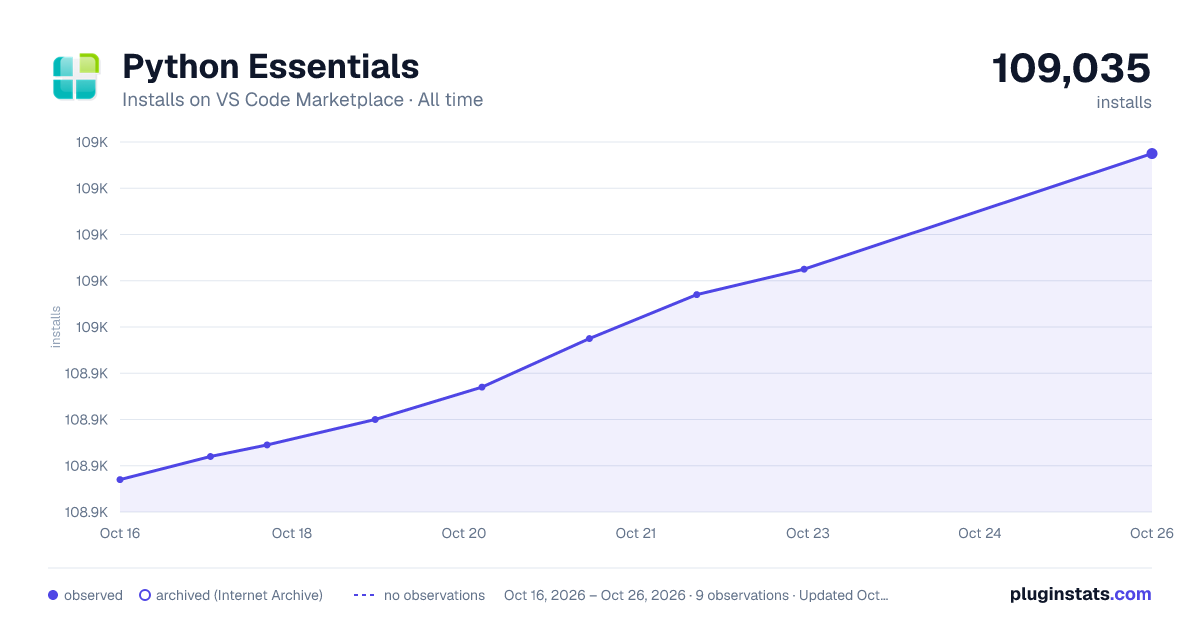

Adoption over time
7/30/90-day growth
Ranking history
Ratings over time
Listing placement
Listing placement
Filled points are observed values; hollow points come from Internet Archive snapshots of the listing page. Dashed segments span periods with no observations — values between points are not interpolated.
Each band is one page of 20. Installs on a linear scale. Placement is projected from installs, so it can differ from the marketplace's own sort order. Hover a dot to see the listing.
Recent observations
Full history (6)Similar VS Code Marketplace Extension Packs plugins
All 20 Python Essentials alternativesData source
Install counts, average rating, and rating counts come from the public Visual Studio Marketplace gallery API. Installs are cumulative and exclude updates.
Listing: https://marketplace.visualstudio.com/items?itemName=JillMNolan.python-essentials. First seen Oct 16, 2026; last successful collection Oct 21, 2026. See the methodology.