 PluginStats
SAP Fiori Tools - XML Annotation Language Server installs statistics
By SAP SE (17 listings) · VS Code Marketplace · Programming Languages
Allows you to access resources that help to define annotations in the code editor thus improving the application development by reducing effort and ensuring code consistency. The following is a subset of features that are part of this extension: code completion, micro-snippets, diagnostics, and inte
SAP Fiori Tools - XML Annotation Language Server has 217,766 recorded installs on VS Code Marketplace, ranking #1431 of 2,502 tracked listings.
About SAP Fiori Tools - XML Annotation Language Server
SAP Fiori Tools - XML Annotation Language Server
Features
<p>The SAP Fiori Tools - XML Annotation Language Server extension provides features that assist with defining annotations in the code editor thus improving the application development productivity by reducing the effort and contributing to the code consistency and correctness.
</p>Code Completion:
<p>The SAP Fiori Tools - XML Annotation Language Server modeler extension provides a list of suggestions based on the project metadata and OData vocabularies. An application developer can open such a list of suggested values for annotation targets, terms, and different elements of annotation values in the annotation file and accept one of the suggestions to add or change them. This eliminates the need to look up the valid values or type complete values thus improving the development efficiency.
</p>Micro-Snippets
<p/>The SAP Fiori Tools - XML Annotation Language Server extension provides a number of generic micro-snippets, which helps the application to accelerate the annotation definition. Bigger blocks of code get inserted and there is no need to trigger the code completion for each element or attribute. An application developer can insert repeating code patterns such as Annotations, Annotation, Record, and PropertyPath more efficiently.
<p/>Diagnostics (error-checking):
<p/>The SAP Fiori Tools - XML Annotation Language Server extension validates the annotation file against the project metadata, annotation vocabularies, and OData specification. An application developer can view the diagnostic messages and navigate to the related place in the annotation file to fix the issues.
<p/>Documentation (Vocabulary Information):
<p/>The SAP Fiori Tools - XML Annotation Language Server extension provides vocabulary information for annotation terms and their elements, such as property values, record types, etc. This information may include a description, applicability, type, etc. It also indicates if a term/element is experimental or deprecated and informs the developer if the element is mandatory. An application developer can use this information to make a better decision on how to use the annotation. The documentation scope depends on the information provided in the respective vocabulary.
<p/>Go to Definition:
<p/> The Go To Definition feature helps you to navigate to the source of annotation or translatable string value and opens the result in a new tab. <p/>Peek Definition:
<p/> The Peek Definition feature lets you preview the definition of annotation or translatable string value without switching away from the code that you're writing. <p/>i18n Support:
<p/>The SAP Fiori Tools - XML Annotation Language Server provides diagnostic warning for translatable texts which are not maintained in the i18n.properties file. An application developer can use code completion or quick fix to solve the issue.
<p/>Usage
To use the code completion:
- Trigger the code completion by pressing
CMD/Ctrl + Space. The list of suggested values is displayed. The list is filtered by already typed characters. <br/> Tip: You can filter it further by typing more characters. - Navigate to the desired value using up/down arrows or your mouse.
- Accept the highlighted value using Enter key or a mouse click.
Note: If the shortcut for triggering code completion CMD + Space does not work on Mac, it is most probably assigned for the other function (e.g. opens the spotlight search). This is a known VS Code issue on Mac. The recommended solution is to change the shortcut for suggestions in VS Code. Choose File->Preferences-> Keyboard shortcuts, press edit icon and set up a new shortcut.
To use the micro-snippets:
-
Open the list of the micro-snippets available for the current position by pressing
CMD/Ctrl + Spacewithin the schema tag or its nested tags. The list of suggested micro-snippets is displayed for the specific context. -
Navigate to the desired value by using the up/down arrows or your mouse.
-
Accept the highlighted snippet by pressing Enter or by a mouse click.
To use the diagnostics:
- Change the annotation file. <br/> SAP UX - XML Annotation Language Server validates the annotation file against the metadata, OData specification and OData vocabularies and displays the diagnostic messages in the problems pane.
- Click on the diagnostic message to navigate to the respective place in the document and fix the problem.
To use Go to Definition:
Place your text cursor somewhere inside the path referencing to annotation term segment or translatable string value and
-
keyboard: press F12 (in Visual Studio Code), or Ctrl + F11 (in SAP Business Application Studio)
-
mouse: right click and select Go To Definition, or.
-
keyboard and mouse: CTRL + Click (Win), command + Click (Mac)
To use Peek Definition:
Place your text cursor somewhere inside path referencing to annotation term segment or translatable string value and
-
keyboard: press Alt + F12 (Win), Option + F12 (Mac), or
-
mouse: right click and select Peek Definition
To use the documentation
- In the code completion list, navigate to the desired value.
Prerequisites
The generated application requires the following software to be installed:
- NodeJS Version 20.19.2 or higher
- Local copy of OData metadata file to be present in the application folder structure.
manifest.jsonfile to be present in the application folder structure and contain local URIs to the metadata and annotation file(s) in its dataSources section.- The annotation file must be within the webapp folder or its sub-folders
Limitations
- Annnotations directly embedded in the metadata are not supported
- Dynamic expressions are not supported…
Description from the VS Code Marketplace listing.
- Annotations
- CDS
- EDMX
- OData
- SAP
- SAP Fiori Elements
- xml
README badge
Show your rank in a README or on your website. The badge updates automatically.
Charts
Images: 30d · 1y · all time · 1600×900 dark


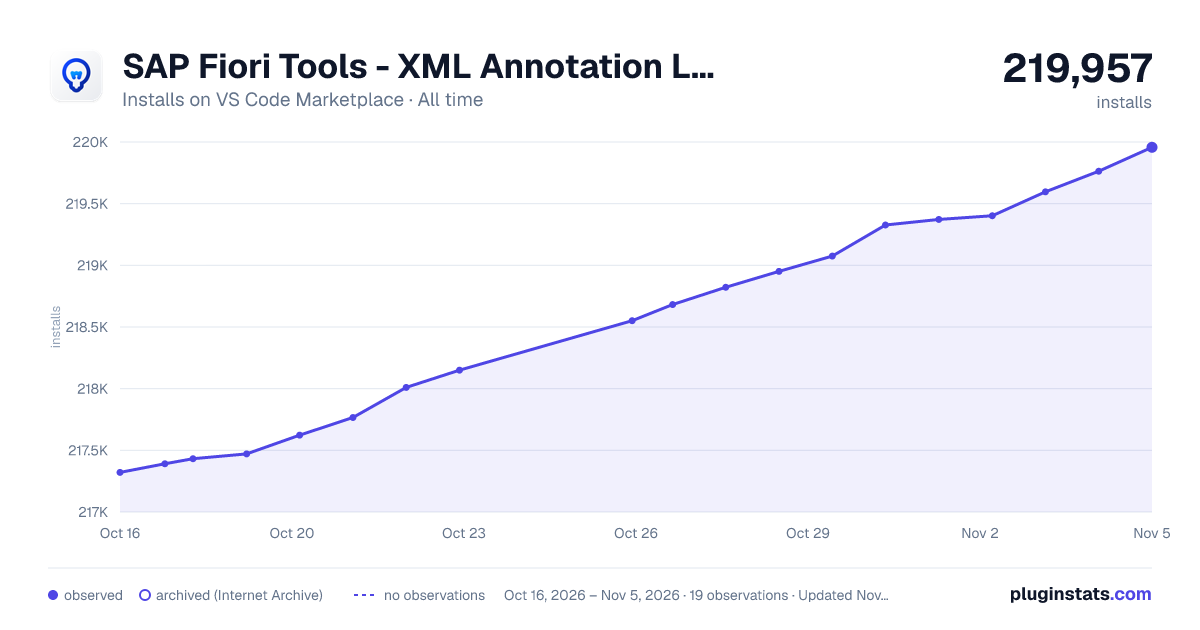

Adoption over time
7/30/90-day growth
Ranking history
Ratings over time
Listing placement
Listing placement
Listing placement
Listing placement
Filled points are observed values; hollow points come from Internet Archive snapshots of the listing page. Dashed segments span periods with no observations — values between points are not interpolated.
Each band is one page of 20. Installs on a linear scale. Placement is projected from installs, so it can differ from the marketplace's own sort order. Hover a dot to see the listing.
Recent observations
Full history (6)Similar VS Code Marketplace Programming Languages plugins
All 20 SAP Fiori Tools - XML Annotation Language Server alternativesData source
Install counts, average rating, and rating counts come from the public Visual Studio Marketplace gallery API. Installs are cumulative and exclude updates.
Listing: https://marketplace.visualstudio.com/items?itemName=SAPSE.sap-ux-annotation-modeler-extension. First seen Oct 16, 2026; last successful collection Oct 21, 2026. See the methodology.