 PluginStats
PHP Debug installs statistics
By tiansin · VS Code Marketplace · Debuggers
Debug support for PHP with Xdebug (Pull and merge)
PHP Debug has 198,464 recorded installs on VS Code Marketplace.
It ranks #1522 of 2,501 tracked VS Code Marketplace listings by installs.
It is rated 3.0 out of 5 from 2 ratings.
PluginStats has 4 daily observations since Oct 16, 2026; the latest is from Oct 19, 2026.
Rating: 3.00 / 5 from 2 ratings
About PHP Debug
PHP Debug Adapter for Visual Studio Code
Installation
Install the extension: Press F1, type ext install php-debug.
This extension is a debug adapter between VS Code and Xdebug by Derick Rethan. Xdebug is a PHP extension (a .so file on Linux and a .dll on Windows) that needs to be installed on your server.
1. Install Xdebug
2. Configure PHP to use Xdebug by adding zend_extension=path/to/xdebug to your php.ini. The path of your php.ini is shown in your phpinfo() output under "Loaded Configuration File".
3. Enable remote debugging in your php.ini:
There are other ways to tell Xdebug to connect to a remote debugger than remote_autostart, like cookies, query parameters or browser extensions. I recommend remote_autostart because it "just works". There are also a variety of other options, like the port (by default 9000), please see the Xdebug documentation on remote debugging for more information.
4. If you are doing web development, don't forget to restart your webserver to reload the settings.
5. Verify your installation by checking your phpinfo() output for an Xdebug section.
VS Code Configuration
In your project, go to the debugger and hit the little gear icon and choose _PHP_. A new launch configuration will be created for you with two configurations:
• Listen for Xdebug This setting will simply start listening on the specified port (by default 9000) for Xdebug. If you configured Xdebug like recommended above, everytime you make a request with a browser to your webserver or launch a CLI script Xdebug will connect and you can stop on breakpoints, exceptions etc. • Launch currently open script This setting is an example of CLI debugging. It will launch the currently opened script as a CLI, show all stdout/stderr output in the debug console and end the debug session once the script exits.
Supported launch.json settings:
• request: Always "launch" • hostname: The address to bind to when listening for Xdebug (default: all IPv6 connections if available, else all IPv4 connections) • port: The port on which to listen for Xdebug (default: 0) • stopOnEntry: Whether to break at the beginning of the script (default: false) • pathMappings: A list of server paths mapping to the local source paths on your machine, see "Remote Host Debugging" below • log: Whether to log all communication between VS Code and the adapter to the debug console. See _Troubleshooting_ further down. • ignore: An optional array of glob patterns that errors should be ignored from (for example /vendor//*.php) • xdebugSettings: Allows you to override Xdebug's remote debugging settings to fine tuning Xdebug to your needs. For example, you can play with max_children and max_depth to change the max number of array and object children that are retrieved and the max depth in structures like arrays and objects. This can speed up the debugger on slow machines. For a full list of feature names that can be set please refer to the Xdebug documentation. • max_children: max number of array or object children to initially retrieve • max_data: max amount of variable data to initially retrieve. • max_depth: maximum depth that the debugger engine may return when sending arrays, hashs or object structures to the IDE. • show_hidden: This feature can get set by the IDE if it wants to have more detailed internal information on properties (eg. private members of classes, etc.) Zero means that hidden members are not shown to the IDE.
Options specific to CLI debugging:
• program: Path to the script that should be launched • args: Arguments passed to the script • cwd: The current working directory to use when launching the script • runtimeExecutable: Path to the PHP binary used for launching the script. By default the one on the PATH. • runtimeArgs: Additional arguments to pass to the PHP binary • externalConsole: Launches the script in an external console window instead of the debug console (default: false) • env: Environment variables to pass to the script
Features
• Line breakpoints • Conditional breakpoints • Function breakpoints • Step over, step in, step out • Break on entry • Breaking on uncaught exceptions and errors / warnings / notices • Multiple, parallel requests • Stack traces, scope variables, superglobals, user defined constants • Arrays & objects (including classname, private and static properties) • Debug console • Set variables • Watches • Run as CLI • Run without debugging
Remote Host Debugging
To debug a running application on a remote host, you need to tell Xdebug to connect to a different IP than localhost. This can either be done by setting xdebug.remote_host to your IP or by setting xdebug.remote_connect_back = 1 to make Xdebug always connect back to the machine who did the web request. The latter is the only setting that supports multiple users debugging the same server and "just works" for web projects. Again, please see the Xdebug documentation on the subject for more information.
To make VS Code map the files on the server to the right files on your local machine, you have to set the pathMappings settings in your launch.json. Example:
Please also note that setting any of the CLI debugging options will not work with remote host debugging, because the script is always launched locally. If you want to debug a CLI script on a remote host, you need to launch it manually from the command line.
Troubleshooting
• If you think you found a bug, open an issue • Make sure you have the latest version of this extension and Xdebug installed • Try out a simple PHP file to recreate the issue, for example from the testproject • In your php.ini, set xdebug.remote_log = /path/to/logfile (make sure your webserver has write permissions to the file) • Set "log": true in your launch.json
Contributing
To hack on this adapter, clone the repository and open it in VS Code. You need NodeJS and typings installed (npm install -g typings). Install dependencies by running npm install and typings install.…
Description from the VS Code Marketplace listing.
- debug
- debuggers
- php
- xdebug
Where PHP Debug sits in the listing
Each band is one page of 20. Installs on a log scale. Placement is projected from installs, so it can differ from the marketplace's own sort order. Hover a dot to see the listing.


Charts
Images: 30d · 1y · all time · 1600×900 dark


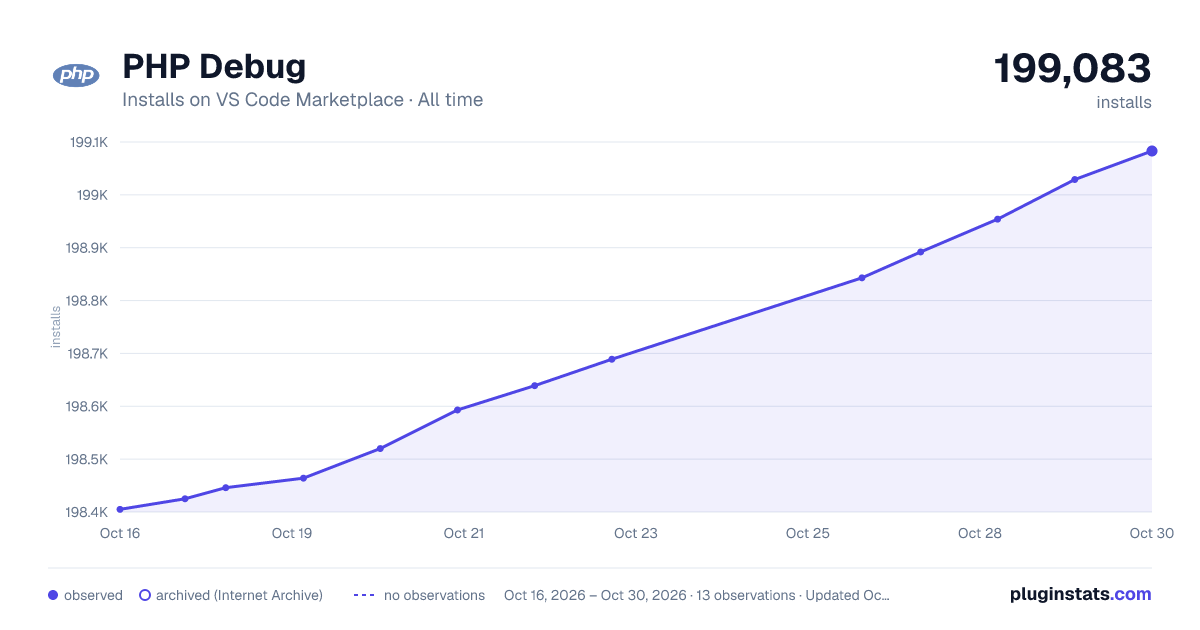

Adoption over time


7/30/90-day growth


Ranking history


Filled points are observed values; hollow points come from Internet Archive snapshots of the listing page. Dashed segments span periods with no observations — values between points are not interpolated.
Recent observations
Full history (4)Similar VS Code Marketplace Debuggers plugins
Data source
Install counts, average rating, and rating counts come from the public Visual Studio Marketplace gallery API. Installs are cumulative and exclude updates.
Listing: https://marketplace.visualstudio.com/items?itemName=tiansin.php-debug. First seen Oct 16, 2026; last successful collection Oct 19, 2026. See the methodology.