 PluginStats
Salesforce Org Management installs statistics
By Salesforce (33 listings) · VS Code Marketplace · Other
Provides org and authorization management commands for Salesforce Development
Salesforce Org Management has 445,920 recorded installs on VS Code Marketplace, ranking #900 of 2,501 tracked listings.
About Salesforce Org Management
salesforcedx-vscode-org
This extension provides Salesforce org and authorization management commands for Visual Studio Code.
Features
Authorization Commands
- Authorize an Org - Connect to a Salesforce org using web-based login flow
- Authorize a Dev Hub - Connect to a Dev Hub org for scratch org management
- Authorize an Org using Session ID - Connect using an access token
- Log Out from Default Org - Remove authorization for the current default org
- Log Out from All Authorized Orgs - Remove all stored org authorizations
If you authorized with a session ID and your access token expires, choosing Login on the extension prompt runs web login again and reuses your org alias or username so the refreshed authorization updates the same org entry instead of adding a separate re-authentication alias.
When Authorize an Org fails because local port 1717 is already in use, the extension now shows an explicit troubleshooting message and a Show Output action so you can inspect the full CLI error details.
Port 1717 Troubleshooting for Authorize an Org
- macOS/Linux:
lsof -i :1717, thenkill -9 <PID>, then retry authorization. - Windows:
netstat -ano | findstr :1717, thentaskkill /PID <PID> /F, then retry authorization.
Org Management Commands
- List All Aliases - Display all configured org aliases
- Create a Default Scratch Org - Create a new scratch org and set it as default
- Open Default Org - Launch your default org in a browser
- Display Org Details - Show information about your orgs
- Delete Org - Remove an org
- Remove Deleted and Expired Orgs - Clean up stale org authorizations
- Set a Default Org - Choose which org to use for development commands
Org Picker
Visual org picker in the VS Code status bar showing your current default org, with quick access to switch between authorized orgs.
Requirements
- Visual Studio Code v1.90.0 or higher
- Salesforce CLI (sf)
- Salesforce Extensions for VS Code (Core)
Extension Settings
This extension contributes the following VS Code settings to customize notification behavior:
Notification Settings
-
salesforcedx-vscode-org.extensionLevelNotifications - Controls default notification behavior for all org commands. Choose from:
progressToastSuccessToast- Show progress toast and success toast (default)progressToastSuccessOff- Show progress toast, no success notificationprogressStatusBarSuccessStatusBar- Show progress in status bar and success in status barprogressStatusBarSuccessOff- Show progress in status bar, no success notification
-
salesforcedx-vscode-org.commandLevelNotifications - Override notification mode for individual commands. Supports all 14 org commands with the same notification modes as above.
Documentation
For more information and detailed documentation, visit:
Currently, Visual Studio Code extensions are not signed or verified on the Microsoft Visual Studio Code Marketplace. Salesforce provides the Secure Hash Algorithm (SHA) of each extension that we publish. Consult Manually Verify the salesforcedx-vscode Extensions' Authenticity to learn how to verify the extensions.
Description from the VS Code Marketplace listing.
README badge
Show your rank in a README or on your website. The badge updates automatically.
Charts
Images: 30d · 1y · all time · 1600×900 dark


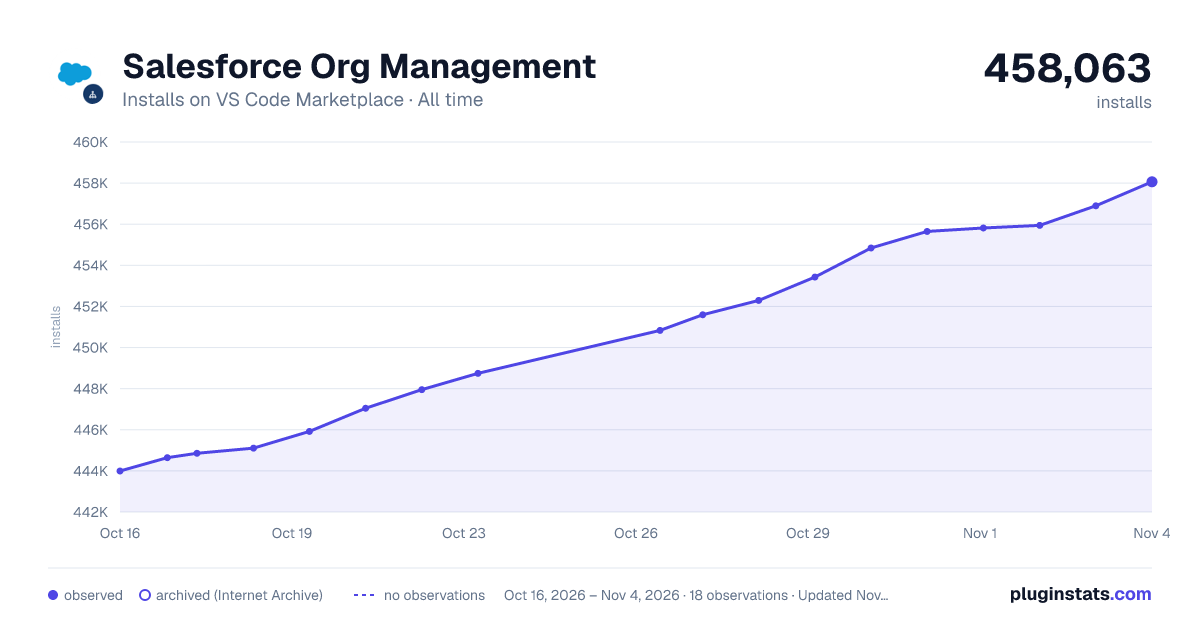

Adoption over time
7/30/90-day growth
Ranking history
Ratings over time
Listing placement
Listing placement
Filled points are observed values; hollow points come from Internet Archive snapshots of the listing page. Dashed segments span periods with no observations — values between points are not interpolated.
Each band is one page of 20. Installs on a linear scale. Placement is projected from installs, so it can differ from the marketplace's own sort order. Hover a dot to see the listing.
Recent observations
Full history (5)Similar VS Code Marketplace Other plugins
All 20 Salesforce Org Management alternativesData source
Install counts, average rating, and rating counts come from the public Visual Studio Marketplace gallery API. Installs are cumulative and exclude updates.
Listing: https://marketplace.visualstudio.com/items?itemName=salesforce.salesforcedx-vscode-org. First seen Oct 16, 2026; last successful collection Oct 20, 2026. See the methodology.