 PluginStats
Data Preview installs statistics
By Random Fractals Inc. (3 listings) · VS Code Marketplace · Programming Languages
Data Preview ?? extension for importing ?? viewing ?? slicing ?? dicing ?? charting ?? & exporting ?? large JSON array/config, YAML, Apache Arrow, Avro, Parquet & Excel data files
Data Preview has 794,348 recorded installs on VS Code Marketplace.
It ranks #621 of 2,501 tracked VS Code Marketplace listings by installs.
It is rated 3.9 out of 5 from 52 ratings.
PluginStats has 4 daily observations since Oct 16, 2026; the latest is from Oct 19, 2026.
Rating: 3.87 / 5 from 52 ratings
About Data Preview
vscode-data-preview
Data Preview 🈸 extension for importing 📤 viewing 🔎 slicing 🔪 dicing 🎲 charting 📊 & exporting 📥 large .json array .arrow .avro .parquet data files, .config .env .properties .ini .yml configurations files, .csv/.tsv & .xlsx/.xlsb Excel files and .md markdown tables with Perspective - streaming data analytics WebAssembly library.
🈸 Features
• Preview .json .arrow .avro .parquet .yml .csv/.tsv & .xlsx/.xlsb data files in a Data Grid w/Sorting & Filtering • Grid Data Summary display w/Aggregate Functions, Row & Column Pivots (a.k.a. Group By & Split By) • Basic Charts 📊 creation w/Aggregate Functions, Row & Column Pivots • Pluggable Charting 📊 libraries for bult-in Charts: d3fc || highcharts • Persistent Data Preview Settings (View, Sort, Filter, Pivots, etc.) for restore of open Data View panels on VSCode Reload • Mulptiple Spreadsheets Data Preview for Excel data files • Markdown tables data preview for .md documentation files • Data .schema.json generation for Arrow & Avro Data Schema Text Previews in JSON format • Binary Data files .json generation for Arrow, Avro & Excel formats for Text Data Preview • Property Grid display for .json .config .env .properties .ini & .yml configuration files • Open Data Preview on Side option for slim data || config files • Quick Launch new Data Preview input box for data files in open workspace • Save Filtered Data Grid || Chart 📊 Data in .arrow .csv .json(s) .yml & .properties formats • Save & Load Data View .config options • Dark, Light, Dense & High Contrast Blue Data Preview 🈸 Panel UI Themes
Next V.
• Will include large text & binary data files loading & Apache Arrow data streaming.
Note: Data Preview 🈸 is already capable of loading a few 10+MB's large data files with 100+K records & extensive list of supported Data Formats you'll be hard pressed to find on VSCode marketplace in one extension.
See data/large/... data folder for sample large data files and Data View .configs you can try in Data Preview 🈸.
Installation
Install Data Preview 🈸 via vscode Extensions tab (Ctrl+Shift+X) by searching for data preview || via VSCode marketplace search results.
List of Data Preview 🈸 extension config Settings, data.preview command(s), keyboard shortcut(s), augmented vscode UI context menus, added Data Language mappings, supported Data Files list & configurable Theme & Charts 📊 Settings:
Configuration
Create User or Workspace Settings in vscode to change default Data Preview 🈸 extension Settings:
| Setting | Type | Default Value | Description |
| data.preview.theme | string | dark | Data Preview UI Theme: dark, light, dense.light, dense.dark, or vaporwave (hight contrast blue theme) | | data.preview.charts.plugin | string | d3fc | Data Preview Charts 📊 library to use for built-in charts: d3fc or highcharts | | data.preview.create.json.files | boolean | false | Creates .json data files for Arrow, Avro & Excel binary data formats | | data.preview.create.json.schema | boolean | true | Creates .schema.json files for Arrow & Avro metadata binary data formats | | data.preview.openSavedFileEditor | boolean | true | Opens created data file Content Editor on Data Save | | data.preview.log.level | string | info | Data Preview run log level: info or debug for issues troubleshooting |
Data Preview 🈸 example using dark UI theme with d3fc Charts 📊 Data View config, viewing superstore.arrow data file :)
Usage Tips
Data Preview 🈸 Launch Tips
1. Run View -> Command Palette...>Data: Preview Data command or Ctrl+Shift+D in an open .json .config .env .properties .ini .yml or .csv/.tsv text data file document to launch Data Preview panel. 2. File -> Save (Ctrl+S) your text data file for immediate updates in an open Data Preview 🈸 panel. 3. Right-click on a Binary .xlsx/.xlsb, .arrow or .avro data file in VSCode File Explorer to launch Data Preview panel. 4. Use exposed explorer/context, editor/title or editor/title/context Preview Data 🈸 or Preview Data on Side context menu options to preview your data files. 5. Click on the Data View Filename toolbar link to Load saved Data View Grid || Chart 📊 .config. 6. Click on the Data View 🈸 icon to Launch new Data Preview Panel for new view config changes. 7. Use Open Data File or URL 📤 option from Data View toolbar to launch new Data Preview 🈸. 8. Run View -> Command Palette...>Data: Preview Remote Data command or Ctrl+Shift+R to launch Data Preview for remote http(s) data files.
Data Grid/Filter/Columns UX Tips
1. Double click on the Grid Column header to Sort data by that column. 2. Drag and drop a column from the left-side Columns control panel into Filter fields for data filtering (Group By, Split By, Sort, Filter). 3. Drag columns up and down in the left-side Columns control panel to reorder displayed columns in the Data Grid. 4. Uncheck a column in the Columns control panel to remove it from a Chart 📊 or Data Grid display.
Usage Scenarios
Use Data Preview 🈸 to:
• Load large data files for sorting, filtering & charting 📊 • Export displayed data in a compact binary .arrow data format, .ods .xlsb || .xlsx spreadsheet format, or .csv .json .yml .md or .properties text formats • Preview .properites and other key-value pairs configuration files to reformat them or find set config option values • Generate Arrow & Avro .shema.json for metadata text preview of those binary data files • Generate .json files for text data preview of binary Excel files • Preview Excel files and workbooks with multiple workseets without opening Excel • Convert .csv or .tsv data to .json or .yml format • Extract, sort, filter and save markdown tables from .md documentation files • Use built-in Charts 📊 for Exploratory Data Analysis
Supported JSON, Config, Binary & Excel Data File Formats
Tip: try sample data and Data View .config files from this repository data/... folders: data/arrow data/avro data/parquet data/config data/excel data/json data/yaml data/large…
Description from the VS Code Marketplace listing.
- arrow
- async data
- avro
- charts
- config
- Configuration
- csv
- data export
- data formatter
- data import
- data inspector 🕵️
- data preview
- data schema
- data tools
- data view
- data viewer
- dataViz
- dif
- editable grid
- env
Where Data Preview sits in the listing
Each band is one page of 20. Installs on a log scale. Placement is projected from installs, so it can differ from the marketplace's own sort order. Hover a dot to see the listing.


Charts
Images: 30d · 1y · all time · 1600×900 dark


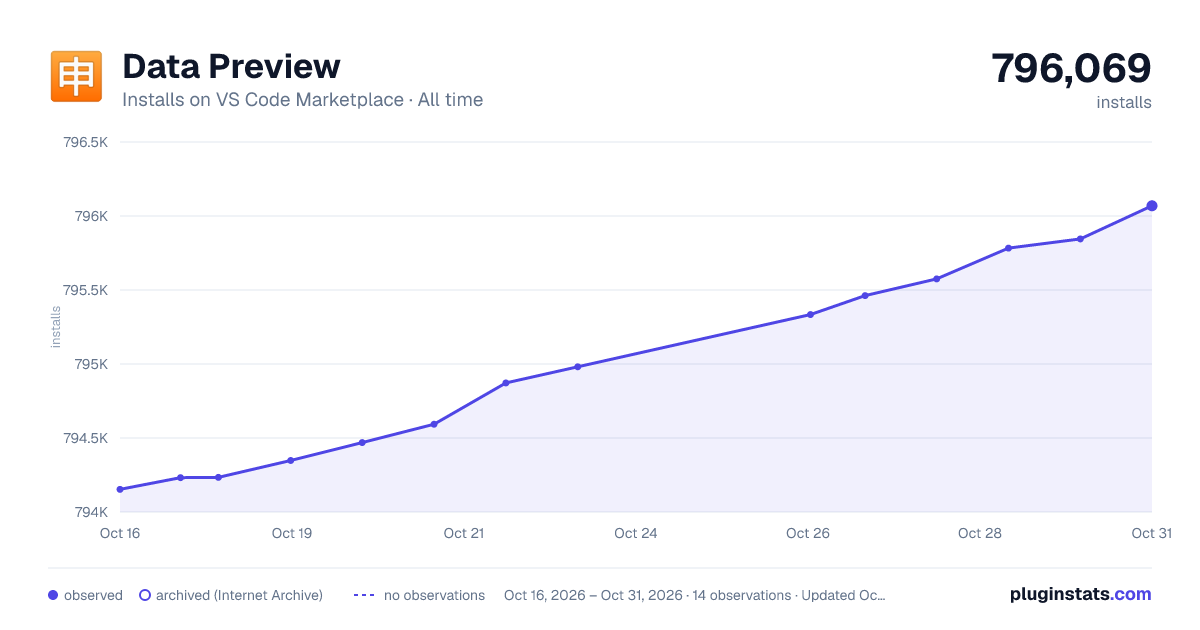

Adoption over time


7/30/90-day growth


Ranking history


Filled points are observed values; hollow points come from Internet Archive snapshots of the listing page. Dashed segments span periods with no observations — values between points are not interpolated.
Recent observations
Full history (4)Similar VS Code Marketplace Programming Languages plugins
Data source
Install counts, average rating, and rating counts come from the public Visual Studio Marketplace gallery API. Installs are cumulative and exclude updates.
Listing: https://marketplace.visualstudio.com/items?itemName=RandomFractalsInc.vscode-data-preview. First seen Oct 16, 2026; last successful collection Oct 19, 2026. See the methodology.