 PluginStats
Offline Markdown Preview installs statistics
By Bowlerr · VS Code Marketplace · Debuggers
Offline Markdown preview for VS Code with Mermaid diagrams, KaTeX math, secure local rendering, export, scroll sync, and outline navigation.
Offline Markdown Preview has 180,480 recorded installs on VS Code Marketplace, ranking #1641 of 2,501 tracked listings.
Rating: 5.00 / 5 from 2 ratings
About Offline Markdown Preview
Offline Markdown Preview





Offline Markdown preview for VS Code with Mermaid diagrams, KaTeX math, secure local rendering, export, scroll sync, and outline navigation.
Offline + Secure: runs locally inside VS Code and the extension does not send your Markdown contents anywhere (no cloud, no telemetry).
GIF Demos
A quick tour of key workflows (all offline, inside VS Code):
<table> <tr> <td width="50%" valign="top"> <strong>Live preview + scroll sync</strong><br/> <img src="https://github.com/Bowlerr/offline-markdown-preview/raw/HEAD/images/scroll.gif" alt="Live preview and scroll sync demo" /> </td> <td width="50%" valign="top"> <strong>Mermaid + math rendering</strong><br/> <img src="https://github.com/Bowlerr/offline-markdown-preview/raw/HEAD/images/mermaid.gif" alt="Mermaid and math rendering demo" /> </td> </tr> <tr> <td width="50%" valign="top"> <strong>Outline + heading navigation</strong><br/> <img src="https://github.com/Bowlerr/offline-markdown-preview/raw/HEAD/images/content-scroll.gif" alt="Outline and heading navigation demo" /> </td> <td width="50%" valign="top"> <strong>Remote image download + cache</strong><br/> <img src="https://github.com/Bowlerr/offline-markdown-preview/raw/HEAD/images/remote-images.gif" alt="Remote image download and cache demo" /> </td> </tr> </table>What You Get
- Free: no paywalls; MIT-licensed.
- Offline + secure by design: render/preview/export works locally with bundled libraries (no CDN, no remote fonts, no telemetry).
- Secure webview defaults: strict CSP + HTML sanitization (
DOMPurify) enabled by default. - Markdown preview panel with live updates and editor/preview scroll sync.
- Bundled rendering stack: Mermaid diagrams, KaTeX math, Prism syntax highlighting.
- Navigation tools: Markdown outline TreeView, heading quick pick, copy heading links.
- Export tools: HTML export and PDF export from the preview workflow.
- Safety controls: external-link confirmation, image size limits, sanitization toggle (with explicit unsafe wording).
Quick Start
- Open a Markdown file (
.md) in VS Code. - Preview opens automatically by default (
offlineMarkdownViewer.preview.autoOpen = true) when a Markdown editor becomes active. - You can also run Offline Markdown Preview: Open Preview (or Open Preview in Current Group) manually.
- Use the outline view and heading commands to navigate larger documents.
- Export when needed with Export HTML or Export PDF.
Tip: use the editor title action to open preview while editing.
Privacy, Offline, and Data Safety
- No network required for render, preview, or export.
- No telemetry and no document-content upload.
- Remote web requests are blocked in the webview runtime (
fetch,XMLHttpRequest,WebSocket,EventSource) forhttp(s)targets. - Remote images are blocked by default; you can opt in via
offlineMarkdownViewer.preview.allowRemoteImages. - When remote images are blocked, each remote image gets a Download Image action that caches it locally and replaces it in preview.
- Strict CSP includes
connect-src 'none'. - Sanitization is on by default (
offlineMarkdownViewer.sanitizeHtml = true). - Export writes files only on explicit user action (HTML/PDF commands).
Settings
These VS Code settings control rendering, safety, and performance:…
Description from the VS Code Marketplace listing.
- export
- html
- katex
- markdown
- markdown-preview
- math
- mermaid
- offline
- outline
- scroll-sync
- secure
- viewer
- vscode
- vscode-extension
README badge
Show your rank in a README or on your website. The badge updates automatically.
Charts
Images: 30d · 1y · all time · 1600×900 dark


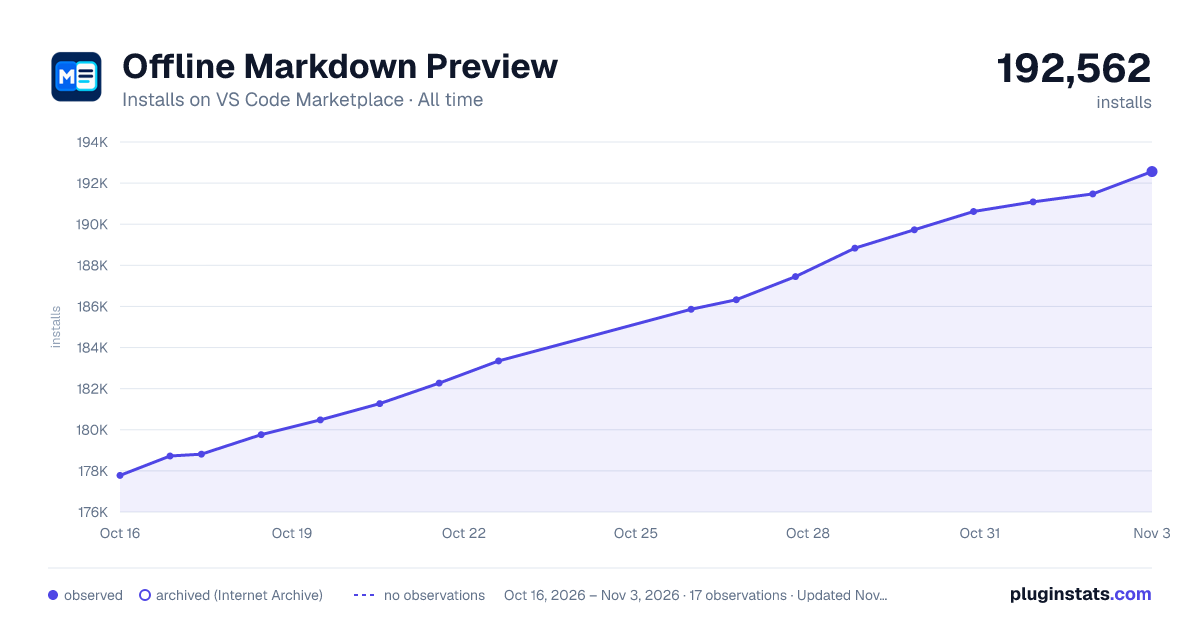

Adoption over time
7/30/90-day growth
Ranking history
Ratings over time
Listing placement
Listing placement
Listing placement
Listing placement
Filled points are observed values; hollow points come from Internet Archive snapshots of the listing page. Dashed segments span periods with no observations — values between points are not interpolated.
Each band is one page of 20. Installs on a linear scale. Placement is projected from installs, so it can differ from the marketplace's own sort order. Hover a dot to see the listing.
Recent observations
Full history (5)Similar VS Code Marketplace Debuggers plugins
All 20 Offline Markdown Preview alternativesData source
Install counts, average rating, and rating counts come from the public Visual Studio Marketplace gallery API. Installs are cumulative and exclude updates.
Listing: https://marketplace.visualstudio.com/items?itemName=Bowlerr.offline-markdown-preview. First seen Oct 16, 2026; last successful collection Oct 20, 2026. See the methodology.