 PluginStats
Color Info installs statistics
By Matt Bierner (11 listings) · VS Code Marketplace · Other
Provides quick information about css colors
Color Info has 1,334,831 recorded installs on VS Code Marketplace, ranking #454 of 2,501 tracked listings.
Rating: 4.85 / 5 from 13 ratings
About Color Info
VSCode Color Info
Visual Studio Code extension that provides quick information css colors.

About
Color Info adds additional information when you hover over a css color, including:
rgb– RGB color values. Enabled by defaulthsl– HSL color values. Enabled by defaultcss-color-name- Name of the color (red,blue, ...).hsv– HSV color valueslab– LAB color valueslch– LCHab color valuescmyk– CMYK color values. Enabled by defaulthex– Hex value. Enabled by defaultalpha– Alpha value. Enabled by defaultpreview– Preview of the color. Displays color with alpha in lower left corner and color without alpha in upper right corner. Enabled by defaultpreview-xl– Larger preview of the colorpreview-square– Square preview of the colorpreview-square-xl– Larger square preview of the color
You can customize which of these fields are displayed and the order they are displayed in using the settings described below.
By default, the extension works with any css, sass, scss, or less document and recognizes all basic css color formats, including named colors. You can also enable Color Info in additional file types using the colorInfo.languages setting
Configuration
colorInfo.fields
Ordered array of color fields to display.

colorInfo.excludedFields
Array of fields not to display. Overrides colorInfo.fields. If you only need to exclude one or two of the default fields, using colorInfo.excludedFields is the preferred approach.

colorInfo.languages
Defines which files and languages have color info enabled, and which color types are supported. The default language setting enables all css color values for css, sass, and less documents:
"colorInfo.languages": [
    {
        "selector": "css",
        "colors": "css"
    }, {
        "selector": "sass",
        "colors": "css"
    }, {
        "selector": "scss",
        "colors": "css"
    }, {
        "selector": "less",
        "colors": "css"
    }
]
Each element consists of:
-
"selector"- VSCode document selector. -
"colors"- String or array of strings defining the types of colors to display information for. Valid values color types are:css- All css color value typeshex- Css hex (#ff00ffor#f0f)hex+alpha- Css hex plus alpha (#ff00ff77or#f0f7)rgb- Css rgb or rgba (rgb(1, 2, 3)orrgba(1, 2, 3, 0.5)) chsl- Css hsl or hsla (hsl(1, 2, 3)orhsla(1, 2, 3, 0.5))css-colors-names- Css color names (red,blue)
VSCode does not currently support nested languages, so to enable Color Info in an html file, you must add:
{
    "selector": "html",
    "colors": "css"
}
To your colorInfo.languages setting. Make you add this setting to the end of the default colorInfo.languages setting so that you do not disable Color Info for the standard languages.
Description from the VS Code Marketplace listing.
- cmyk
- color
- css
- hsl
- less
- rgb
- sass
README badge
Show your rank in a README or on your website. The badge updates automatically.
Charts
Images: 30d · 1y · all time · 1600×900 dark


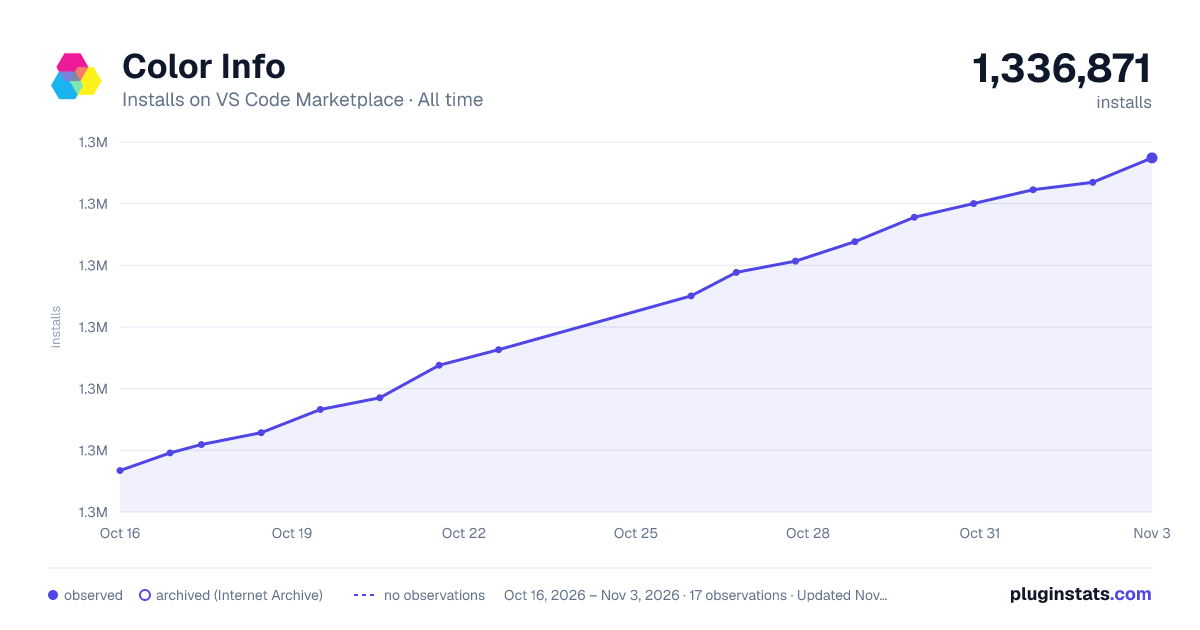

Adoption over time
7/30/90-day growth
Ranking history
Ratings over time
Listing placement
Listing placement
Filled points are observed values; hollow points come from Internet Archive snapshots of the listing page. Dashed segments span periods with no observations — values between points are not interpolated.
Each band is one page of 20. Installs on a linear scale. Placement is projected from installs, so it can differ from the marketplace's own sort order. Hover a dot to see the listing.
Recent observations
Full history (5)Similar VS Code Marketplace Other plugins
All 20 Color Info alternativesData source
Install counts, average rating, and rating counts come from the public Visual Studio Marketplace gallery API. Installs are cumulative and exclude updates.
Listing: https://marketplace.visualstudio.com/items?itemName=bierner.color-info. First seen Oct 16, 2026; last successful collection Oct 20, 2026. See the methodology.