 PluginStats
Version Lens installs statistics
By pflannery · VS Code Marketplace · Programming Languages
Shows the latest version for each package using code lens
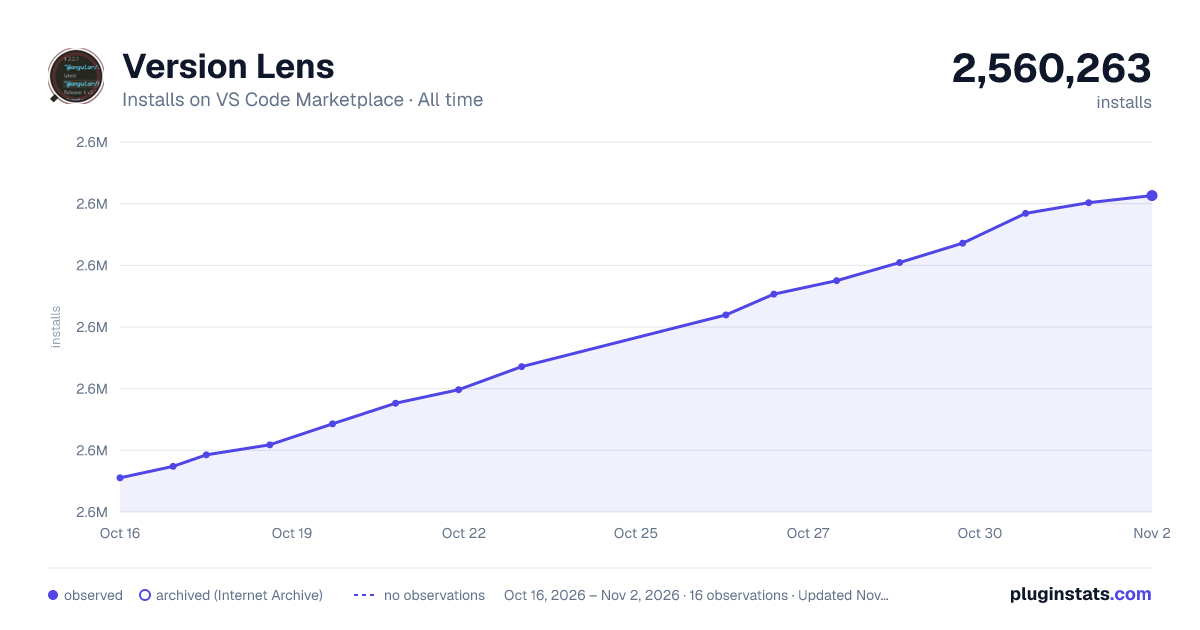
Version Lens has 2,552,859 recorded installs on VS Code Marketplace, ranking #289 of 2,501 tracked listings.
Rating: 4.60 / 5 from 94 ratings
About Version Lens
VersionLens for Visual Studio Code




This project is active, not sponsored or funded.
<a href="https://www.buymeacoffee.com/peterf"><img src="https://cdn.buymeacoffee.com/buttons/v2/default-violet.png" alt="BuyMeACoffee" height="50"></a>
VersionLens shows version information when opening a package or project file in VS Code. It abides by semver rules and uses the Node Semver package to compare and sort versions.

Contents
- Supported Languages & Ecosystems
- How do I see version information for a package?
- Pre-release versions
- Can I check for package vulnerabilities?
- Can I see package deprecations?
- Can I see yanked or unlisted package versions?
- What do the suggestion links mean?
- Will this extension install packages for me?
- How do I authorize packages that need credentials?
- How do I install this extension?
- How do I troubleshoot this extension?
- Commands & Settings
- Development Guide
Supported Languages & Ecosystems
VersionLens supports a wide range of ecosystems:
- Cargo (Rust): crates.io
- Composer (PHP): packagist.org
- Deno (JSR/NPM): deno.com
- Docker: Docker Hub / MCR
- Dotnet: NuGet
- Dub (D): code.dlang.org
- Go: proxy.golang.org
- Maven (Java): Maven Central
- NPM (Node): npmjs.com, JSPM, PNPM
- Pub (Dart/Flutter): pub.dev
- Python: PyPI
- Ruby: rubygems.org
Note: TOML files require an extension that registers the TOML language with VS Code (e.g., Even Better TOML).
How do I see version information for a package?
Select the V icon in the package/project file toolbar.
You can also find this in the editor
...(secondary) menu as Show release versions.
You can also set the default startup state using versionlens.suggestions.showOnStartup in your settings.
Can I see pre-release versions?
Yes, select the tag icon in the package/project file toolbar.
You can also find this in the editor
...(secondary) menu as Show prerelease versions.
You can also set the default startup state using versionlens.suggestions.showPrereleasesOnStartup.

Can I check for package vulnerabilities?
VersionLens integrates with OSV.dev to highlight vulnerable packages directly in your manifest files.
- Editor Diagnostics: If a vulnerability is found for your current version, a red squiggle will appear. Hovering over the version will show the vulnerability details and a direct link to the advisory.
- Update Safeguards: If you click to update to a version that is known to be vulnerable, a modal confirmation will appear to prevent accidental updates to insecure versions.
- Visual Indicators: Updatable versions with known vulnerabilities are marked with a
⚠️indicator in the CodeLens title.
Note: This feature is enabled by default and can be toggled using the
versionlens.suggestions.showVulnerabilitiessetting.
Can I see package deprecations?
VersionLens checks for package and version deprecations across supported ecosystems (Composer, Dotnet, NPM, PNPM, and Pub).
- Editor Diagnostics: If a package or installed version is deprecated, a warning squiggle will appear under the dependency. Hovering over the version displays the deprecation notice provided by the registry.
- Problems Panel: Deprecated packages are surfaced as warnings in VS Code's Problems panel.
- Status Indicator: Deprecated dependencies show a
🟡 deprecated <version>status in their CodeLens while continuing to offer newer, non-deprecated versions as update suggestions.
Note: This feature is enabled by default and can be toggled using the
versionlens.suggestions.showDeprecationssetting.
Can I see yanked or unlisted package versions?…
Description from the VS Code Marketplace listing.
- c#
- composer
- csharp
- dart
- deno
- dependencies
- docker
- dockercompose
- dockerfile
- dotnet
- dub
- f#
- fsharp
- go
- go.mod
- java
- json
- jsonc
- jspm
- maven
README badge
Show your rank in a README or on your website. The badge updates automatically.
Charts
Images: 30d · 1y · all time · 1600×900 dark
Adoption over time
7/30/90-day growth
Ranking history
Ratings over time
Listing placement
Listing placement
Filled points are observed values; hollow points come from Internet Archive snapshots of the listing page. Dashed segments span periods with no observations — values between points are not interpolated.
Each band is one page of 20. Installs on a linear scale. Placement is projected from installs, so it can differ from the marketplace's own sort order. Hover a dot to see the listing.
Recent observations
Full history (5)Similar VS Code Marketplace Programming Languages plugins
All 20 Version Lens alternatives




Data source
Install counts, average rating, and rating counts come from the public Visual Studio Marketplace gallery API. Installs are cumulative and exclude updates.
Listing: https://marketplace.visualstudio.com/items?itemName=pflannery.vscode-versionlens. First seen Oct 16, 2026; last successful collection Oct 20, 2026. See the methodology.