 PluginStats
G-Code Syntax installs statistics
By Applied Engineering & Design · VS Code Marketplace · Programming Languages
Turn VSCode into a fully capable G-Code editor, including language support & more.
G-Code Syntax has 116,742 recorded installs on VS Code Marketplace, ranking #2169 of 2,501 tracked listings.
Rating: 4.50 / 5 from 14 ratings
About G-Code Syntax


VSCode G-Code Syntax is the premier extension for editing G-Code inside of VSCode. Going past the simple syntax highlighting, this extension aims to turn your editor into a full blown g-code management suite. Building on the features of VSCode like Intellisense, snippets, debugging and more, we are able to offer nearly all of the features you would see in very expensive proprietary editors.
Additionally, by editing your G-Code inside of VSCode, you can take advantage of source control using Git to manage your g-code file versions.
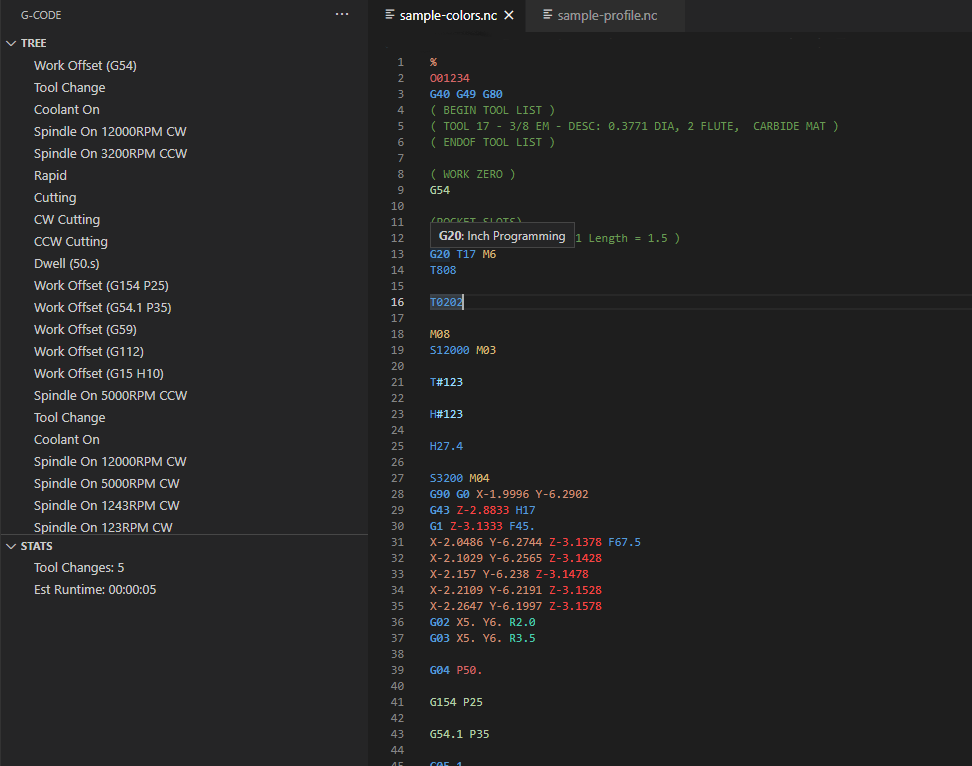
VSCode or Visual Studio Code is a FREE (as in beer), open source application for editing code of all kinds of programming languages. To make it even better, there is a great marketplace where you can download and add extensions to the application to support other languages, add features and more.
Support VSCode-G-Code-Syntax
G-Code Syntax is generously offered to everyone free of charge, if you find it useful, please consider supporting the project by becoming a sponsor, sharing it, and letting your friends know!
Also, please write a review, star me on GitHub, and follow me on Twitter or Instagram.
You can also subscribe to our videos over on YouTube.
Features
This extension adds language syntax for CNC G-Code, code snippets, and colorization.
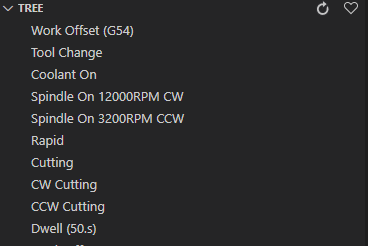
Tree View
- Tree View shows an overview of the operations in the G-Code Program
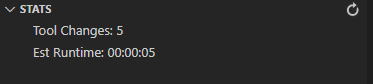
Stats View
- Stats View shows a number of stats like tool changes, runtime, etc.
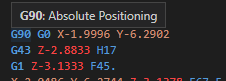
Hovers
- Hovering over G/M codes will show a short description of the code
- Descriptions for the codes are taken from the sister project: gcode-reference
- Hovers are dependent on the machine type selected
Status Bars
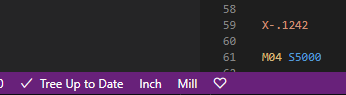
- G-Code adds three informative sections to the VSCode status bar area
- Tree Status (Dirty or Up to Date) depending on Refresh needed
- Current units as set by settings (Auto, Inch or Metric)
- Machine Type as set by settings
- Ok there's a little heart there too.
Context Menu
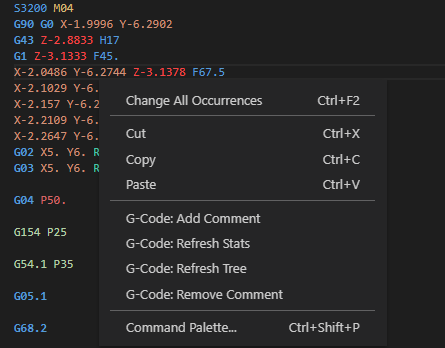
- G-Code adds several commands to the context menu when viewing g-code
- Change selected code into a comment
- Refresh Stats
- Refresh Tree
- Remove Comment from selected code
Current Supported File Extensions
| .001   | .apt | .aptcl | .cls   | .cnc | .din | .dnc | .ecs |
| .eia   | .fan | .fgc   | .fnc   | .g   | .g00 | .gc  | .gcd |
| .gcode | .gp  | .hnc   | .knc   | .lib | .m   | .min | .mpf |
| .mpr   | .msb | .nc    | .ncc   | .ncd | .ncf | .ncg | .nci |
| .ncp   | .ngc | .out   | .pim   | .pit | .plt | .ply | .prg |
| .pu1   | .rol | .S     | .sbp   | .spf | .ssb | .sub | .tap |
| .xpi   |      |        |        |      |      |      |      |
If you would like another file extension supported by this extension, please open an issue.
Installation
Install from Extensions Marketplace or manually install the vsix file.
Usage
Install & activate extension. Extension activates when you open a file marked for the gcode language.
Tree view is enabled by default and can be access from the G icon on the activity bar.
G-Code Syntax Settings
G-Code Syntax is customizable and provides many configuration settings to allow the personalization of almost all features.…
Description from the VS Code Marketplace listing.
- CNC
- gcode
- G-Code
- highlighter
- language
- nc
- snippet
- syntax
README badge
Show your rank in a README or on your website. The badge updates automatically.
Charts
Images: 30d · 1y · all time · 1600×900 dark


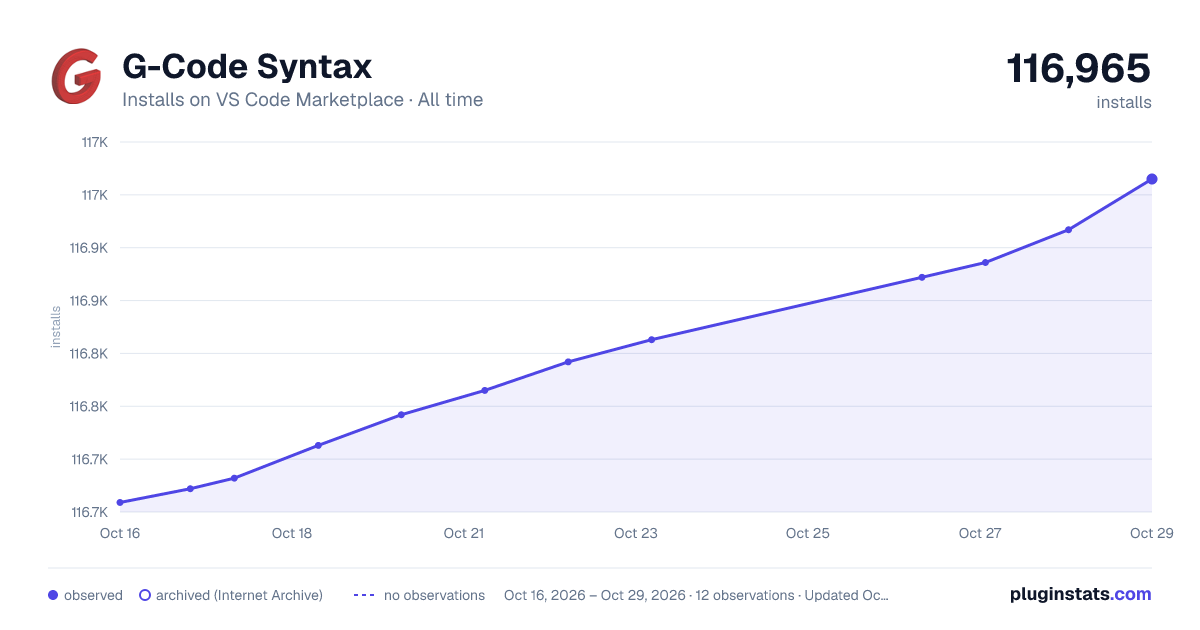

Adoption over time
7/30/90-day growth
Ranking history
Ratings over time
Listing placement
Listing placement
Listing placement
Listing placement
Filled points are observed values; hollow points come from Internet Archive snapshots of the listing page. Dashed segments span periods with no observations — values between points are not interpolated.
Each band is one page of 20. Installs on a linear scale. Placement is projected from installs, so it can differ from the marketplace's own sort order. Hover a dot to see the listing.
Recent observations
Full history (5)Similar VS Code Marketplace Programming Languages plugins
All 20 G-Code Syntax alternativesData source
Install counts, average rating, and rating counts come from the public Visual Studio Marketplace gallery API. Installs are cumulative and exclude updates.
Listing: https://marketplace.visualstudio.com/items?itemName=appliedengdesign.vscode-gcode-syntax. First seen Oct 16, 2026; last successful collection Oct 20, 2026. See the methodology.