 PluginStats
Colorful Comments installs statistics
By Parth Rastogi · VS Code Marketplace · Formatters
Improve and Enhance your code and make it attractive by adding Colorful Comments
Colorful Comments has 199,270 recorded installs on VS Code Marketplace, ranking #1516 of 2,502 tracked listings.
Rating: 4.27 / 5 from 11 ratings
About Colorful Comments
Colorful Comments
The Colorful Comments Extension will help you create more human-friendly comments in your code.
With this Extension, you will be able to categorise your cody by special colour into:
- Red (!)
- Blue (?)
- Green (*)
- Yellow (^)
- Pink (&)
- Purple (~)
- Mustard (todo)
- Grey (//)
- Commented out Code can also be Styled to make it Clear the Code shouldn't be There.
- Any Other Comment Styles you'd like can be Specified in the Settings.

Configurations
This extension can be configured in User Settings or Workspace settings.
"colorful-comments.multilineComments": true
This setting will control whether multiline comments are styled using the annotation tags.
When false, multiline comments will be presented without decoration.
"colorful-comments.highlightPlainText": false
This setting will control whether comments in a plain text file are styled using the annotation tags.
When true, the tags (defaults: ! * ? // ~ & ^) will be detected if they're the first character on a line.
colorful-comments.tags
The tags are the characters or sequences used to mark a comment for decoration.
The default 7 can be modifed to change the colors, and more can be added.
"colorful-comments.tags": [
  {
    "tag": "!",
    "color": "#FF2D00",
    "strikethrough": false,
    "backgroundColor": "transparent",
    "bold": false,
    "italic": false
  },
  {
    "tag": "?",
    "color": "#0076FF",
    "strikethrough": false,
    "backgroundColor": "transparent",
    "bold": false,
    "italic": false
  },
  {
    "tag": "//",
    "color": "#474747",
    "strikethrough": true,
    "backgroundColor": "transparent",
    "bold": false,
    "italic": false
  },
  {
    "tag": "^",
    "color": "#EAF622",
    "strikethrough": false,
    "backgroundColor": "transparent",
    "bold": false,
    "italic": false
  },
  {
    "tag": "*",
    "color": "#28FF00",
    "strikethrough": false,
    "backgroundColor": "transparent",
    "bold": false,
    "italic": false
  },
  {
    "tag": "&",
    "color": "#FF06A0",
    "strikethrough": false,
    "backgroundColor": "transparent",
    "bold": false,
    "italic": false
  },
  {
    "tag": "~",
    "color": "#BE00FF",
    "strikethrough": false,
    "backgroundColor": "transparent",
    "bold": false,
    "italic": false
  },
  {
    "tag": "todo",
    "color": "#FF8C00",
    "strikethrough": false,
    "backgroundColor": "transparent",
    "bold": false,
    "italic": false
  }
]
Supported Languages
- BrightScript
- C
- C#
- C++
- Clojure
- CSS
- Dart
- Dockerfile
- Groovy
- HTML
- Java
- Javascript
- JavaScript React
- JSON with comments
- Less
- Lua
- Markdown
- Objective-C
- Objective-C++
- PHP
- PowerShell
- Python
- Sass
- SCSS
- TypeScript
- TypeScript React
- XML
- YAML
Description from the VS Code Marketplace listing.
- ada
- al
- apex
- asciidoc
- bibtex
- brightscript
- c
- cfml
- clojure
- COBOL
- coffeescript
- cpp
- csharp
- css
- d
- dart
- diagram
- dockerfile
- elixir
- elm
README badge
Show your rank in a README or on your website. The badge updates automatically.
Charts
Images: 30d · 1y · all time · 1600×900 dark


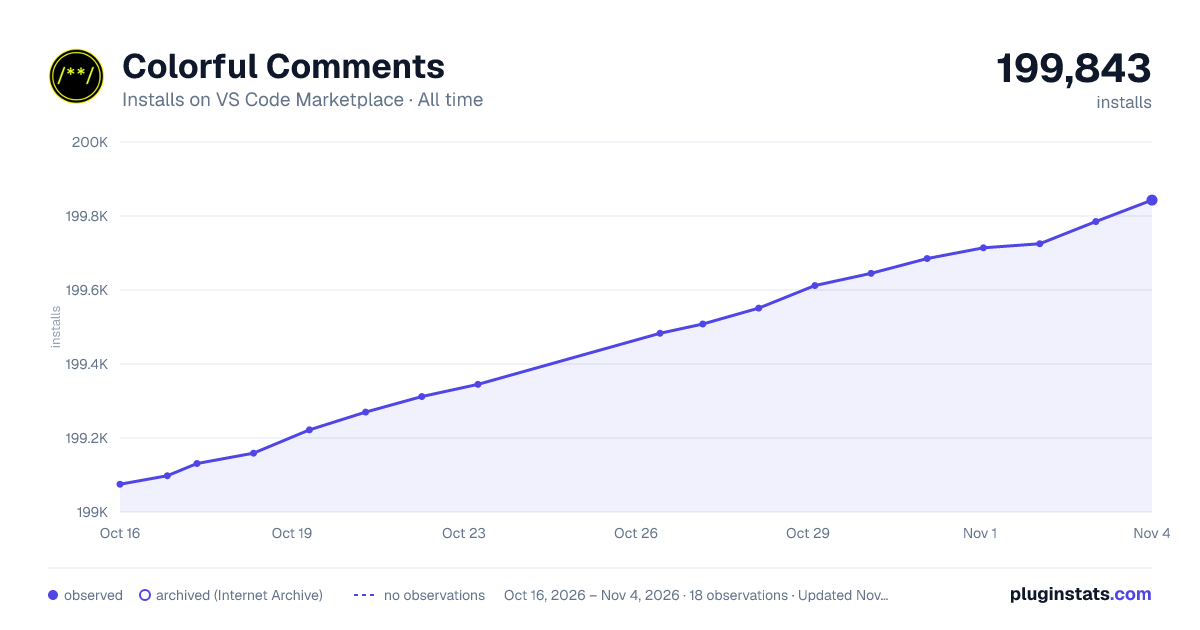

Adoption over time
7/30/90-day growth
Ranking history
Ratings over time
Listing placement
Listing placement
Filled points are observed values; hollow points come from Internet Archive snapshots of the listing page. Dashed segments span periods with no observations — values between points are not interpolated.
Each band is one page of 20. Installs on a linear scale. Placement is projected from installs, so it can differ from the marketplace's own sort order. Hover a dot to see the listing.
Recent observations
Full history (6)Similar VS Code Marketplace Formatters plugins
All 20 Colorful Comments alternativesData source
Install counts, average rating, and rating counts come from the public Visual Studio Marketplace gallery API. Installs are cumulative and exclude updates.
Listing: https://marketplace.visualstudio.com/items?itemName=ParthR2031.colorful-comments. First seen Oct 16, 2026; last successful collection Oct 21, 2026. See the methodology.