 PluginStats
glsl-canvas installs statistics
By circledev · VS Code Marketplace · Snippets
Live WebGL preview of GLSL shaders
glsl-canvas has 175,228 recorded installs on VS Code Marketplace.
It ranks #1676 of 2,501 tracked VS Code Marketplace listings by installs.
It is rated 4.4 out of 5 from 7 ratings.
PluginStats has 4 daily observations since Oct 16, 2026; the latest is from Oct 19, 2026.
Rating: 4.43 / 5 from 7 ratings
About glsl-canvas
💎 vscode-glsl-canvas
The extension opens a live WebGL preview of GLSL shaders within VSCode by providing a command.
It use glsl-canvas a modified and improved version of glslCanvas javascript library from Book of Shaders and glslEditor made by Patricio Gonzalez Vivo.
*Now supporting WebGL2. just add #version 300 es at the very start of the file.*
*Now supporting nested includes with relative paths.*
*Optimized video recording options, with record size and duration. Choose between MediaRecorderApi or CCapture for high quality compression.*
*Run ⌘ ⇧ P on mac os, ctrl ⇧ P on windows.* *Then type command to display a fullscreen preview of your fragment shader.*
Features
• Both supports WebGL and WebGL2. Automatically create WebGL2 context by adding #version 300 es as the first line of file. • Integrated support of error handling with lines hilight. • Drawing modes: , , , and with default mesh. • Mesh loader and parser for format. • Vertex in fragment with macro. • Multiple buffers with macro. • Play / pause functionality. • Recording and exporting to video with resolution and duration settings, using or for high quality video. • Activable stats.js performance monitor. • Custom uniforms. • Activable gui for changing custom uniforms at runtime. • Export to html page with live reload. • Glsl code formatter standard and compact mode. • Glsl Snippets.
Attributes
The attributes provided are , , , .
| Type | Property |
| vec4 | a_position | | vec4 | a_normal | | vec2 | a_texcoord | | vec4 | a_color |
Uniforms
The uniforms provided are , , , and .
| Type | Property |
| vec2 | u_resolution | | float | u_time | | vec2 | u_mouse | | vec3 | u_camera | | vec2[10] | u_trails[10] |
WebGL Extensions
You can include any supported WebGL extension through the array option modifying the workspace's file.
You can then enable the extension in the shader
WebGL2
For WebGL2 context creation just add #version 300 es at the very start of the file.
*no other characters allowed before macro!*
IO Buffers
You can use shader buffers by requiring definition with #ifdef or defined directly in .glsl code. Just ask for BUFFER_N definition and a u_bufferN uniform will be created for you:
Playground
Textures
You can define the texture channels (, , ...) by modifying the workspace's file.
*As of today VSCode do not support video element or audio element. You can use video texture with the Export to html feature.*
u_camera
is a vec3 array with coordinates for an orbital camera positioned at world zero, useful for raymarching.
Playground
u_trails[10]
is a vec2 array with stored inertia mouse positions for mouse trailing effects.
Playground
Custom Uniforms
You can also define custom uniforms by modifying the workspace's file.
Types supported are , , and . Vectors structures are converted from arrays of floats. Range values goes from to .
| Type | Property |
| float | "u_float": 1.0, | | vec2 | "u_vec2": [1.0, 1.0], | | vec3 | "u_vec3": [1.0, 1.0, 1.0], | | vec4 | "u_vec4": [1.0, 1.0, 1.0, 1.0], |
Uniforms Gui
By clicking the option button you can view and modify at runtime uniforms via the dat.gui interface.
Export to html
You can export your shader, assets and uniforms to an html page with livereload for testing in browser.
Color Picker
Waiting for a more customizable code inset feature, and arrays can be modified with the integrated color picker.
Including dependent files with #include
You can now include other GLSL code using a traditional #include "file.glsl" macro.
Antialias
Enables or disables antialias in the WebGL context.
Change detection
You can set the timeout change detection option by modifying the workspace's file.
Refresh on save
Enables or disables refreshing the glslCanvas when saving the document.
Refresh on change
Enables or disables refreshing the glslCanvas when changing the document.
Use formatter
Enables or disables glsl code formatter.
Use compact formatter
Enables or disables glsl code formatter compact mode.
Install on export
Enables or disables installing the Npm packages on export.
Record duration
Specify automatic recording duration in seconds. Set to to disable this feature.
Record width
Specify canvas recording width in pixels. Default value is .
Record height
Specify canvas recording height in pixels. Default value is .
Fragment shader
An example of fragment shader. You can copy paste this code in an empty .glsl file:
Glsl snippets
| Snippet | Purpose |
| glsl.animation | Staggered animations | | glsl.modifiers.blend | Blend functions | | glsl.modifiers.boolean | Boolean functions | | glsl.colors | Colors palette | | glsl.coords | Pixel units utility functions | | glsl.drawing | Signed distance drawing methods | | glsl.ease.back.in | Ease equation back in | | glsl.ease.bounce.in | Ease equation bounce in | | glsl.ease.circular.in | Ease equation circular in | | glsl.ease.cubic.in | Ease equation cubic in | | glsl.ease.elastic.in | Ease equation elastic in | | glsl.ease.expo.in | Ease equation expo in | | glsl.ease.quad.in | Ease equation quad in | | glsl.ease.quart.in | Ease equation quart in | | glsl.ease.quint.in | Ease equation quint in | | glsl.ease.sine.in | Ease equation sine in | | glsl.main.new | Main function, uniforms & utils | | glsl.core.object | Object struct with distance and color | | glsl.shapes.2d.arc | Shape 2D arc | | glsl.shapes.2d.circle | Shape 2D circle | | glsl.shapes.2d.grid | Shape 2D grid | | glsl.shapes.2d.hex | Shape 2D hexagon | | glsl.shapes.2d.line | Shape 2D line | | glsl.shapes.2d.pie | Shape 2D pie | | glsl.shapes.2d.plot | Shape 2D plot | | glsl.shapes.2d.poly | Shape 2D poly | | glsl.shapes.2d.rect | Shape 2D rect | | glsl.shapes.2d.roundrect | Shape 2D roundrect | | glsl.shapes.2d.segment | Shape 2D segment | | glsl.shapes.2d.spiral | Shape 2D spiral | | glsl.shapes.2d.star | Shape 2D star | | glsl.modifiers.tile | Tiling function | | glsl.units | Pixel unit conversion function |…
Description from the VS Code Marketplace listing.
- glsl
- OpenGL Shading Language
- shader
- snippet
Charts
Images: 30d · 1y · all time · 1600×900 dark


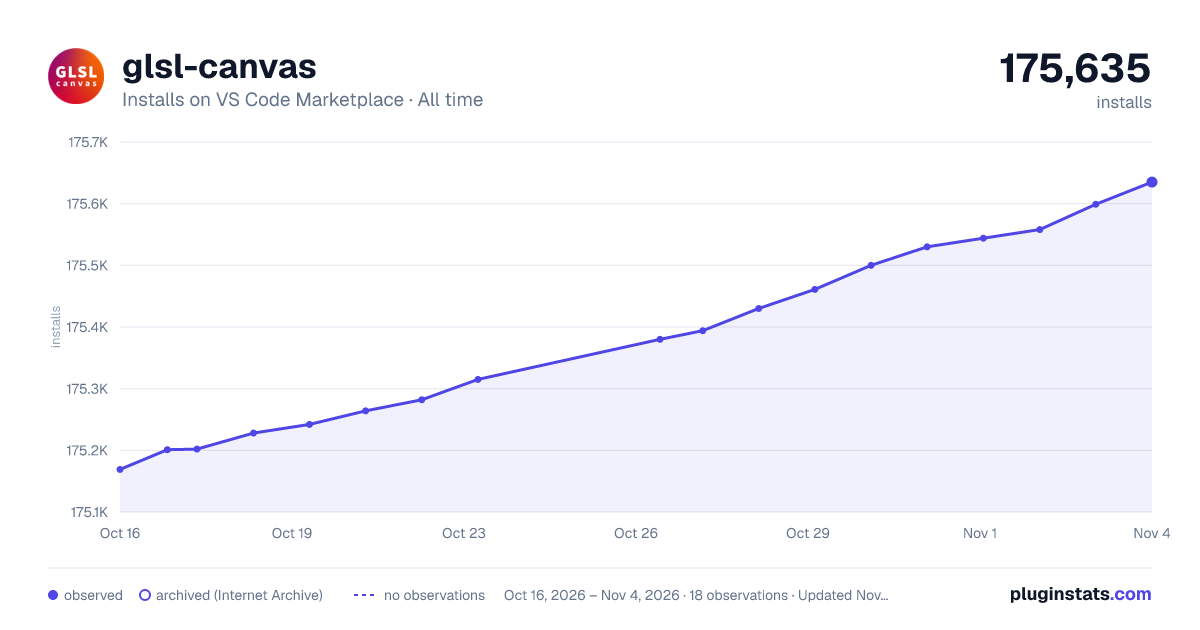

Adoption over time


7/30/90-day growth


Ranking history


Ratings over time


Listing placement


Filled points are observed values; hollow points come from Internet Archive snapshots of the listing page. Dashed segments span periods with no observations — values between points are not interpolated.
Each band is one page of 20. Installs on a log scale. Placement is projected from installs, so it can differ from the marketplace's own sort order. Hover a dot to see the listing.
Recent observations
Full history (4)Similar VS Code Marketplace Snippets plugins
All 20 glsl-canvas alternativesData source
Install counts, average rating, and rating counts come from the public Visual Studio Marketplace gallery API. Installs are cumulative and exclude updates.
Listing: https://marketplace.visualstudio.com/items?itemName=circledev.glsl-canvas. First seen Oct 16, 2026; last successful collection Oct 19, 2026. See the methodology.