 PluginStats
GPT installs statistics
By Silas Nevstad · VS Code Marketplace · Other
Use OpenAI, Anthropic, or Gemini models inside VS Code
GPT has 358,876 recorded installs on VS Code Marketplace, ranking #1032 of 2,501 tracked listings.
Rating: 3.86 / 5 from 7 ratings
About GPT
GPT
Use OpenAI, Anthropic, or Gemini models inside Visual Studio Code
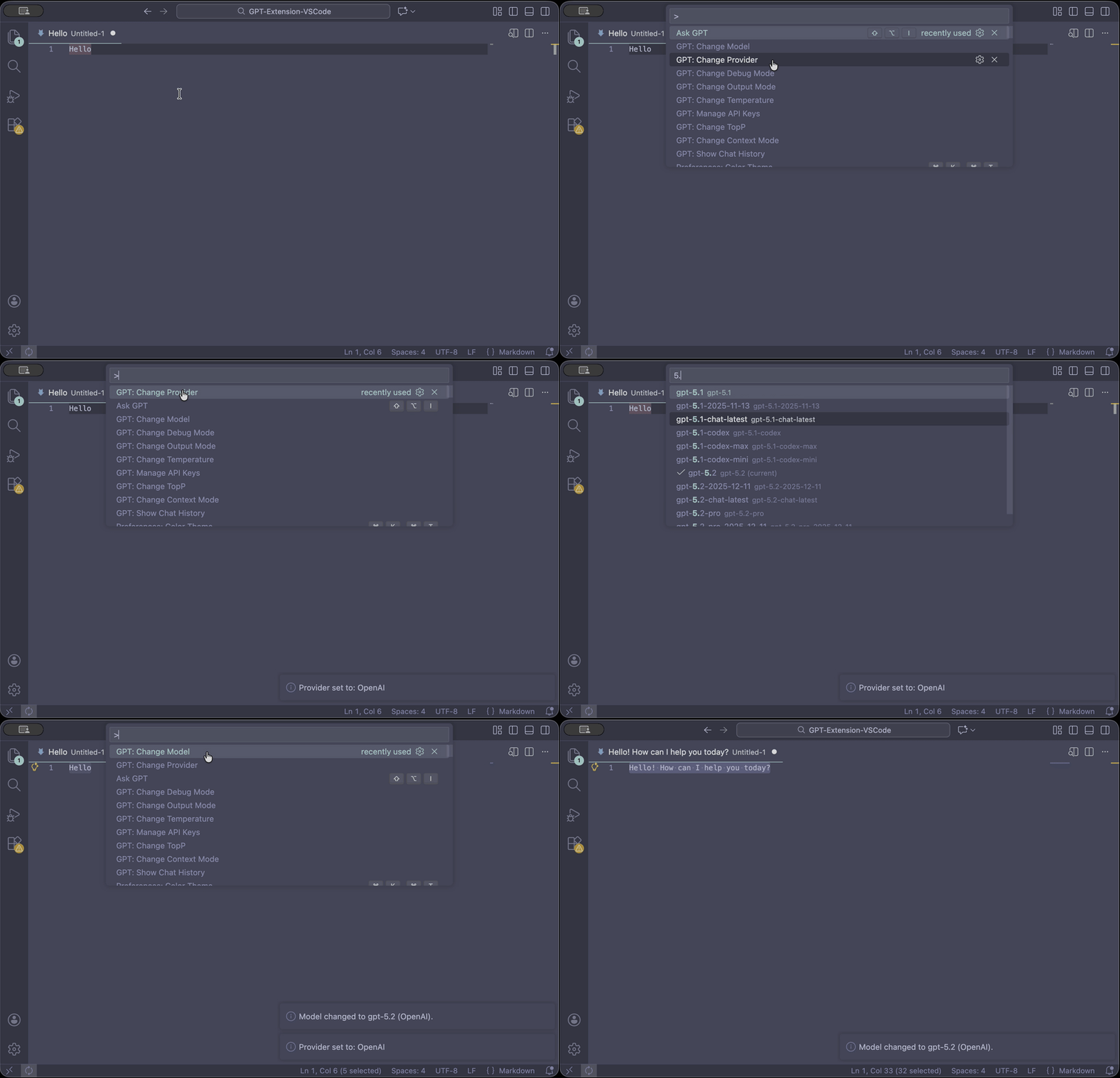
🚀 Quick Start (30 seconds) <div id="getting-started"></div>
Prerequisite: an API key from your provider (OpenAI / Anthropic / Gemini).
- Run GPT: Setup
- Select any text in the editor
- Press Alt + Shift + I (Ask GPT)
No key set? Ask GPT will prompt you to set one and automatically retry once.
Contents
- How it works
- How to use
- 🔑 Setup & API keys
- 🧠 Providers & models
- 🧩 Project instructions (.gpt-instruction)
- 🧰 Commands
- 🛠️ Troubleshooting
- 💙 Support
- License
How it works <div id="how-it-works"></div>
- You select text (or a full file) → GPT sends that content to the currently selected model/provider and returns a response.
- Responses are shown either in a new file or by replacing the selection (configurable).
- API keys are stored securely in VS Code SecretStorage when available.
Privacy & security
- API keys: stored in VS Code SecretStorage when available; otherwise stored for the current session only.
- Logging: debug logs intentionally avoid secrets and prompt contents.
- Chat history: kept in-memory during the session; you can export it manually.
How to use <div id="how-to-use"></div>
Ask GPT (selection) — recommended default
- Select text
- Run Ask GPT (Alt + Shift + I)
Ask GPT with File (whole file)
Use Ask GPT with File when you need full-file context (refactors, audits, “explain this file”).
🔑 Setup & API keys <div id="setup--api-keys"></div>
GPT: Setup
One onboarding flow:
- Choose a provider (OpenAI / Anthropic / Gemini)
- Set an API key if missing
- Optionally pick a model
GPT: Set API Key (fast path)
Sets/updates the API key for the currently selected provider.
GPT: Manage API Keys
Manage keys across providers (view status, set/update, remove).
Legacy OpenAI keys previously stored in globalState are migrated automatically when SecretStorage is available.
🧠 Providers & models <div id="providers--models"></div>
- Default provider: OpenAI
- Switch provider: GPT: Change Provider
- Change model: GPT: Change Model
Model list behavior
- Pick from a built-in list or use Custom model id…
- Refresh model list (online) appears only after an API key is configured for the active provider
🧩 Project instructions (.gpt-instruction) <div id="project-instructions"></div>
Place a .gpt-instruction file in your workspace to automatically prefix each query with project-specific guidance.
-
Multi-root: resolves per workspace folder based on the active document.
-
Lookup modes:
workspaceRoot(default): reads<workspaceFolder>/.gpt-instructionnearestParent: closest parent.gpt-instructionwins
-
Nearest-parent behavior:
- An empty
.gpt-instructionsuppresses parent instructions. - This mode can be more expensive in very large repos (recursive watcher).
- An empty
-
Size limits:
- Content beyond the configured max is truncated with a warning.
- In remote/virtual workspaces, very large files may be ignored for safety.
🧰 Commands <div id="commands"></div>
Core
- GPT: Setup — onboarding
- Ask GPT — run on selection (Alt + Shift + I)
- Ask GPT with File — run on entire file
- GPT: Set API Key — set key for active provider
- GPT: Manage API Keys — manage keys across providers
Provider & model
- GPT: Change Provider
- GPT: Change Model
- GPT: Change Token Limit
Conversation & output
- GPT: Change Output Mode — Replace Selection vs New File
- GPT: Change Context Mode — No Context / Last N / Full
- GPT: Set Context Length
- GPT: Export Chat History
- GPT: Show Chat History
- GPT: Clear Chat History
Debug
- GPT: Change Debug Mode — show/hide the GPT Debug output channel
🛠️ Troubleshooting <div id="troubleshooting"></div>
Invalid or missing API key
- Run GPT: Setup (recommended) or GPT: Set API Key
- Confirm provider via GPT: Change Provider
“Model not available”
- Run GPT: Change Model
- If a key is configured, use Refresh model list (online) or choose Custom model id…
Rate limits / quota
- Retry later or check your provider plan/quota.
- OpenAI usage dashboard: https://platform.openai.com/account/usage
Debugging
- Toggle GPT: Change Debug Mode
- Check the GPT Debug output channel (no secrets or prompts are logged)
Support <div id="support"></div>
If this extension saves you time, you can support ongoing maintenance:
- ☕ Buy Me a Coffee: https://buymeacoffee.com/silasnevstad
- ⭐ GitHub Sponsors: https://github.com/sponsors/silasnevstad
License <div id="license"></div>
MIT License — see LICENSE
Description from the VS Code Marketplace listing.
- keybindings
README badge
Show your rank in a README or on your website. The badge updates automatically.
Charts
Images: 30d · 1y · all time · 1600×900 dark


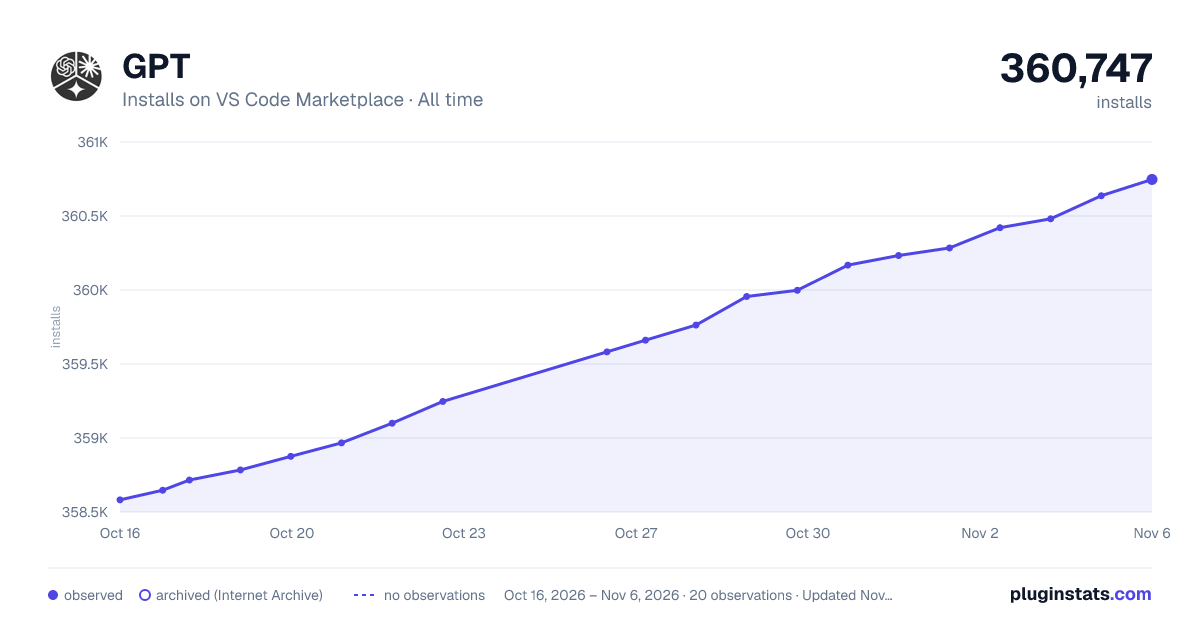

Adoption over time
7/30/90-day growth
Ranking history
Ratings over time
Listing placement
Listing placement
Filled points are observed values; hollow points come from Internet Archive snapshots of the listing page. Dashed segments span periods with no observations — values between points are not interpolated.
Each band is one page of 20. Installs on a linear scale. Placement is projected from installs, so it can differ from the marketplace's own sort order. Hover a dot to see the listing.
Recent observations
Full history (5)Similar VS Code Marketplace Other plugins
All 20 GPT alternativesData source
Install counts, average rating, and rating counts come from the public Visual Studio Marketplace gallery API. Installs are cumulative and exclude updates.
Listing: https://marketplace.visualstudio.com/items?itemName=SilasNevstad.gpthelper. First seen Oct 16, 2026; last successful collection Oct 20, 2026. See the methodology.