 PluginStats
ChatGPT installs statistics
By Kiran Shah · VS Code Marketplace · Other
Make queries to OpenAI's ChatGPT from inside VS Code.
ChatGPT has 398,058 recorded installs on VS Code Marketplace, ranking #972 of 2,502 tracked listings.
Rating: 4.00 / 5 from 8 ratings
About ChatGPT
ChatGPT Helper
This is an extension to quickly query OpenAI's ChatGPT (both GPT-3.5 and GPT-4) from VS Code. A ChatGPT Plus subcription is not required to use this extension.
GPT-3.5, which powers ChatGPT, is a large language model made by OpenAI. The official GPT-3.5 API costs $0.002 / 1K tokens for both prompts and responses, where 1,000 tokens is approximately 750 words, so $1 would buy approximately 375,000 words.
Alternatively, you can opt to use GPT-4, GPT-3.5's successor, which is an even more powerful model. The API is currently invite-only, however you can sign up for the waitlist here. The API is more expensive than GPT-3.5, costing $0.03 / 1K tokens for prompts and $0.06 / 1K tokens for responses, meaning $1 would buy approximately 12,500 words of prompts and 6,250 words of response..
To use this extension, you must provide an OpenAI API token linked to an account with billing set up; costs for using the API are charged directly to your OpenAI account.
Features
Ask why your code's not working
- Select the code you want to ask about. If you want to ask about the whole file, do not select any text.
- Right click inside the editor and select
ChatGPT: Ask why code isn't working. - Wait for the response. It will appear in a new tab.
Ask to explain your code
- Select the code you want to ask about. If you want to ask about the whole file, do not select any text.
- Right click inside the editor and select
ChatGPT: Ask to explain code. - Wait for the response. It will appear in a new tab.
Ask a free-form question
Use the "ChatGPT: Ask a question" command in the Command Palette:
- Press
Ctrl+Shift+Pto open the Command Palette. - Begin typing
ChatGPT: Ask a question, and select it when it appears. - Enter the question you'd like to ask.
- Wait for the response. It will appear in a new tab.
Authentication
When you first query ChatGPT, you will be prompted to enter an OpenAI API key. This is used by the extension to access the API and is only sent to OpenAI.
To find your OpenAI API key:
- Go to https://platform.openai.com/account/api-keys. You will need to log in (or sign up) to your OpenAI account.
- Click "Create new secret key", and copy it.
- You should then paste it into VS Code when prompted.
You must also have billing set up on your OpenAI account (see Pricing below).
Changing API key
Once your OpenAI API key has been set you can update it using the "ChatGPT: Change OpenAI API key" command in the Command Palette:
- Press
Ctrl+Shift+Pto open the Command Palette. - Begin typing
ChatGPT: Change OpenAI API key, and select it when it appears. - Enter your OpenAI API key (see above instructions on how to find).
Pricing
The GPT-3.5 API is charged by OpenAI at $0.002 / 1K tokens, while the GPT-4 API comes at $0.03 / 1K tokens. This is charged directly to your OpenAI account. To use this extension, you must set up billing on your account. Find more info about pricing at https://openai.com/pricing#chat.
Configuration
Switching Between Models
In order to switch the model between GPT-3.5 (default) and GPT-4:
Ctrl+,to open Preferences.- Search for
chatgpt-helper.model. - Use the dropdown to switch between GPT-3.5 and GPT-4.
Description from the VS Code Marketplace listing.
- ai
- chatgpt
- codex
- gpt-3
- openai
README badge
Show your rank in a README or on your website. The badge updates automatically.
Charts
Images: 30d · 1y · all time · 1600×900 dark


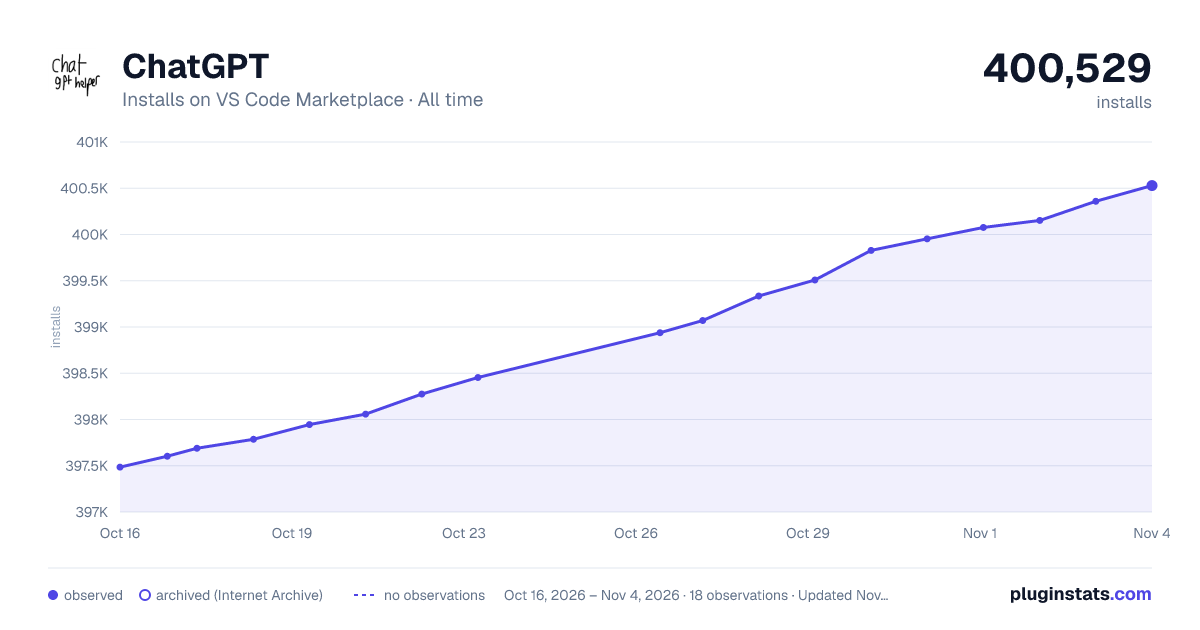

Adoption over time
7/30/90-day growth
Ranking history
Ratings over time
Listing placement
Listing placement
Filled points are observed values; hollow points come from Internet Archive snapshots of the listing page. Dashed segments span periods with no observations — values between points are not interpolated.
Each band is one page of 20. Installs on a linear scale. Placement is projected from installs, so it can differ from the marketplace's own sort order. Hover a dot to see the listing.
Recent observations
Full history (6)Similar VS Code Marketplace Other plugins
All 20 ChatGPT alternativesData source
Install counts, average rating, and rating counts come from the public Visual Studio Marketplace gallery API. Installs are cumulative and exclude updates.
Listing: https://marketplace.visualstudio.com/items?itemName=kiranshah.chatgpt-helper. First seen Oct 16, 2026; last successful collection Oct 21, 2026. See the methodology.