 PluginStats
VSC-Prolog installs statistics
By arthurwang · VS Code Marketplace · Programming Languages
Support for Prolog language
VSC-Prolog has 228,201 recorded installs on VS Code Marketplace.
It ranks #1379 of 2,501 tracked VS Code Marketplace listings by installs.
It is rated 4.0 out of 5 from 18 ratings.
PluginStats has 4 daily observations since Oct 16, 2026; the latest is from Oct 19, 2026.
Rating: 4.00 / 5 from 18 ratings
About VSC-Prolog
VSC-Prolog
A VS Code extension which provides language support for Prolog (mainly for SWI-Prolog and some features for ECLiPSe).
Features | Configurations | Debugger Settings | Commands & Keybindings | Bug Reporting
Note before installation
This extension can be installed via extensions viewlet of VS Code or 'Extensions: install extension' command from the command palette. The author notices that it is developed and tested in *SWI-Prolog 7.4.2*, *ECLiPSe 6.1* and *VS Code 1.15* on *Debian 9.0* (stretch). It's tested under Windows 10 but not other environments. • Please update to 7.5.13 of swipl if you want to use 'Show all references' feature. • For Windows users: Run VS Code as administrator if going to switch to ECLiPSe from default SWI-Prolog or back to SWI from ECLiPSe. Non-administrator is ok while remain using the same dialect as last time.
Features
• Syntax highlighting • Snippets • Information Hovers • Linter • Edit helpers • Import/Dynamic helper (SWI ONLY) • Export helper (SWI ONLY) • Recursion helper • Anonymous variable helper • Load active source file and query goals • Goto definition of predicate under cursor • Show all refences of predicate under cursor • Refactor predicate under cursor(experimental • Code formatter (Linux os only) • Debugger(experimental, SWI ONLY) • Leep, creep, skip, Up, Stop, Restart • Breakpoints, including conditional breakpoints and hit count breakpoints • Spy(function breakpoints) • Data inspection • Evaluation
Feature descriptions and usages
Syntax highlighting
• Based on sublimeprolog • Builtin pattern support
Predicate snippets
• Predicate templates auto-completion • Produced from source files with structured comments and html document of swipl system
Information hovers
Hovers show Document information about the predicate under the mouse cursor.
Grammar linter
• Lint for errors, warning and undefined predicates of the source file in active editor window and its imported file • Errors are marked with red squiggles, Warnings green ones. • Mesage shown in OUTPUT and PROBLEMS channels • Clicking lines in PROBLEMS channels brings cursor to the respective lines in the editor • Traverse error lines in the editor by commands, the error/warning message responding to the line is presented in OUTPUT channel. • Prolog: Goto next error line (default map to f8) • Prolog: Goto previous error line (default map to shift-f8) • Linter can be configured as action upon saving, typing and disabled by setting prolog.linter.run to 'onSave', 'onType' and 'never' respectively
Edit helpers
Import or Dynamic predicate helper
This feature only works in SWI-Prolog.
Clicking on the squiggle indicating 'undefined predicate' lights the yellow bulb in the left margin besides the line number. A suggesition list is presented when you click the bulb that includes 'add dynamic ' for the undefined predicate or 'import' it if VSC-Prolog finds it could be exported from some module(s). Triggering 'Add dynamic' inserts the predicate indicator into dynamic directive, or creates such a directive if no one exists. 'Add use_module' inserts ':- use_module' directive with the predicate indicator whithin the import list.
Export helper
This feature only works in SWI-Prolog.
Move cursor to the head of a clause or a fact to be exported and trigger the command 'Prolog: export predicate under cursor' via command palette or right click the predicate to pop up the Editor/context menu which contains the command. Then VSC-Prolog inserts :- module/2 if module is not defined or adds the predicate indicator to the export list otherwise. After that a message box displays that asks for if adding structured comment for the predicate and comment lines are inserted above the head of the clause if 'yes' chosen, you should edit the comments of course.
Recursion helper
Leading dot (only spaces before it) of a line repeat the above nearest predicate or the head of current clause being edited if last line ends with comma, in which case the recursive variable change accordingly as intelligent as possible.
Anonymous variables helper
Typing underscore in front of any parameters makes the parameter an anonymous variable.
Load active source file and query goals
• Command 'Prolog: load document' (default map to alt-x l) loads the source file in active editor into prolog process in the integrated terminal, spawning the prolog process it if not opened. The prolog process provides a real prolog REPL console. • Command 'Prolog: query goal under cursor' (default map to alt-x q) loads the source file and querys the goal under the cursor. You can call this command from editor context menu.
Go to definition of predicate under cursor
• Go to definition
Editor/context menu command 'Go to Definition' (default map to f12) brings the cursor to the line where where the predicate is defined. • Peek definition
Editor/context menu command 'Peek Definition' (default ctrl-shift-f10) pops up a panel to display the definition.
Show all references of predicate under cursor
Right click a predicate in editor, then trigger the command 'Find all references' from the editor context menu. All references of the predicate will be displayed in a popup panel.
Refactor predicate under cursor
Right click a predicate in editor, then trigger the command 'Refactor predicate under cursor' from the editor context menu. VSC-Prolog pops up a message box to ask for user confirmation and then an input box shows off to accept new predicate name that is used to replace the original one in all the references and its definition clause head(s). If the user selects a builtin or foreign predicate and confirms in the warning box, all the predicate functor names of referencs would be replaced but the definition remains unchanged. This maybe is useful if you want to substitute a predicate with the same arity.…
Description from the VS Code Marketplace listing.
- debug
- debuggers
- format
- keybindings
- linter
- prolog
- snippet
- swipl
Charts
Images: 30d · 1y · all time · 1600×900 dark


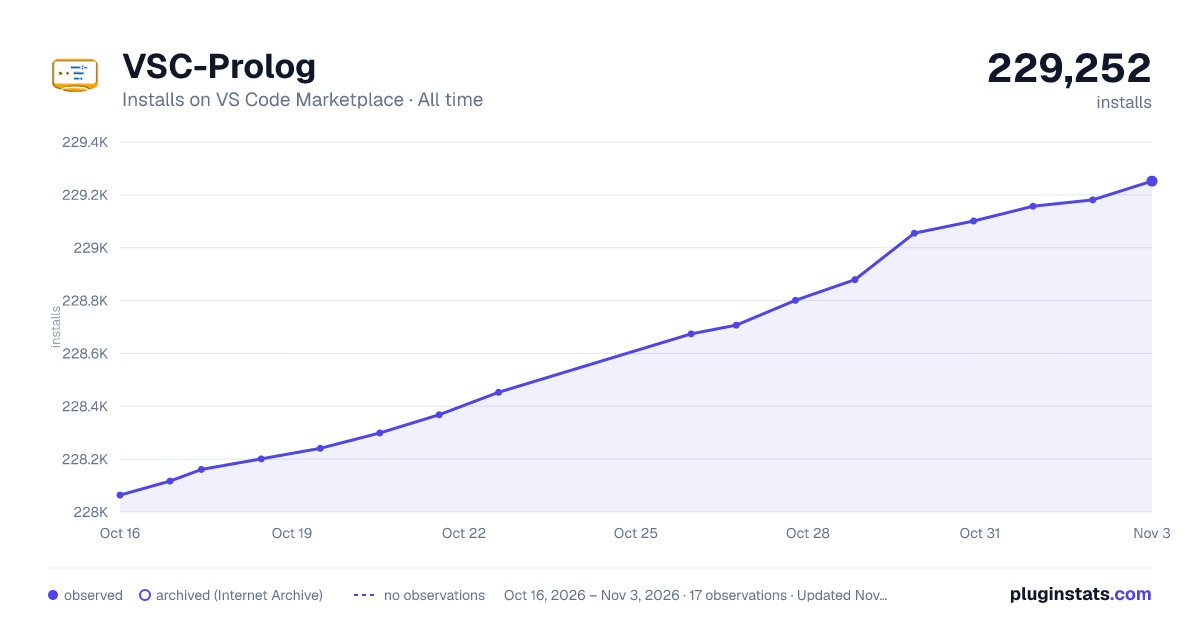

Adoption over time


7/30/90-day growth


Ranking history


Ratings over time


Listing placement


Listing placement


Listing placement


Filled points are observed values; hollow points come from Internet Archive snapshots of the listing page. Dashed segments span periods with no observations — values between points are not interpolated.
Each band is one page of 20. Installs on a log scale. Placement is projected from installs, so it can differ from the marketplace's own sort order. Hover a dot to see the listing.
Recent observations
Full history (4)Similar VS Code Marketplace Programming Languages plugins
All 20 VSC-Prolog alternativesData source
Install counts, average rating, and rating counts come from the public Visual Studio Marketplace gallery API. Installs are cumulative and exclude updates.
Listing: https://marketplace.visualstudio.com/items?itemName=arthurwang.vsc-prolog. First seen Oct 16, 2026; last successful collection Oct 19, 2026. See the methodology.