 PluginStats
Python C++ Debugger installs statistics
By BeniBenj · VS Code Marketplace · Debuggers
Extension for starting the Python & C++ debugger on the same process in VScode
Python C++ Debugger has 786,040 recorded installs on VS Code Marketplace.
It ranks #630 of 2,500 tracked VS Code Marketplace listings by installs.
It is rated 4.7 out of 5 from 10 ratings.
PluginStats has 3 daily observations since Oct 16, 2026; the latest is from Oct 18, 2026.
Rating: 4.70 / 5 from 10 ratings
About Python C++ Debugger
VS Code Python C++ Debug
This debugger starts a python debugger and attaches a C++ debugger to it for debugging python code that calls functions from shared object files (.so/.dll).
Python C++ Debug Requirements
To use this debug-extension you must have the following extensions installed: • Python by Microsoft (ms-python.python) • C/C++ by Microsoft (ms-vscode.cpptools)
Default Configurations:
If you plan to use the default configuration of the python and/or C++ debugger, you don't need to define them manually.
• Python: pythonConfig: default will start the Python debugger with the default configuration (Python: Current File) • C++: • cppConfig: default (win) Attach will attach the C++ debugger with the (Windows) Attach config. • cppConfig: default (gdb) Attach will attach the C++ debugger with the (gdb) Attach config. This will also set the program path automatically to the path of the current python interpreter and lookup the gdb path.
Custom Configurations:
To manually define the configurations you can set the attributes pythonLaunchName & cppAttachName to the name of the configuration you wish to use from your launch.json file.
The following is an example launch.json file for windows users. If your working on Linux make sure to have a (gdb) Attach configuration instead of (Windows) Attach.
What the debugger does
When you start Python C++ Debug it launches a Python debugger and attaches a C++ debugger to it by using the processId of the python debugger. As soon as both debuggers are attached the Python C++ debugger terminates.
Additional information
• Make sure the shared object files (.so/.dll) you are loading your functions from have been compiled with debug info. • Between consecutive breakpoints where one is located in python and the other in the C++ code, only the 'continue' button will work correctly. • Additionally, the restart button isn't supported due to the Python debugger changing its processId after a restart.
Description from the VS Code Marketplace listing.
- C
- C++
- C++ attach
- C++ Python Debug
- C++ Python Debugger
- cpp
- Cpp attach
- ctypes
- debug python c++
- debugger
- debuggers
- native
- python
- python & c++
- python and c++
- python attach
- Python attach C++
- python C++ Debug
- python c++ debugger
- python debug
Where Python C++ Debugger sits in the listing
Each band is one page of 20. Installs on a log scale. Placement is projected from installs, so it can differ from the marketplace's own sort order. Hover a dot to see the listing.


Charts
Images: 30d · 1y · all time · 1600×900 dark


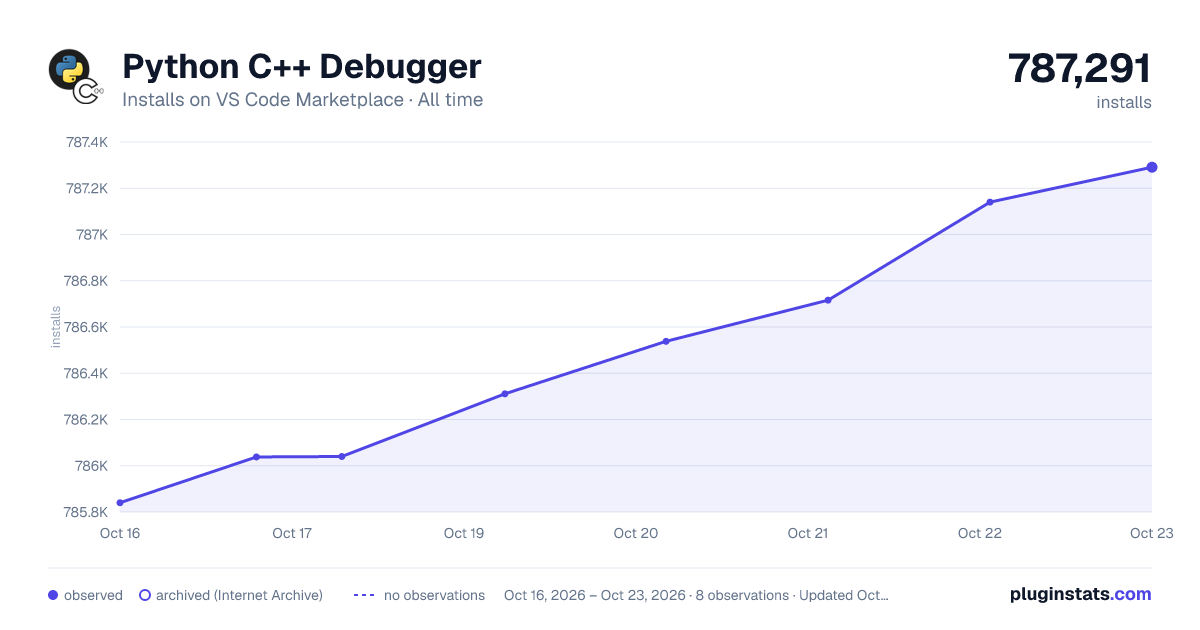

Adoption over time


7/30/90-day growth


Ranking history


Filled points are observed values; hollow points come from Internet Archive snapshots of the listing page. Dashed segments span periods with no observations — values between points are not interpolated.
Recent observations
Full history (3)Similar VS Code Marketplace Debuggers plugins
Data source
Install counts, average rating, and rating counts come from the public Visual Studio Marketplace gallery API. Installs are cumulative and exclude updates.
Listing: https://marketplace.visualstudio.com/items?itemName=benjamin-simmonds.pythoncpp-debug. First seen Oct 16, 2026; last successful collection Oct 18, 2026. See the methodology.