 PluginStats
vscode-pokemon installs statistics
By jakobhoeg · VS Code Marketplace · Other
Pokémon for your VS Code
vscode-pokemon has 267,573 recorded installs on VS Code Marketplace, ranking #1244 of 2,502 tracked listings.
Rating: 5.00 / 5 from 13 ratings
About vscode-pokemon
VS Code Pokémon




Seen used by engineers at Microsoft!
</div>Installation
Install this extension from the VS Code marketplace or the Open VSX Registry.

OR
With VS Code open, search for vscode-pokemon in the extension panel (Ctrl+Shift+X on Windows/Linux or Cmd(⌘)+Shift+X on MacOS) and click install.
OR
With VS Code open, launch VS Code Quick Open (Ctrl+P on Windows/Linux or Cmd(⌘)+P on MacOS), paste the following command, and press enter.
ext install jakobhoeg.vscode-pokemon
Using VS Code Pokémon
After installing, open the command palette with Ctrl+Shift+P on Windows/Linux or Cmd(⌘)+Shift+P on MacOS.
Run the "Start Pokemon coding session" command (vscode-pokemon.start) to see a Bulbasaur in VS Code:

Enjoy interacting with your favourite Pokémon!
Keyboard Shortcuts
VS Code Pokémon comes with default keyboard shortcuts to make managing your Pokémon quick and easy:

Configuring Keyboard Shortcuts
You can customize these shortcuts to match your preferences:
- Open the command palette (
Ctrl+Shift+Pon Windows/Linux orCmd(⌘)+Shift+Pon MacOS) - Run the
Pokemon Coding: Configure keybindingscommand - Select the command you want to customize
- VS Code will open the Keyboard Shortcuts editor filtered to that command
- Click the pencil icon next to the command and press your desired key combination
Changing settings
Open the setting panel with Ctrl+, on Windows/Linux or Cmd(⌘)+, on MacOS. In the search bar, enter “vscode-pokemon" to see all available options.
Set the size and position of the extension.
Default Pokémon
You can configure specific Pokémon to automatically appear when you first start using the extension. This is useful for setting up your preferred team without having to manually spawn them when you open new windows.
To configure default Pokémon, add the following to your settings.json:
{
  "vscode-pokemon.defaultPokemon": [
    {
      "type": "pikachu",
      "name": "Sparky"
    },
    {
      "type": "charizard",
      "name": "Flame"
    },
    {
      "type": "articuno"
    },
    {
      "type": "mewtwo",
      "shiny": true
    },
    {
      "type": "random"
    },
    {
      "type": "random",
      "pool": ["pikachu", "eevee", "gengar", "snorlax"]
    }
  ]
}
type(required): The Pokémon species (e.g.,"pikachu","charizard","mewtwo"), or"random"to spawn a random speciesname(optional): A custom name for your Pokémon. If not provided, a random name will be assignedshiny(optional): Determines if the Pokémon is shiny, if not set will usevscode-pokemon.shinyOddssetting.pool(optional): Only used whentypeis"random". Restricts the random selection to this list of species. Invalid entries are dropped with a warning; if none are valid, selection falls back to any Pokémon.
Note: The extension automatically saves your current Pokémon between sessions. The defaultPokemon setting is only used when:
- You start the extension for the first time
- You open a new windows/repository
- You have removed all Pokémon (no saved session exists)
A "random" entry is resolved to a specific species the first time it's applied, then saved like any other Pokémon — reopening the window won't re-roll it, only removing all Pokémon will.
To reset to your default Pokémon, use the "Remove all pokemon" command and restart VS Code.
Pokémon Language
You can customize the language used for Pokémon names. The extension supports official Pokémon languages: English (US), French, German, and Japanese.
Using the Command
- Open the command palette (
Ctrl+Shift+Pon Windows/Linux orCmd(⌘)+Shift+Pon MacOS) - Run the
Pokemon Coding: Change Pokemon languagecommand - Select your preferred language from the list
Using Settings
You can also configure the language directly in your settings.json:
{
  "vscode-pokemon.pokemonLanguage": "fr-FR"
}
```…
Description from the VS Code Marketplace listing.
- keybindings
- pets
- pixel
- pixelart
- pokemon
- pokémon
- vscode
README badge
Show your rank in a README or on your website. The badge updates automatically.
Charts
Images: 30d · 1y · all time · 1600×900 dark


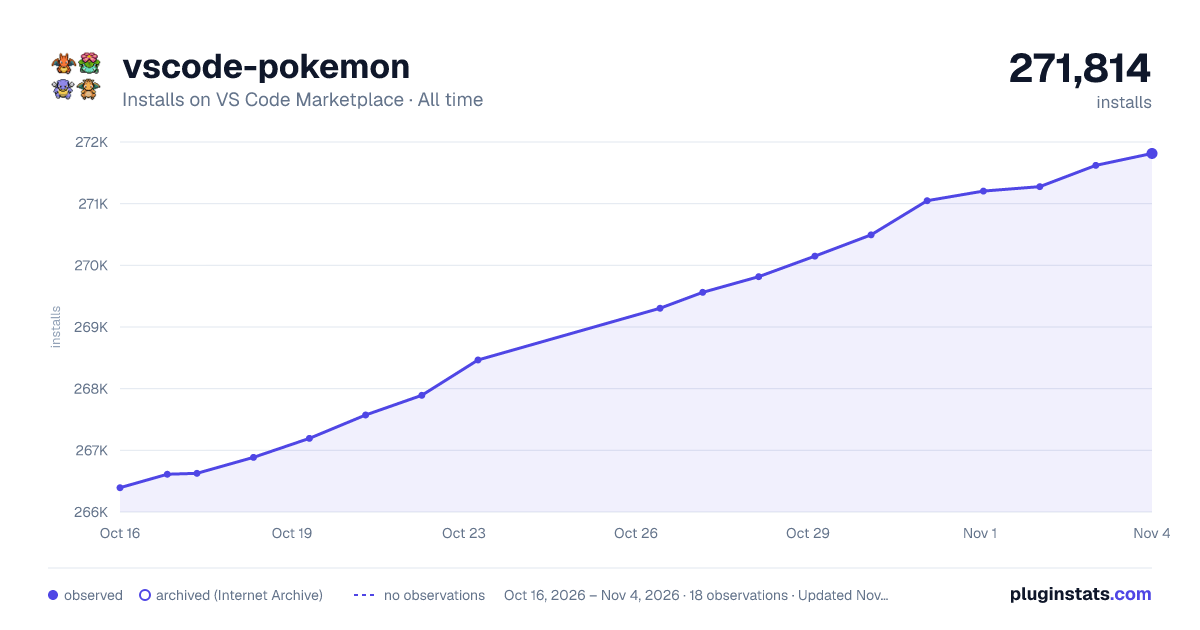

Adoption over time
7/30/90-day growth
Ranking history
Ratings over time
Listing placement
Listing placement
Filled points are observed values; hollow points come from Internet Archive snapshots of the listing page. Dashed segments span periods with no observations — values between points are not interpolated.
Each band is one page of 20. Installs on a linear scale. Placement is projected from installs, so it can differ from the marketplace's own sort order. Hover a dot to see the listing.
Recent observations
Full history (6)Similar VS Code Marketplace Other plugins
All 20 vscode-pokemon alternativesData source
Install counts, average rating, and rating counts come from the public Visual Studio Marketplace gallery API. Installs are cumulative and exclude updates.
Listing: https://marketplace.visualstudio.com/items?itemName=jakobhoeg.vscode-pokemon. First seen Oct 16, 2026; last successful collection Oct 21, 2026. See the methodology.