 PluginStats
Bazel installs statistics
By The Bazel Team · VS Code Marketplace · Programming Languages
Bazel BUILD integration
Bazel has 1,030,378 recorded installs on VS Code Marketplace.
It ranks #529 of 2,501 tracked VS Code Marketplace listings by installs.
It is rated 3.5 out of 5 from 11 ratings.
PluginStats has 4 daily observations since Oct 16, 2026; the latest is from Oct 19, 2026.
Rating: 3.55 / 5 from 11 ratings
About Bazel
Bazel plugin for Visual Studio Code
This extension provides support for Bazel in Visual Studio.
Features
• Syntax highlighting • Bazel Targets tree displays the build packages/targets in your workspace • CodeLens links in BUILD files to directly launch a build or test by simply clicking on the targets • Buildifier integration to lint and format your Bazel files (requires that Buildifier be installed) • Bazel Task definitions for tasks.json • Coverage Support showing coverage results from bazel coverage directly in VS Code. • Code Navigation to go to BUILD files or labels • Starlark Debugger to debug Starlark code in your .bzl files during analysis phase (set breakpoints, step through code, inspect variables, etc.) • URI handler to go to targets from outside of VSCode. (Example: vscode://bazelbuild.vscode-bazel//path/to/tests:target)
Configuring the Extension
This extension adds a Bazel section to the extension settings in Visual Studio Code. If you have Bazel installed in a location that is not on your system path or if you wish to use a different version in the IDE, you should set the Bazel: Executable setting to the location of the Bazel executable.
Similarly, the Bazel: Buildifier Executable setting can be configured if you install Buildifier in a location that is not on your system path.
When Buildifier is installed, the Format Document command in Visual Studio code will reformat BUILD, WORKSPACE, .bzl, and .sky files using the tool and will display lint warnings from those files as you type. By default, this extension does not automatically _fix_ lint warnings during formatting, but you can opt into this by enabling the Bazel: Buildifier Fix on Format setting.
Selecting the Bazel workspace root
The extension automatically searches upward for a MODULE.bazel, REPO.bazel, WORKSPACE.bazel, or WORKSPACE file. If that selects the wrong root, or if the Bazel root is nested below the folder opened in VS Code, set bazel.workspace.path to the Bazel root. The value can be an absolute path or a path relative to the VS Code workspace folder.
The extension supports one Bazel root per VS Code workspace folder. To work with multiple independent Bazel roots, use a VS Code multi-root workspace and add each Bazel root as a separate folder; bazel.workspace.path can then be set independently for each folder.
Using a separate output base
By default this extension will use the default output base for running queries. This will cause builds to block queries, potentially causing degraded performance. In Bazel versions since 7.1 it is safe to disable this by changing the bazel.commandLine.queriesShareServer setting to false. In earlier versions it can be safely disabled after adding the convenience symlinks to .bazelignore, for example:
See #216 and bazelbuild/bazel#106539.
Using the Starlark Debugger
The Starlark Debugger is designed to help you understand and debug Starlark code execution during Bazel's analysis phase. It's particularly useful when working with macros, rule implementations, or aspects - giving you insight into how your build configuration is processed.
To start debugging, simply right-click any build target in the Bazel Targets section in the Explorer View and select "Build Target with Starlark Debugger". Or use the command palette and search for "Bazel: Build Target with Starlark Debugger". This launches the Bazel build within Visual Studio Code's debugger, redirecting output to the Debug Console pane and automatically pausing at any breakpoints you've set.
Helpful tips for effective debugging:
• The debugger activates when Bazel evaluates Starlark code. With the flags automatically applied by the extension, your Starlark code will be reanalyzed each debugging session, ensuring breakpoints are consistently hit. • Set breakpoints directly in *.bzl files next to line numbers where your Starlark functions are implemented. • For builds requiring specific configuration arguments, use the bazel.commandLine.commandArgs setting to add them.
Once debugging is active and Bazel pauses, you can step through your Starlark code, add watch expressions in VSCode's Debug pane to monitor variables, and execute statements directly in the Debug Console input area.
To stop the debugging session, click the "Stop" button in the debugger. This terminates the current Bazel process while keeping the Bazel server running for future builds.
Using a language server (experimental)
This extension can use a language server for various features, such as go to definition and completions. There are currently two compatible language servers:
• bazel-lsp is based on Facebook's Starlark language server and extends it with additional, Bazel-specific functionality. • starpls is an implementation based on rust-analyzer which also provides Bazel-specific functionality.
In general, you need to install the language server binary and then set the bazel.lsp.command setting. See the README of the corresponding repo for more specific setup instructions.
We can't currently make any recommendation between these two. Both are under active development and are rapidly gaining more functionality.
Bazel tasks
Bazel tasks can be configured from the tasks.json using the following structure:
Coverage support (Experimental)
For all coverage tasks, the coverage results are automatically loaded into VS Code upon completion of the task. E.g., you could define your own task to display the coverage provided by your integration tests using the following task definition:
You might need additional Bazel options to get the intended coverage results. In particular if are using remote builds, you might need to use the --experimental_split_coverage_postprocessing and --experimental_fetch_all_coverage_outputs options. See the documentation on Code Coverage with Bazel for more details.…
Description from the VS Code Marketplace listing.
- Bazel
- bazelrc
- debuggers
- starlark
Where Bazel sits in the listing
Each band is one page of 20. Installs on a log scale. Placement is projected from installs, so it can differ from the marketplace's own sort order. Hover a dot to see the listing.


Charts
Images: 30d · 1y · all time · 1600×900 dark


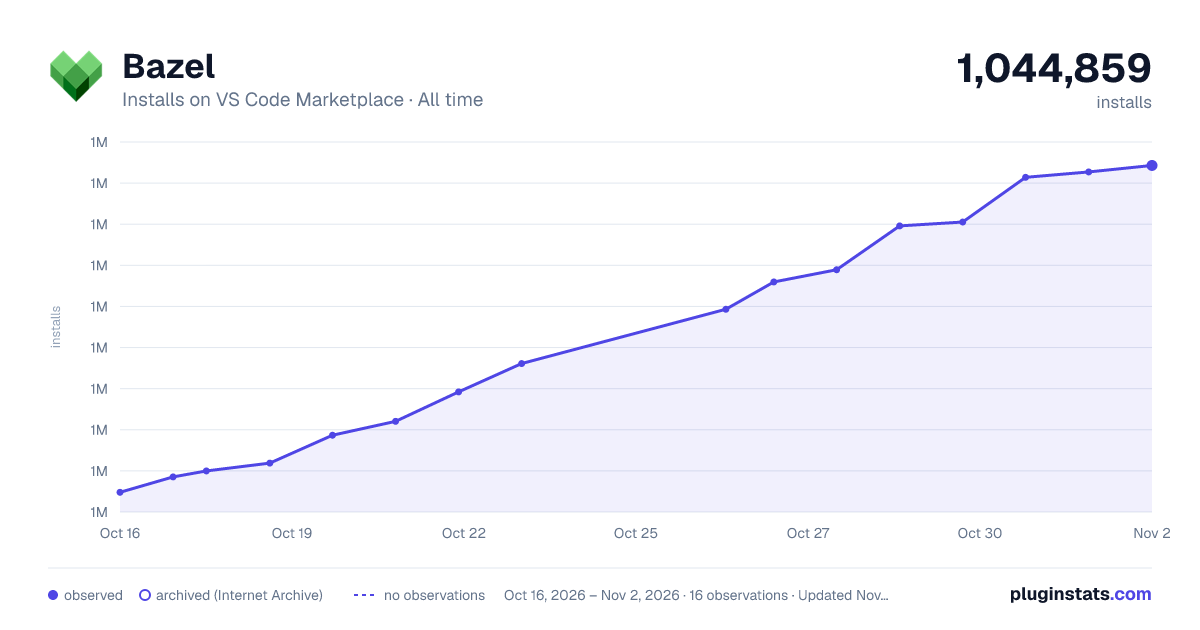

Adoption over time


7/30/90-day growth


Filled points are observed values; hollow points come from Internet Archive snapshots of the listing page. Dashed segments span periods with no observations — values between points are not interpolated.
Recent observations
Full history (4)Similar VS Code Marketplace Programming Languages plugins
Data source
Install counts, average rating, and rating counts come from the public Visual Studio Marketplace gallery API. Installs are cumulative and exclude updates.
Listing: https://marketplace.visualstudio.com/items?itemName=BazelBuild.vscode-bazel. First seen Oct 16, 2026; last successful collection Oct 19, 2026. See the methodology.