 PluginStats
TSLint (deprecated) installs statistics
By eg2 (2 listings) · VS Code Marketplace · Programming Languages
TSLint for Visual Studio Code
TSLint (deprecated) has 2,863,360 recorded installs on VS Code Marketplace.
It ranks #258 of 2,501 tracked VS Code Marketplace listings by installs.
It is rated 4.9 out of 5 from 46 ratings.
PluginStats has 4 daily observations since Oct 16, 2026; the latest is from Oct 19, 2026.
Rating: 4.87 / 5 from 46 ratings
About TSLint (deprecated)
vscode-tslint (deprecated)
Note: This extension has been deprecated in favor of the vscode-typescript-tslint-plugin. To learn about the differences between vscode-tslint and the new extension please refer to this document.
Integrates the tslint linter for the TypeScript language into VS Code.
Please refer to the tslint documentation for how to configure the linting rules.
Prerequisites
The extension requires that the tslint and typescript modules are installed either locally or globally. The extension will use the tslint module that is installed closest to the linted file. To install tslint and typescript globally you can run npm install -g tslint typescript.
FAQ
The tslint no-unused-variable rule doesn't report warnings any more?
Since tslint version 5 the rule no-unused-variable requires type information. Rules with type information are currently not supported by vscode-tslint, pls see issue [#70](https://github.com/Microsoft/vscode-tslint/issues/70#issuecomment-241041929). The recommended work around is to enable the TypeScript compiler options noUnusedLocals and noUnusedParameters in your tsconfig.json file.
tsconfig.json
You can use the TypeScript setting typescript.reportStyleChecksAsWarnings to define whether noUnusedLocals and noUnusedParameters are reported as warnings or errors. By default the setting is true.
How can I use tslint rules that require type information
The recommended way is to run tslint manually on your project from a task. To see the lint warnings in the Problems panel you can associate the task with a Problem matcher as described in the section below.
• First linting is very slow #287
When you have installed tslint globally using npm install -g then you can get hit by a performance issue in npm. The command to determine the location of the global node modules can be very slow with version 5 of npm. This problem could not be reproduce with npm version 4.2. You can work around this issue by:
1. installing tslint locally for you project using npm install tslint
1. define the location of the global node_modules folder using the tslint.nodePath setting.
How can I distinguish errors warnings from tslint and TypeScript and how can I suppress them?
Error or warnings from TypeScript have the prefix [ts], error or warnings from tslint have the prefix [tslint]. You can suppress warnings as follows: • typescript - use the // @ts-ignore comment. • tslint - use the // tslint:rulename comment.
Trouble shooting
Open the tslint output log using the command TSLint: Show Output. Verify that there is no error message in the shown log.
You can enable more tracing output by adding the setting "tslint.trace.server" with a value of "verbose" or "messages".
If this doesn't help then please file an issue and include the trace output produced when running with the setting "tslint.trace.server" set to "verbose".
There were some reports that vscode-tslint could not be started due to missing files #342. Please file an issue when this happens and follow the work around described in the issue.
Configuration options
Notice this configuration settings allow you to configure the behaviour of the vscode-tslint extension. To configure rules and tslint options you should use the tslint.json file.
• tslint.enable - enable/disable tslint. • tslint.jsEnable - enable/disable tslint for .js files, default is false. • tslint.run - run the linter onSave or onType, default is onType. • tslint.rulesDirectory - an additional rules directory, for user-created rules. • tslint.configFile - the configuration file that tslint should use instead of the default tslint.json. • tslint.ignoreDefinitionFiles - control if TypeScript definition files should be ignored, default is true. • tslint.exclude - configure glob patterns of file paths to exclude from linting. The pattern is matched against the absolute path of the linted file. • tslint.validateWithDefaultConfig - validate a file for which no custom tslint configuration was found. The default is false. • tslint.nodePath - custom path to node modules directory, used to load tslint from a different location than the default of the current workspace or the global node modules directory. • tslint.autoFixOnSave - turns auto fix on save on or off, or defines an array of rules (e.g. [no-var-keyword]) to auto fix on save. Note: Auto-fixing is only done when manually saving a file. It is not performed when the file is automatically saved based on the files.autoSave setting. Executing a manual save on an already-saved document will trigger auto-fixing. • tslint.alwaysShowStatus - always show the TSLint status bar item and not only when there are errors. The default is false. • tslint.alwaysShowRuleFailuresAsWarnings - always show rule failures as warnings, ignoring the severity configuration in the tslint.json configuration. • tslint.packageManager: use this package manager to locate the tslint and typescript modules. Valid values are "npm" or "yarn". This setting is only consulted when the modules are installed globally.
Auto-fixing
The extension supports automatic fixing of warnings to the extent supported by tslint. For warnings which support an auto-fix, a light bulb is shown when the cursor is positioned inside the warning's range. You can apply the quick fix by either:
• clicking the light bulb appearing or by executing the Quick Fix, when the mouse is over the erroneous code • or using the command Fix all auto-fixable problems.
When there are overlapping auto fixes a user will have to trigger Fix all auto-fixable problems more than once.
ProblemPatterns and ProblemMatchers
The extension contributes a tslint4 and a tslint5 ProblemMatcher and corresponding problem patterns. You can use these variables when defining a tslint task in your task.json file. The tslint5 problem matcher matches the rule severities introduced in version 5 of tslint.
The problem matcher is defined as follows:
The meaning of the different attributes is:…
Description from the VS Code Marketplace listing.
- javascript
- javascriptreact
- json
- jsonc
- multi-root ready
- typescript
- typescriptreact
Where TSLint (deprecated) sits in the listing
Each band is one page of 20. Installs on a log scale. Placement is projected from installs, so it can differ from the marketplace's own sort order. Hover a dot to see the listing.


Charts
Images: 30d · 1y · all time · 1600×900 dark


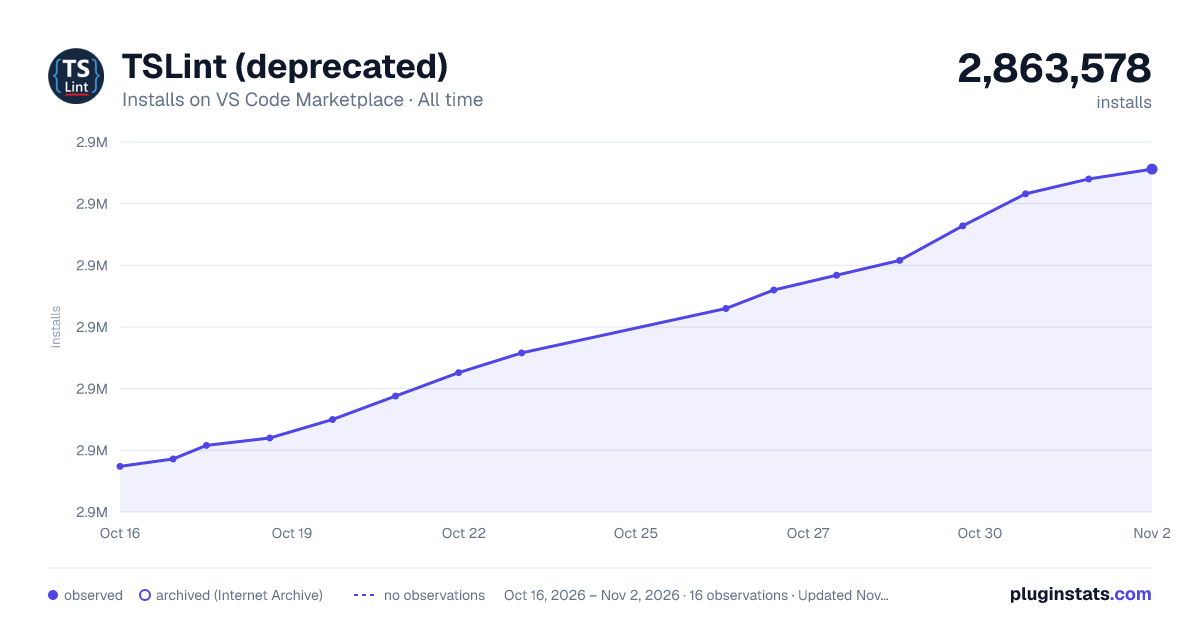

Adoption over time


7/30/90-day growth


Ranking history


Filled points are observed values; hollow points come from Internet Archive snapshots of the listing page. Dashed segments span periods with no observations — values between points are not interpolated.
Recent observations
Full history (4)Similar VS Code Marketplace Programming Languages plugins
Data source
Install counts, average rating, and rating counts come from the public Visual Studio Marketplace gallery API. Installs are cumulative and exclude updates.
Listing: https://marketplace.visualstudio.com/items?itemName=eg2.tslint. First seen Oct 16, 2026; last successful collection Oct 19, 2026. See the methodology.