 PluginStats
Home Assistant Config Helper installs statistics
By Kees Schollaart · VS Code Marketplace · Programming Languages
Completion for entity-id's in Home Assistant Configurations
Home Assistant Config Helper has 203,837 recorded installs on VS Code Marketplace, ranking #1490 of 2,502 tracked listings.
Rating: 4.25 / 5 from 20 ratings
About Home Assistant Config Helper
Getting started
-
Install via the VS Code Marketplace
-
Open your (local copy of the) Home Assistant Configuration with VS Code
-
Configure the connection to Home Assistant via the HA Section in the VS Code Settings UI
More details in the How-To in the Wiki
-
Enjoy the features showcased below 👇
-
Continue reading in the Wiki:
Features
Completion for Entity IDs, Actions, Scenes and Triggers
When connected with your Home Assistant server, entity IDs and actions will be auto-completed.
<img src="https://raw.githubusercontent.com/keesschollaart81/vscode-home-assistant/dev/assets/entity_service_completion.gif">Completion & Validation for Configuration & Lovelace Schema
Most of the scheme's of Home Assistant will be validated and things like properties, values and enums will be auto-completed. This extension understands the behaviour of Home Assistant '!include...' behaviour and use this to provide scoped validation for all your files.
<img src="https://raw.githubusercontent.com/keesschollaart81/vscode-home-assistant/dev/assets/schema_validation_completion.gif">Deprecation Warnings:
<img src="https://raw.githubusercontent.com/keesschollaart81/vscode-home-assistant/dev/assets/deprecation-warnings.png">Schema Documentation
<img src="https://raw.githubusercontent.com/keesschollaart81/vscode-home-assistant/dev/assets/schema-documentation.png">Go to Definition for Includes
Easy navigate between your files references via the different !include... tags using 'f12' / 'Go to Definition'.
<img src="https://raw.githubusercontent.com/keesschollaart81/vscode-home-assistant/dev/assets/go_to_definition.gif">Snippets
Snippets allow you to create commonly used data structures very quickly.
<img src="https://raw.githubusercontent.com/keesschollaart81/vscode-home-assistant/dev/assets/snippet.gif">Commands
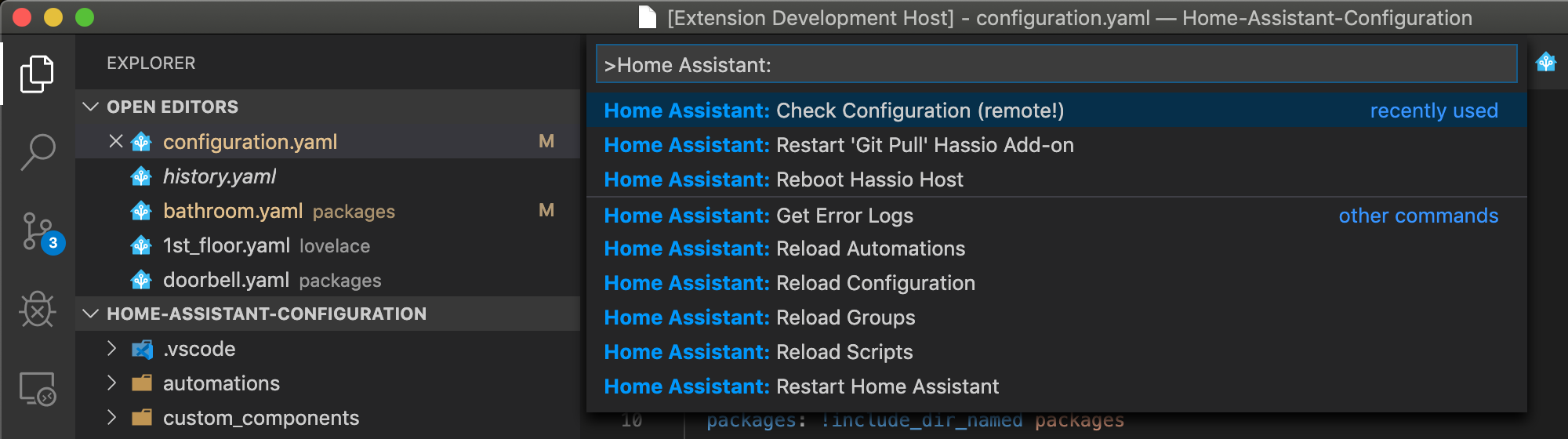
Commands allow you to quickly interact with Home Assistant! Find them using Cmd+shift+P and type 'Home Assistant'
Render templates
Evaluate jinja templates via Home Assistant's API and see how they would render.
Contribution
Release Notes
Read all the recent changes in the GitHub releases section
Feedback / Ideas
Create an issue, reach out to me on Twitter or the Home Assistant Discord.
Things to do / up for grabs
- Go to Definition for entities, scripts and automations
- Check local config with HA Server
Telemetry
This extension collects telemetry data to help us build a better experience for using VS Code with Home Assistant. We use vscode-extension-telemetry, which reports the following data:
- Extension name
- Extension version
- Machine ID and session ID from VS Code
- Operating system
- Platform version
Additionally, if the language server fails to activate, we report the diagnostic
data the language server produces. The extension respects the telemetry.enableTelemetry
setting, which you can learn more about at VS Code's
telemetry FAQ.
Description from the VS Code Marketplace listing.
- assistant
- home
- homeassistant
- home-assistant
- home-assistant-jinja
- snippet
README badge
Show your rank in a README or on your website. The badge updates automatically.
Charts
Images: 30d · 1y · all time · 1600×900 dark


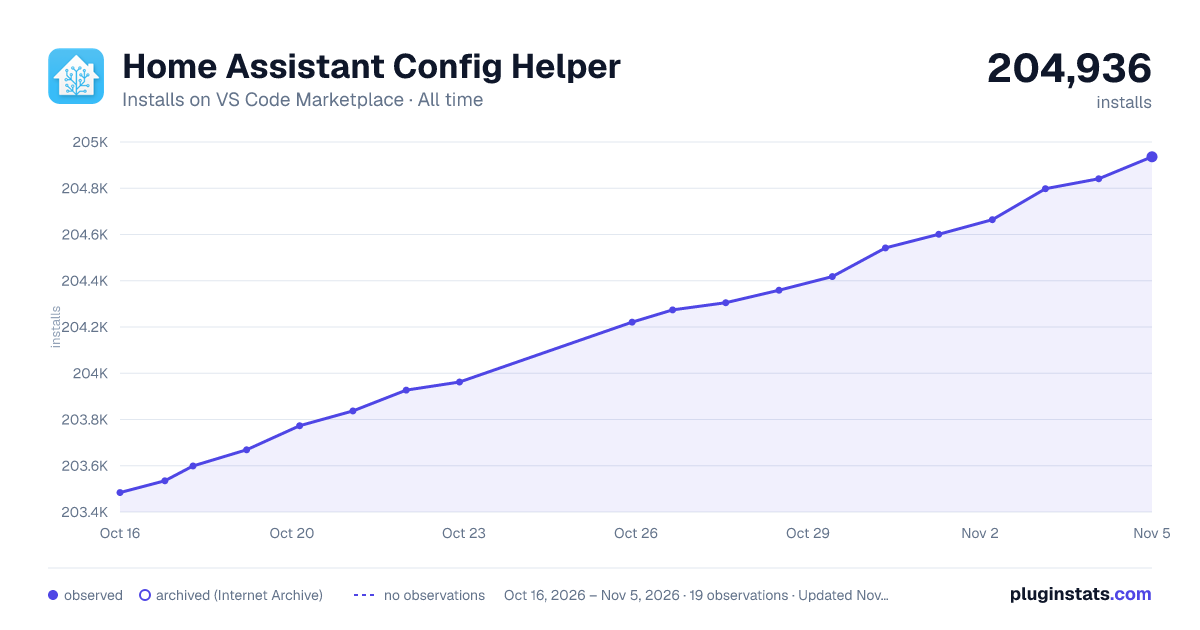

Adoption over time
7/30/90-day growth
Ranking history
Ratings over time
Listing placement
Listing placement
Listing placement
Listing placement
Filled points are observed values; hollow points come from Internet Archive snapshots of the listing page. Dashed segments span periods with no observations — values between points are not interpolated.
Each band is one page of 20. Installs on a linear scale. Placement is projected from installs, so it can differ from the marketplace's own sort order. Hover a dot to see the listing.
Recent observations
Full history (6)Similar VS Code Marketplace Programming Languages plugins
All 20 Home Assistant Config Helper alternativesData source
Install counts, average rating, and rating counts come from the public Visual Studio Marketplace gallery API. Installs are cumulative and exclude updates.
Listing: https://marketplace.visualstudio.com/items?itemName=keesschollaart.vscode-home-assistant. First seen Oct 16, 2026; last successful collection Oct 21, 2026. See the methodology.