 PluginStats
.gitignore Generator installs statistics
By Piotr Palarz · VS Code Marketplace · SCM Providers
Generate .gitignore file using gitignore.io API
.gitignore Generator has 327,622 recorded installs on VS Code Marketplace, ranking #1091 of 2,502 tracked listings.
Rating: 4.93 / 5 from 15 ratings
About .gitignore Generator
.gitignore Generator for VS Code and Cursor
Lets you easily and quickly generate .gitignore file for your project using gitignore.io API.
Features:
- easy to use
- smart - lets you update existing
.gitignorefile - custom rules - preserves user-defined rules upon update
- lightweight - no external dependencies!
Why do I need that?
Did you know that your operating system can store a lot of hidden files in every directory you create? How about .DS_Store or Icon? on macOS or Thumbs.db and Desktop.ini on Windows? These are certainly not the files you want to commit to a Git repository.
And what about other files and directories used by various frameworks and tools? These may be node_modules for Node.js or vendors for PHP projects using Composer. And this is only the tip of the iceberg, so you can't possibly know every file that should be excluded from being commited to a repository.
That's where gitignore.io API comes in handy. It allows you to pick and choose tools, frameworks or operating system you're working with and it generates .gitignore file containing all the exclusions you need for those. You can, of course, use the website manually and then save the generated .gitignore file but leaving your editor to do just that is counterproductive.
Using this extension for Visual Studio Code or Cursor you can achieve exactly that without ever leaving the editor (or even touching a mouse).
Installation
To install this extension go to View->Extensions and search for .gitignore Generator. Next click Install and then Reload.
Usage
The main purpose of this extension is to generate .gitignore file but it's also smart enough to know if you already have one or if you added your custom rules to it. It's also OS-aware so it prechecks that checkbox for you.
To use the extension go to the Command Palette (Shift+CMD+P on macOS or Shift+CTRL+P on Windows) and launch Generate .gitignore File command.
Case 1: You don't have .gitignore file yet
If you don't have .gitignore file already you'll be prompted right away with the list of all available tools, frameworks etc. to choose from. You can select or deselect the item with Space or by clicking the checkbox. Fuzzy-search is also available to speed things up.
Once you finished press Return (Enter) and your .gitignore file will be generated and saved on the disk.

Case 2: You already have .gitignore file generated by this extension
If you generated .gitignore file before you'll be asked if you want to override it entirely or just update it. If you choose former option everything goes like described in Case 1. If you choose Update, all previously chosen items will be checked automatically so you don't have to do it again. Now you can choose other technologies or remove ones that you already have selected but don't want to use anymore.
Warning! If you have
.gitignorefile that was not generated using this extension, updating will remove its content.

User-defined rules
The cool thing is that using this extension doesn't mean that you can't put your own exclusion rules in .gitignore file for fear of loosing them when you run Update command again.
Everything you put under # Custom rules ... (at the bottom of the file) will be preserved on the next update.
Warning! If you choose Override option your custom rules will be lost.

Multi-folder workspace
If you have more than one folder open in the workspace you'll be asked which one to use to generate .gitignore file into or update that file from.
Available commands
Currently only one command is available:
extension.gitignoreGenerate(same as Generate .gitignore File in Command Palette)
By default, it's not bound to any keyboard shortcut but you're free to do so.
Issues
If you find any problems using this extension or you want to propose new features to it, feel free to open an issue on Github.
Credits…
Description from the VS Code Marketplace listing.
- git
- gitignore
- gitignore generator
- gitignore.io
README badge
Show your rank in a README or on your website. The badge updates automatically.
Charts
Images: 30d · 1y · all time · 1600×900 dark


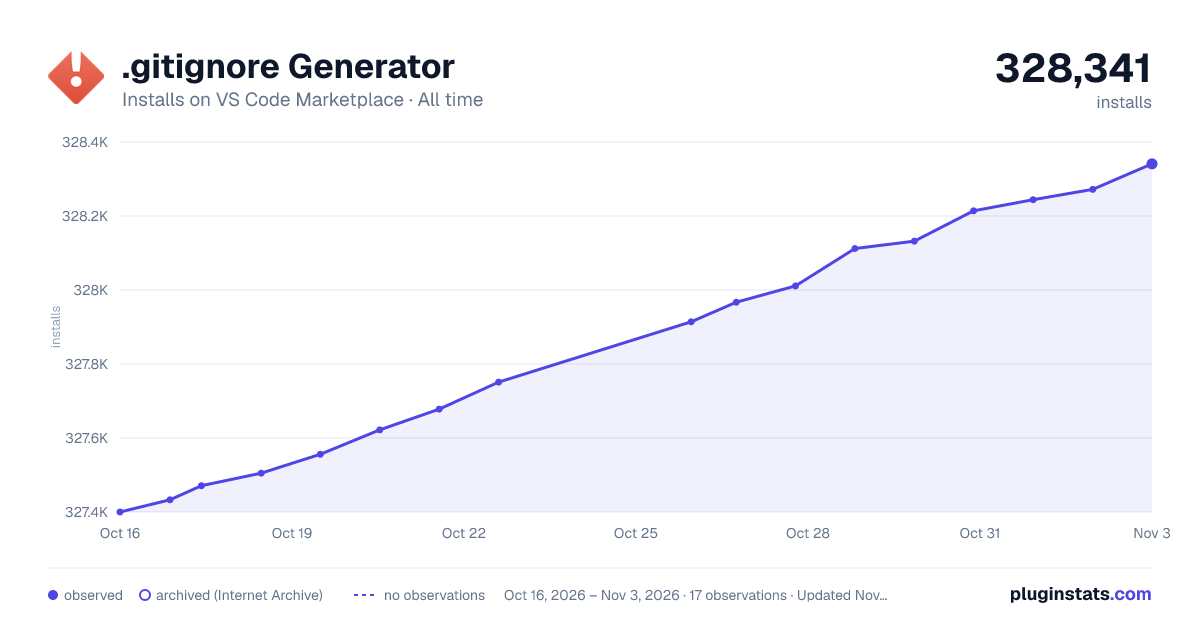

Adoption over time
7/30/90-day growth
Ranking history
Ratings over time
Listing placement
Listing placement
Filled points are observed values; hollow points come from Internet Archive snapshots of the listing page. Dashed segments span periods with no observations — values between points are not interpolated.
Each band is one page of 20. Installs on a linear scale. Placement is projected from installs, so it can differ from the marketplace's own sort order. Hover a dot to see the listing.
Recent observations
Full history (6)Similar VS Code Marketplace SCM Providers plugins
All 20 .gitignore Generator alternativesData source
Install counts, average rating, and rating counts come from the public Visual Studio Marketplace gallery API. Installs are cumulative and exclude updates.
Listing: https://marketplace.visualstudio.com/items?itemName=piotrpalarz.vscode-gitignore-generator. First seen Oct 16, 2026; last successful collection Oct 21, 2026. See the methodology.