 PluginStats
.NET MAUI installs statistics
By Microsoft (224 listings) · VS Code Marketplace · Programming Languages
Extend C# Dev Kit with tools for building .NET Multi-platform App UI (MAUI) apps
.NET MAUI has 447,458 recorded installs on VS Code Marketplace, ranking #897 of 2,501 tracked listings.
Rating: 3.55 / 5 from 29 ratings
About .NET MAUI
.NET MAUI extension for VS Code
The .NET Multi-platform App UI (MAUI) extension gives you the tools you need to build beautiful, performant, cross-platform apps anywhere you write code. It's built on top of the C# and C# Dev Kit extensions, which supercharge your .NET development with powerful IntelliSense, an intuitive Solution Explorer, package management, and more. This extension adds more features for .NET developers building multi-platform apps, including:
- Hit
F5to debug your app on emulators, simulators, and devices - Switch between different startup projects and target frameworks
- Write your cross-platform C# and XAML anywhere VS Code runs
Quick Start
- Install the .NET MAUI extension (The C# and C# Dev Kit extensions will automatically be installed as dependencies)
- (a) Open a folder/workspace that contains a .NET MAUI project or solution (.csproj or .sln),
OR
(b) Use the Solution Explorer's "Create .NET Project" button or Command Palette's ".NET: New Project.." and choose a .NET MAUI project type - Select your debug target by hovering over the curly braces
{}next toC#orXAMLin the status bar, then hitF5!
Feature List
- Debug your .NET MAUI app on any supported* emulator, simulator, or device
- Easily change debug/deploy targets and build for all .NET MAUI platforms
- Leverage all of the features in C# Dev Kit including Solution Explorer, Test Explorer, code navigation and refactoring, and Roslyn-powered language features
- Edit your XAML UIs with syntax highlighting and IntelliSense code completion
- Apply XAML and C# changes without restarting your app, using Hot Reload
Supported Debug Targets
| Your Operating System | Supported Target Platforms |
|---|---|
| Windows | Windows, Android |
| macOS | Android, iOS, macOS |
| Linux | Android |
You can build without running (to check for compilation errors) for all target platforms on any OS.
<!--- To see some of what you can do with .NET MAUI, watch our walkthrough video: [PLACEHOLDER] --->Minimum Requirements
- Latest supported version of the .NET SDK with .NET MAUI workload
- C# extension version 2.151.28 or later
- Activated C# Dev Kit extension version 11.0.2 or later with a valid Visual Studio or IntelliCode subscription
- Building for Android requires an Android SDK (Learn how to get set up)
- Building for iOS and macOS requires the latest Xcode (Learn how to get set up)
If a required extension is missing or below its minimum version, .NET MAUI activates with limited functionality and offers an Upgrade action. MAUI project, debugging, and brokered services remain unavailable until the dependencies are updated and VS Code reloads. The upgrade preserves a dependency's pre-release channel and uses pre-release dependencies when the MAUI extension is a pre-release.
Known Limitations
Please give us your feedback on other features you'd like to see as we continue building this new experience!
- Currently, you can't switch the target framework for IntelliSense (it will show syntax highlighting for only the first target framework listed in your .csproj file). This capability is in progress
- C# Hot Reload is currently off by default. To enable it, in Preferences: Open User Settings search for Hot Reload and check [Experimental] Enables Hot Reload while debugging. Click the "Fire" icon in the debug toolbar while the app is running to apply code changes. C# Hot Reload with Android and WinUI should work, but iOS/Catalyst aren't yet supported.
- If, when attempting to create a new MAUI project there are no project templates, installing the latest MAUI workload and resarting VS Code should provide them.
Found a bug?
To file a new issue, go to VS Code Help > Report Issue. In the Issue Reporter dialog, select "An extension" and “.NET MAUI” in the relevant dropdowns. Submitting this form will automatically generate a new issue in the C# Dev Kit GitHub repo.
Alternatively, you can file an issue directly in the C# Dev Kit GitHub Repo.
Feedback
❓FAQs Please read the FAQs before filing a question
💭 Provide feedback File questions, issues, or feature requests for the extension
🪲 Known issues If someone has already filed an issue that encompasses your feedback, please leave a 👍 reaction to upvote it and help us prioritize the issue
📣 Quick survey Let us know what you think of the extension by taking our quick survey
Description from the VS Code Marketplace listing.
- C
- C#
- csharp
- debuggers
- dotnet
- language-model-tools
- mobile
- tools
- xaml
README badge
Show your rank in a README or on your website. The badge updates automatically.
Charts
Images: 30d · 1y · all time · 1600×900 dark


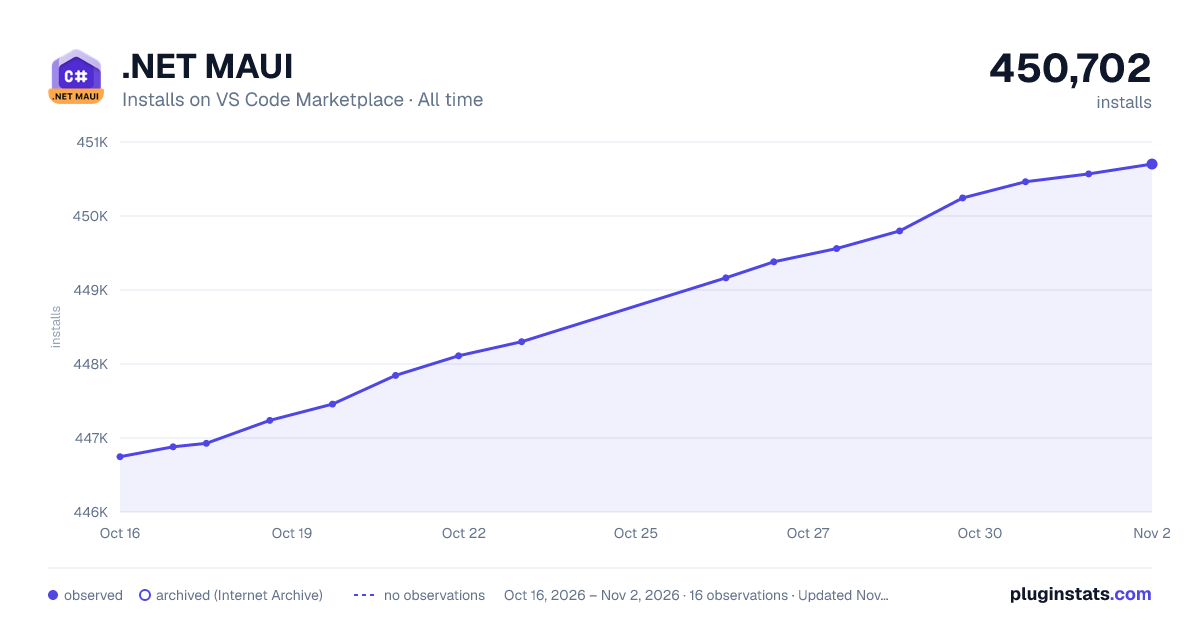

Adoption over time
7/30/90-day growth
Ranking history
Ratings over time
Listing placement
Listing placement
Listing placement
Listing placement
Filled points are observed values; hollow points come from Internet Archive snapshots of the listing page. Dashed segments span periods with no observations — values between points are not interpolated.
Each band is one page of 20. Installs on a linear scale. Placement is projected from installs, so it can differ from the marketplace's own sort order. Hover a dot to see the listing.
Recent observations
Full history (5)Similar VS Code Marketplace Programming Languages plugins
All 20 .NET MAUI alternativesData source
Install counts, average rating, and rating counts come from the public Visual Studio Marketplace gallery API. Installs are cumulative and exclude updates.
Listing: https://marketplace.visualstudio.com/items?itemName=ms-dotnettools.dotnet-maui. First seen Oct 16, 2026; last successful collection Oct 20, 2026. See the methodology.