 PluginStats
SVG Editor installs statistics
By henoc · VS Code Marketplace · Other
Visual and literal SVG editor for VSCode.
SVG Editor has 229,635 recorded installs on VS Code Marketplace, ranking #1370 of 2,501 tracked listings.
Rating: 3.27 / 5 from 15 ratings
About SVG Editor
SVG Editor

ver 2.9: Correct only the changed portions without auto formatting
Now your VSCode can mutate to an interactive visual & literal SVG editor 😎
You can create shapes using the SVG's coder or directly creating shapes with the shaping tool.
Commands
| command | title |
|---|---|
| svgeditor.openSvgEditor | Open SVG Editor |
| svgeditor.newSvgEditor | New File with SVG Editor |
| svgeditor.reopenRelatedTextEditor | Reopen Text Editor Related to Current SVG Editor |
Configuration
| name | description | default |
|---|---|---|
| svgeditor.filenameExtension | Initial filename extension of new untitled file. | svg |
| svgeditor.width | Initial width of new untitled file. | 400px |
| svgeditor.height | Initial height of new untitled file. | 400px |
| svgeditor.defaultUnit | Specifies the unit when creating some shapes. | null |
| svgeditor.decimalPlaces | The number of decimal places. | 1 |
| svgeditor.collectTransformMatrix | Collect two or more transform functions into a matrix. | true |
| svgeditor.additionalResourcePaths | Additional resource directory paths SVG Editor can access. | |
| svgeditor.useStyleAttribute | Use style attribute instead of presentation attriubte when there are no previous specifications. | false |
| svgeditor.indentStyle | Indent style for auto-formatting. | space |
| svgeditor.indentSize | Indent size of spaces for auto-formatting. | 4 |
Keybindings
| operation | key |
|---|---|
| delete | backspace / delete |
| duplicate | ctrl+d |
| zoom in | oem_plus |
| zoom out | oem_minus |
| group | ctrl+g |
| ungroup | ctrl+u |
| font | f8 |
| bring forward | pageup |
| send backward | pagedown |
| align left | ctrl+alt+numpad4 |
| align right | ctrl+alt+numpad6 |
| align bottom | ctrl+alt+numpad2 |
| align top | ctrl+alt+numpad8 |
| object to path | shift+ctrl+c |
| rotate clockwise | ctrl+] |
| rotate counterclockwise | ctrl+[ |
| rotate clockwise by the angle step | ] |
| rotate counterclockwise by the angle step | [ |
| center vertical | ctrl+alt+h |
| center horizontal | ctrl+alt+t |
Current support tags and attributes
- *: id, class, style
- svg: xmlns, xmlns:xlink, version, viewBox, x, y, width, height
- circle: cx, cy, r, 🎨
- rect: x, y, width, height, rx, ry, 🎨
- ellipse: cx, cy, rx, ry, 🎨
- polyline/polygon: points, 🎨
- path: d, 🎨
- text: x, y, dx, dy, textLength, lengthAdjust, 🎨
- g: 🎨
- defs: 🎨
- linearGradient: 🎨
- radialGradient: 🎨
- stop: offset, stop-color, 🎨
- image: x, y, width, height, xlink:href, href, 🎨
- use: x, y, width, height, xlink:href, href, 🎨
- style
- script
🎨(presentation attributes): fill, fill-rule, stroke, stroke-width, stroke-linecap, stroke-linejoin, stroke-dasharray, stroke-dashoffset, transform, font-family, font-size, font-style, font-weight
Notice
Image
Localtion (xlink:)href refers to is restricted with your workspace, extension and svgeditor.additionalResourcePaths directories due to vscode-resource scheme settings.
Future plans
- Embedded CSS
- Gradient colors
- Images
- Correct only the changed portions without auto formatting
- Filters
- Animations
License
MIT
Description from the VS Code Marketplace listing.
- keybindings
README badge
Show your rank in a README or on your website. The badge updates automatically.
Charts
Images: 30d · 1y · all time · 1600×900 dark


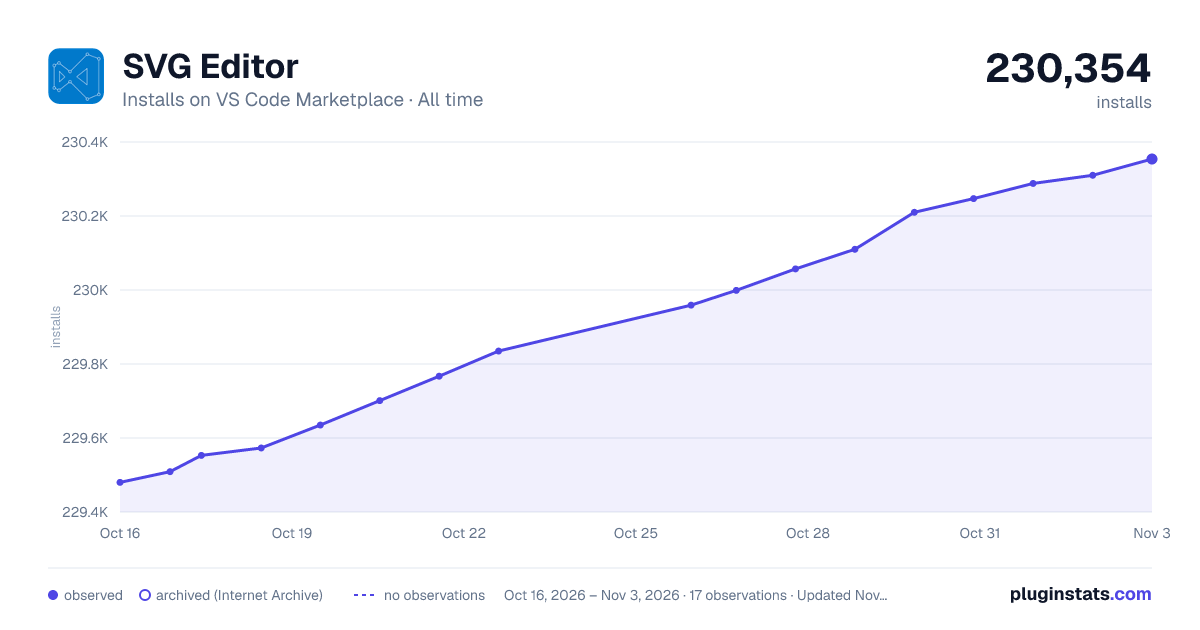

Adoption over time
7/30/90-day growth
Ranking history
Ratings over time
Listing placement
Listing placement
Filled points are observed values; hollow points come from Internet Archive snapshots of the listing page. Dashed segments span periods with no observations — values between points are not interpolated.
Each band is one page of 20. Installs on a linear scale. Placement is projected from installs, so it can differ from the marketplace's own sort order. Hover a dot to see the listing.
Recent observations
Full history (5)Similar VS Code Marketplace Other plugins
All 20 SVG Editor alternativesData source
Install counts, average rating, and rating counts come from the public Visual Studio Marketplace gallery API. Installs are cumulative and exclude updates.
Listing: https://marketplace.visualstudio.com/items?itemName=henoc.svgeditor. First seen Oct 16, 2026; last successful collection Oct 20, 2026. See the methodology.