 PluginStats
Clipboard History installs statistics
By Anjali · VS Code Marketplace · Other
Keep a history of your copied items and re-paste if needed
Clipboard History has 105,677 recorded installs on VS Code Marketplace.
It ranks #2290 of 2,501 tracked VS Code Marketplace listings by installs.
It is rated 3.8 out of 5 from 20 ratings.
PluginStats has 4 daily observations since Oct 16, 2026; the latest is from Oct 19, 2026.
Rating: 3.75 / 5 from 20 ratings
About Clipboard History
VS Code - Clipboard History Extension
Keep a history of your copied and cut items and re-paste if needed.
Key Features
1. Save history of all copied and cut items 2. Paste from history 3. Clear all history 4. Remove selected item from history 5. Edit selected item in history
Keyboard Shortcuts
Type Clipboard in the command palette to view all commands.
Ctrl+C copies and Ctrl+X cuts the selected item. These override the default shortcuts to save the item to clipboard. If nothing is selected, the entire line will be saved.
Ctrl+V pastes the most recent item.
Ctrl+Shift+V opens the clipboard history. Use the arrow keys to scroll and press Enter to paste a selected item.
Ctrl+Alt+V D opens the clipboard delete settings. Use the arrow keys to scroll and press Enter to remove a selected item. The "Clear History" option will erase all items from history.
Ctrl+Alt+V E opens the clipboard editor settings. Use the arrow keys to scroll and press Enter to edit a selected item.
You can also add custom keyboard short cuts by following the instructions in the customization documentation.
Configuration
clipboard.size is the maximum number of items saved in the clipboard. The default is 12, but this can be changed in settings.
Demos
Saving to and Pasting from Clipboard History
Erasing from Clipboard History
Editing Clipboard History
Description from the VS Code Marketplace listing.
- keybindings
Where Clipboard History sits in the listing
Each band is one page of 20. Installs on a log scale. Placement is projected from installs, so it can differ from the marketplace's own sort order. Hover a dot to see the listing.


Charts
Images: 30d · 1y · all time · 1600×900 dark


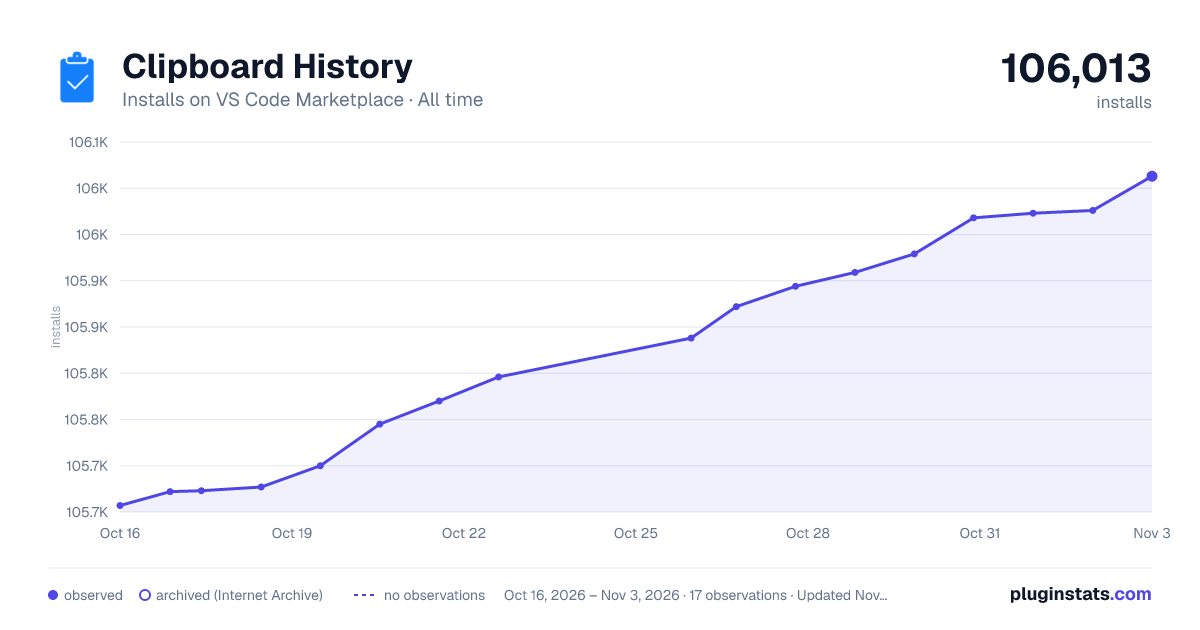

Adoption over time


7/30/90-day growth


Ranking history


Filled points are observed values; hollow points come from Internet Archive snapshots of the listing page. Dashed segments span periods with no observations — values between points are not interpolated.
Recent observations
Full history (4)Similar VS Code Marketplace Other plugins
Data source
Install counts, average rating, and rating counts come from the public Visual Studio Marketplace gallery API. Installs are cumulative and exclude updates.
Listing: https://marketplace.visualstudio.com/items?itemName=Anjali.clipboard-history. First seen Oct 16, 2026; last successful collection Oct 19, 2026. See the methodology.