 PluginStats
Monkey C installs statistics
By Garmin · VS Code Marketplace · Programming Languages
Monkey C Language Support
Monkey C has 186,748 recorded installs on VS Code Marketplace.
It ranks #1599 of 2,501 tracked VS Code Marketplace listings by installs.
It is rated 4.1 out of 5 from 9 ratings.
PluginStats has 4 daily observations since Oct 16, 2026; the latest is from Oct 19, 2026.
Rating: 4.11 / 5 from 9 ratings
About Monkey C
Connect IQ
The Monkey C extension adds support for using the Connect IQ SDK. Building and running a Connect IQ app requires the [Connect IQ SDK Manager][downloadSdkManager].
This extension requires Connect IQ SDK 4.0.6 or greater. For more information see [Getting Started guide][gettingStartedGuide].
Quick Start
1. Install extension 2. Download the [Connect IQ SDK Manager][downloadSdkManager] 3. Download an SDK and set it as the current SDK using the SDK Manager 4. Download devices using the SDK Manager 5. Run the Monkey C: Verify Installation command to ensure the development environment is correctly setup
Features
The Monkey C extension allows for creating, building, running, and debugging a Connect IQ app.
The extension supports the following features for .mc, .jungle, and .mss files:
• Autocomplete • Folding Ranges • Real time errors • Renaming • Syntax highlighting
The extension additionally supports the following features for .mc files:
• Find symbols in workspace or document • Find all references for a value • Highlight uses of the value that is currently selected • Hover over a member to see its documentation • Jump to definitions • Show type hierarchy
The following commands are supported:
• Build Current Project: compile an app • Build for Device: launch the Build for Device wizard to select the device, location, and build mode of the build • Clean Project: remove the output folder of the project • Configure Monkey Barrel: add or remove a barrel to the current project • Edit Annotations: add or remove annotations to a barrel project • Edit Application: set the app type, minimum SDK, and other application settings in manifest.xml • Edit Languages: select the translations provided by the app • Edit Permissions: select the permissions needed by the app • Edit Products: select individual products to support • Export Project: generate a .iq file for upload or a .barrel file for distribution • Generate a Developer Key: create a new developer key and set as the current key • Launch Native Pairing: launch the app in native pairing mode • New Project: launch the New Project wizard • Open Monkey Graph: opens the Monkey Graph FIT tool • Open Monkey Motion: opens the Monkey Motion animation tool • Open ERA Viewer: opens the ERA Viewer • Open Samples Folder: opens the folder containing the samples • Open SDK Manager: opens the SDK Manager • Regenerate UUID: regenerate the UUID for the app • Run Tests: run an app's tests • Set Products by Product Category: select products to support based on device grouping and support Connect IQ versions • Verify Installation: verify that the Connect IQ SDK is correctly installed • View Documentation: view the documentation that is found in the SDK
The commands Build Current Project, Run Tests, and New Project can also be launched through the context menu by right-clicking on a folder or file in the Explorer Side Bar.
Extension Settings
This extension contributes the following settings:
• monkeyC.compilerOptions: additional parameters to pass to the compiler • monkeyC.compilerWarnings: show warnings from the compiler, default is true • monkeyC.debugLogLevel: the debug log level to apply when compiling • monkeyC.developerKeyPath: the path to your Connect IQ developer key • monkeyC.javaPath: the path to the root Java SDK folder to use for running Java based tools • monkeyC.jungleFiles: the jungle file(s) to use for compilation, default is monkey.jungle • monkeyC.optimizationLevel: the level of optimization to apply when compiling with SDK 4.1.6 or greater • monkeyC.typeCheckLevel: the level of type checking to apply when using CIQ 4.0 or greater • monkeyC.developerId: developer ID to use with the ERA Viewer
Feedback
Provide any feedback or submit bug reports using the [Connect IQ Development Forums][connectIQForums]
Attributions
This extension uses the following libraries: • The [GSON library][gson] which is licensed under the [Apache 2.0 License][gsonLicense]. • The [LSP4J library][lsp4j] which is licensed under the [Eclipse Public License v2.0][lsp4jLicense]. • The [Apache Commons project][commons] which is licensed under the [Apache 2.0 License][commonsLicense].
Description from the VS Code Marketplace listing.
- debuggers
- jungle
- Monkey C
- monkeyc
- mss
Where Monkey C sits in the listing
Each band is one page of 20. Installs on a log scale. Placement is projected from installs, so it can differ from the marketplace's own sort order. Hover a dot to see the listing.


Charts
Images: 30d · 1y · all time · 1600×900 dark


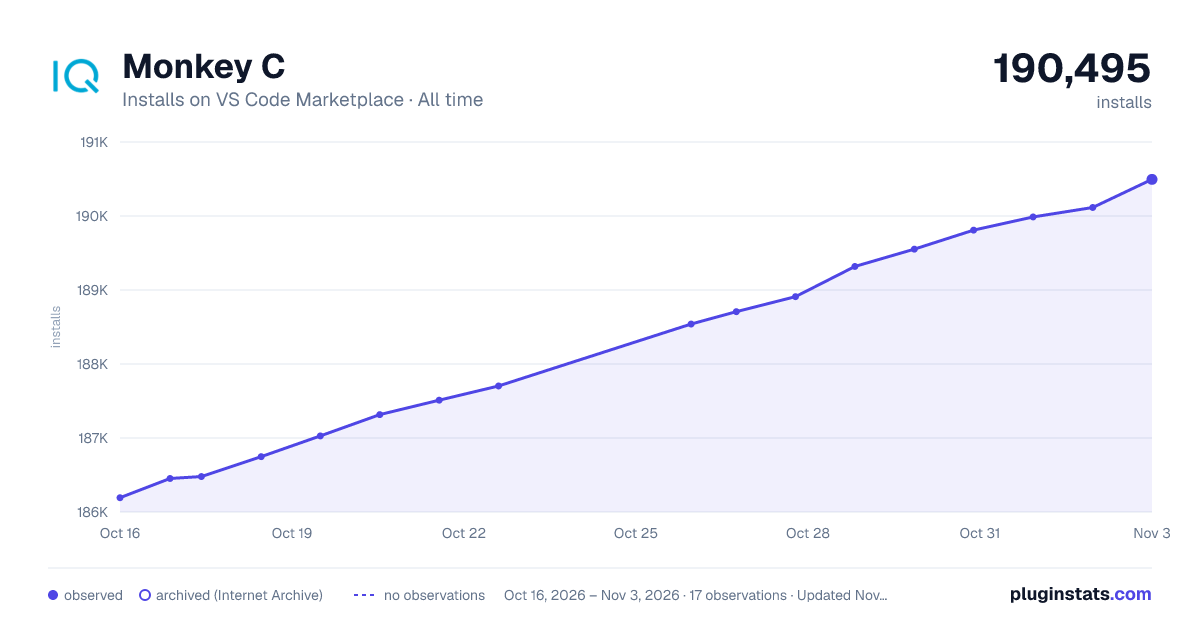

Adoption over time


7/30/90-day growth


Filled points are observed values; hollow points come from Internet Archive snapshots of the listing page. Dashed segments span periods with no observations — values between points are not interpolated.
Recent observations
Full history (4)Similar VS Code Marketplace Programming Languages plugins
Data source
Install counts, average rating, and rating counts come from the public Visual Studio Marketplace gallery API. Installs are cumulative and exclude updates.
Listing: https://marketplace.visualstudio.com/items?itemName=garmin.monkey-c. First seen Oct 16, 2026; last successful collection Oct 19, 2026. See the methodology.