 PluginStats
Local Lua Debugger installs statistics
By Tom Blind · VS Code Marketplace · Debuggers
Local Lua Debugger - simple Lua debugger with no dependencies
Local Lua Debugger has 120,888 recorded installs on VS Code Marketplace.
It ranks #2129 of 2,501 tracked VS Code Marketplace listings by installs.
It is rated 5.0 out of 5 from 11 ratings.
PluginStats has 4 daily observations since Oct 16, 2026; the latest is from Oct 19, 2026.
Rating: 5.00 / 5 from 11 ratings
About Local Lua Debugger
Local Lua Debugger for Visual Studio Code
A simple Lua debugger which requires no additional dependencies.
Notice of Breaking Change
Beginning in version 0.3.0, projects which use sourcemaps to debug code transpiled from another language (such as TypescriptToLua), must specify the scriptFiles launch configuration option in order to use breakpoints in the original source files. This allows these to be resolved at startup instead of at runtime which allows for a significant performance increase.
Features
• Debug Lua using stand-alone interpretor or a custom executable • Supports Lua versions 5.1, 5.2, 5.3 and LuaJIT • Basic debugging features (stepping, inspecting, breakpoints, etc...) • Conditional breakpoints • Debug coroutines as separate threads • Basic support for source maps, such as those generated by TypescriptToLua
Usage
Lua Stand-Alone Interpreter
To debug a Lua program using a stand-alone interpreter, set lua-local.interpreter in your user or workspace settings:
Alternatively, you can set the interpreter and file to run in launch.json:
Custom Lua Environment
To debug using a custom Lua executable, you must set up your launch.json with the name/path of the executable and any additional arguments that may be needed.
You must then manually start the debugger in your Lua code:
Note that the path to lldebugger will automatically be appended to the LUA_PATH environment variable, so it can be found by Lua.
Requirements & Limitations
• The Lua environment must support communication via either stdio or pipes (named pipes on Windows, fifos on Linux). • Some enviroments may require command line options to support stdio communication (ex. Solar2D requires /no-console flag) • Use of io.read or other calls that require user input will cause problems in stdio mode. Set program.communication to pipe to work around this. • The Lua environment must be built with the debug library, and no other code should attempt to set debug hooks. • You cannot manually pause debugging while the program is running. • In Lua 5.1 and LuaJIT, the main thread cannot be accessed while stopped inside of a coroutine.
Tips
• For convenience, a global reference to the debugger is always stored as lldebugger. • You can detect that the debugger extension is attached by inspecting the environment variable LOCAL_LUA_DEBUGGER_VSCODE. This is useful for conditionally starting the debugger in custom environments. • Some custom environments will not break on uncaught runtime errors. To catch a runtime error, you can wrap the code with lldebugger.call(): • Some environments will not load required files from the standard filesystem. In these cases, you may be able to load the debugger manually using the file path stored in LOCAL_LUA_DEBUGGER_FILEPATH:
Additional Configuration Options
scriptRoots
A list of alternate paths to find Lua scripts. This is useful for environments like LÖVE, which use custom resolvers to find scripts in other locations than what is in package.config.
scriptFiles
A list of glob patterns identifying where to find Lua scripts in the workspace when debugging. This is required for placing breakpoints in sourcemapped files (ex. 'ts' scripts when using TypescriptToLua), as the source files must be looked up ahead of time so that breakpoints can be resolved.
Example: scriptFiles: ["**/*.lua"]
ignorePatterns
A list of Lua patterns that specifies files to skip when stepping through code.
Example: ignorePatterns: ["^/usr"]
stepUnmappedLines
Step into Lua when stepping through source-mapped code and no mapping is available for the current line.
breakInCoroutines
Break into the debugger when errors occur inside coroutines. • Coroutines created with coroutine.wrap will always break, regardless of this option. • In Lua 5.1, this will break where the coroutine was resumed and the message will contain the actual location of the error.
stopOnEntry
Automatically break on first line after debug hook is set.
cwd
Specify working directory to launch executable in. Default is the project directory.
args
List of arguments to pass to Lua script or custom environment when launching.
env
Specify environment variables to set when launching executable.
program.communication
Specifies how the extension communicates with the debugger.
Possible values: • stdio (default): Messages are embeded in stdin and stdout. • pipe: Pipes are created for passing messages (named pipes on Windows, fifos on Linux). Use this if your environment has issues with stdio communication.
verbose
Enable verbose output from debugger. Only useful when trying to identify problems with the debugger itself.
Custom Environment Examples
LÖVE
Note that console must be set to false (the default value) in conf.lua, or the debugger will not be able to communicate with the running program.
game/conf.lua
Busted
Note that even when using busted via a lua interpreter, it must be set up as a custom environment to work correctly.
test/start-cli.lua
test/start-interpreter.lua
Defold
Information on downloading dmengine for your platform can be found here.
Solar2D / Corona
TypescriptToLua (Custom Environment)
tsconfig.json
Description from the VS Code Marketplace listing.
- corona
- debuggers
- love
- löve
- lua
- luajit
- tstl
- typescripttolua
- typescript-to-lua
Where Local Lua Debugger sits in the listing
Each band is one page of 20. Installs on a log scale. Placement is projected from installs, so it can differ from the marketplace's own sort order. Hover a dot to see the listing.


Charts
Images: 30d · 1y · all time · 1600×900 dark


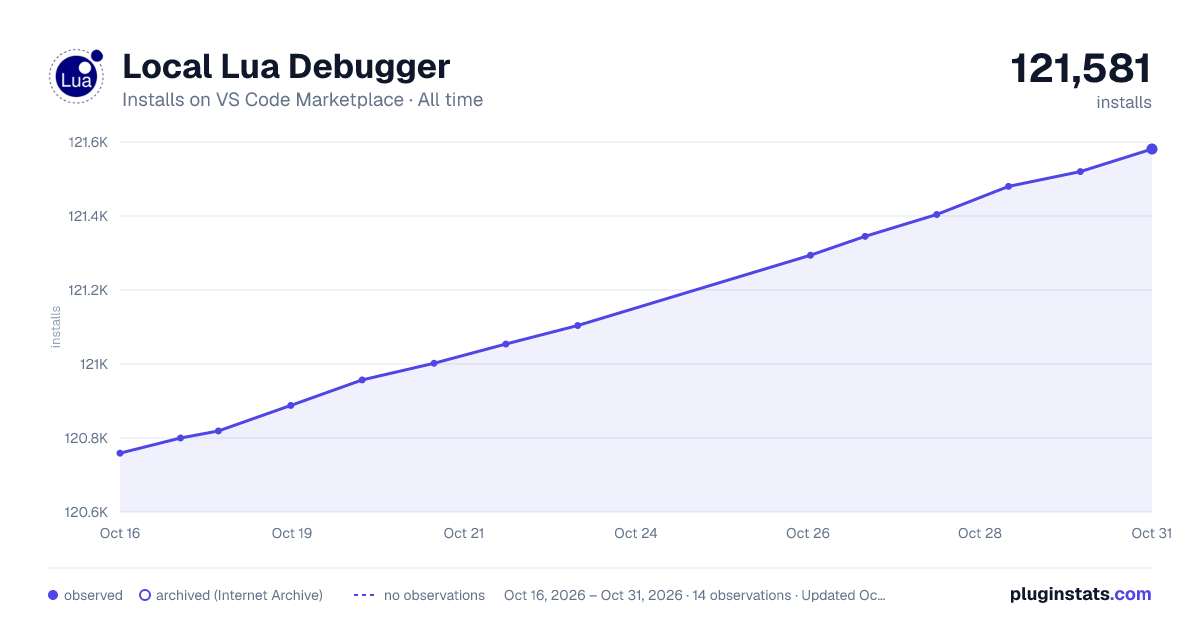

Adoption over time


7/30/90-day growth


Ranking history


Filled points are observed values; hollow points come from Internet Archive snapshots of the listing page. Dashed segments span periods with no observations — values between points are not interpolated.
Recent observations
Full history (4)Similar VS Code Marketplace Debuggers plugins
Data source
Install counts, average rating, and rating counts come from the public Visual Studio Marketplace gallery API. Installs are cumulative and exclude updates.
Listing: https://marketplace.visualstudio.com/items?itemName=tomblind.local-lua-debugger-vscode. First seen Oct 16, 2026; last successful collection Oct 19, 2026. See the methodology.