 PluginStats
Postcode installs statistics
By Rohini Senthil · VS Code Marketplace · Programming Languages
An API client to test and create HTTP/s requests
Postcode has 115,547 recorded installs on VS Code Marketplace.
It ranks #2179 of 2,501 tracked VS Code Marketplace listings by installs.
It is rated 4.3 out of 5 from 11 ratings.
PluginStats has 4 daily observations since Oct 16, 2026; the latest is from Oct 19, 2026.
Rating: 4.27 / 5 from 11 ratings
About Postcode
Postcode
API client for VS code 📦
Postcode is a Visual Studio Code extension that can be used to create and test simple and complex HTTP/s requests, as well as view responses. You can find the extension available here.
Release: 1.3.3
Highlighted Features
• Intuitive UI/UX similar to Postman fitting seamlessly with any VSCode theme • Supports GraphQL requests • Supports code snippet generation from requests
Quick start
Step 1. Install the Postcode extension for Visual Studio Code Step 2. Click on the Postcode icon in the side panel OR run the following command Postcode: Create Request Step 3 Create or test your HTTP/s requests and hit Send to see the responses
Commands
| Command | Description |
| Postcode: Create Request | Opens a new Postcode tab to create and test requests |
Issues, feature requests, and contributions
Issues
• If you come across a problem with the extension, please file an issue • For list of known issues, please check the issues tab
Feature requests
• Find planned features for future releases marked as feature under issues tab. • For new feature requests, please file an issue
Contributions
Contributions are always welcome!
Running the extension locally for development
1. Clone the repository and install dependencies by running yarn install 2. Press F5 to open a new window with your extension loaded. 3. Run your command from the command palette by pressing (Ctrl+Shift+P or Cmd+Shift+P on Mac) and typing Postcode: Create Request.
Folder structure
• package.json - this is the manifest file in which you declare your extension and command. The plugin registers a command and defines its title and command name. With this information VS Code can show the command in the command palette. • webview: folder where you will find entire React code • src/extension.ts: this is the main file where you will provide the implementation of your command. The file exports one function, activate, which is called the very first time your extension is activated (in this case by executing the command). Inside the activate function we call registerCommand. We pass the function containing the implementation of the command as the second parameter to registerCommand.
Making changes
• You can relaunch the extension from the debug toolbar after changing code in src/extension.ts. • You can also reload (Ctrl+R or Cmd+R on Mac) the VS Code window with your extension to load your changes.
Related
• Read the launch blog post on Medium • Featured #11 Product of the day on Product Hunt • Featured in Trending this week on Visual Studio Code Marketplace
Description from the VS Code Marketplace listing.
- api-client
- graphql
- http
- postman
- REST
Charts
Images: 30d · 1y · all time · 1600×900 dark


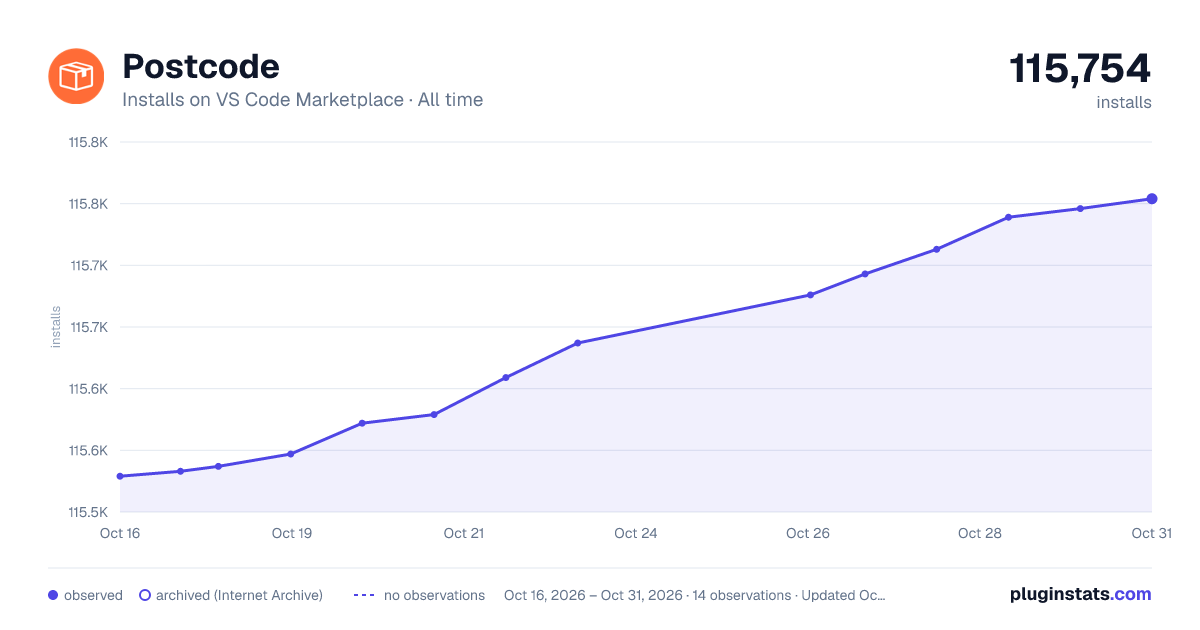

Adoption over time


7/30/90-day growth


Ratings over time


Listing placement


Filled points are observed values; hollow points come from Internet Archive snapshots of the listing page. Dashed segments span periods with no observations — values between points are not interpolated.
Each band is one page of 20. Installs on a log scale. Placement is projected from installs, so it can differ from the marketplace's own sort order. Hover a dot to see the listing.
Recent observations
Full history (4)Similar VS Code Marketplace Programming Languages plugins
All 20 Postcode alternativesData source
Install counts, average rating, and rating counts come from the public Visual Studio Marketplace gallery API. Installs are cumulative and exclude updates.
Listing: https://marketplace.visualstudio.com/items?itemName=rohinivsenthil.postcode. First seen Oct 16, 2026; last successful collection Oct 19, 2026. See the methodology.