 PluginStats
Catppuccin Icons for VSCode installs statistics
By Catppuccin (5 listings) · VS Code Marketplace · Themes
🦊 Soothing pastel icon theme for VSCode
Catppuccin Icons for VSCode has 664,015 recorded installs on VS Code Marketplace, ranking #721 of 2,502 tracked listings.
Rating: 4.94 / 5 from 33 ratings
About Catppuccin Icons for VSCode
Previews
<details> <summary>🌻 Latte</summary> <img src="https://github.com/catppuccin/vscode-icons/raw/HEAD/assets/latte.webp"/> </details> <details> <summary>🪴 Frappé</summary> <img src="https://github.com/catppuccin/vscode-icons/raw/HEAD/assets/frappe.webp"/> </details> <details> <summary>🌺 Macchiato</summary> <img src="https://github.com/catppuccin/vscode-icons/raw/HEAD/assets/macchiato.webp"/> </details> <details> <summary>🌿 Mocha</summary> <img src="https://github.com/catppuccin/vscode-icons/raw/HEAD/assets/mocha.webp"/> </details>Features
- Soothing colors from the Catppuccin palette.
- Ever growing collection of language/technology specific icons.
- Look and feel consistency.
- Custom associations, monochrome icons, and more!
Usage
[!TIP] We also have a Catppuccin theme for the rest of VSCode/VSCodium, as well as a Catppuccin theme that brings these icons right into file explorers on the web. For Jetbrains IDEs we have catppuccin/Jetbrains-icons.
Marketplace
Install the extension from one of the following marketplaces.
Manual
Download the VSIX from the latest GitHub release. Open the Command Palette and select "Extensions: Install from VSIX...", then select the file you just downloaded.
Customization
Settings
Defaults for each setting are shown below.
{
  // Set to `true` to disable folding arrows next to folder icons.
  "catppuccin-icons.hidesExplorerArrows": false,

  // Set to `false` to only use the default folder icon.
  "catppuccin-icons.specificFolders": true,

  // Set to `true` to only use the `text` fill color for all icons.
  "catppuccin-icons.monochrome": false
}
To see all available options, open your settings UI and look for Extensions > Catppuccin Icons.
[!IMPORTANT] Changing settings regenerates/rewrites theme files and icons. It may take some time on lower-end computers. You may also be prompted to reload the window for changes to take effect.
Custom icon associations
You can also associate specific languagesIds/fileExtensions/fileNames/folderNames to icons and override the provided defaults.
{
  // Files with the language type `typescriptreact` will have the `typescript-react` icon.
  "catppuccin-icons.associations.languages": {
    "typescriptreact": "typescript-react"
  },

  // Files with the `spec.ts` extension will have the `typescript-test` icon.
  "catppuccin-icons.associations.extensions": {
    "spec.ts": "typescript-test"
  },

  // Files with the name `vite.config.ts` will have the `vite` icon.
  "catppuccin-icons.associations.files": {
    "vite.config.ts": "vite"
  },

  // Folders with the name `typings/` will have the `folder_types` icon.
  "catppuccin-icons.associations.folders": {
    "typings": "folder_types"
  }
}
[!NOTE] All available icons are listed in the preview images above. Custom/external SVGs are not supported, though you may request icons.
Commands
We provide a set of commands to interact with the extension and icons if needed.
Catppuccin Icons: Factory reset settings: removes all customization and resets the theme to the defaults.
Requesting icons and features
To request a new icon or a specific feature, open an issue documenting everything needed — the more information provided, the faster your request will be processed.
Contributing
If you are willing to contribute new icons or features, refer to the contribution guide.
💝 Thanks to
<p align="center"> <img src="https://raw.githubusercontent.com/catppuccin/catppuccin/main/assets/footers/gray0_ctp_on_line.png"/> </p> <p align="center"> Copyright © 2021-present <a href="https://github.com/catppuccin" target="_blank">Catppuccin Org</a> </p> <p align="center"> <a href="https://github.com/catppuccin/catppuccin/blob/main/LICENSE"> <img src="https://img.shields.io/static/v1.svg?style=for-the-badge&label=License&message=MIT&logoColor=d9e0ee&colorA=363a4f&colorB=b7bdf8"/> </a> </p>
Description from the VS Code Marketplace listing.
- catppuccin
- fancy
- icon-theme
- pastel-colors
- theme
- vscode
- vscode-extension
- vscode-icons
- vscode-theme
README badge
Show your rank in a README or on your website. The badge updates automatically.
Charts
Images: 30d · 1y · all time · 1600×900 dark


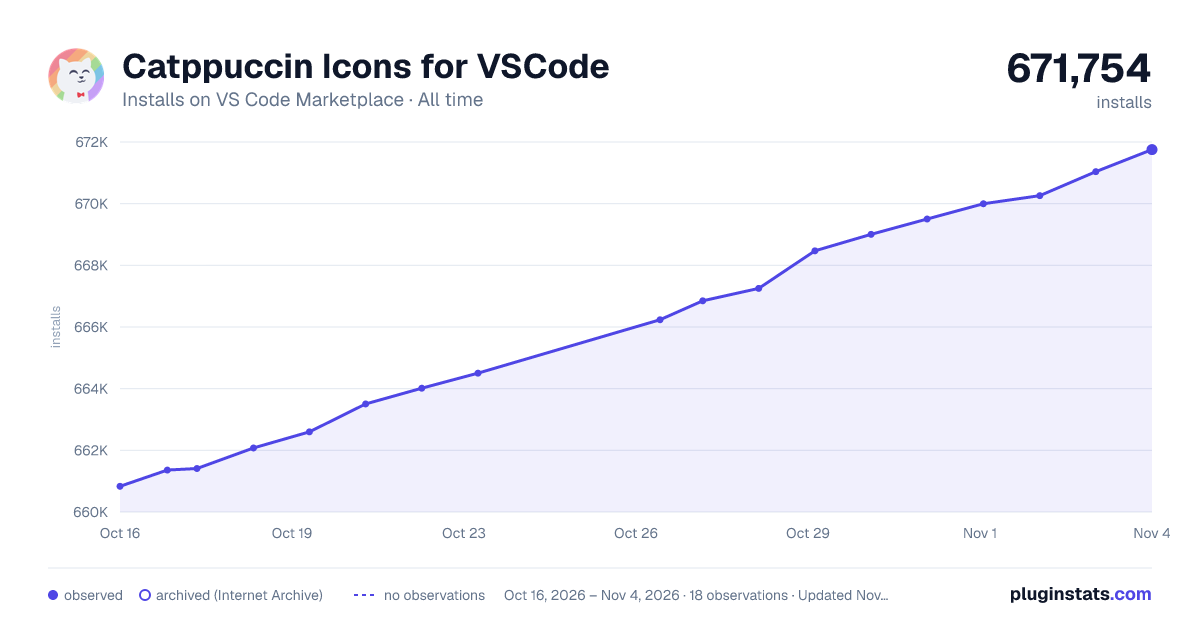

Adoption over time
7/30/90-day growth
Ranking history
Ratings over time
Listing placement
Listing placement
Filled points are observed values; hollow points come from Internet Archive snapshots of the listing page. Dashed segments span periods with no observations — values between points are not interpolated.
Each band is one page of 20. Installs on a linear scale. Placement is projected from installs, so it can differ from the marketplace's own sort order. Hover a dot to see the listing.
Recent observations
Full history (7)Similar VS Code Marketplace Themes plugins
All 20 Catppuccin Icons for VSCode alternativesData source
Install counts, average rating, and rating counts come from the public Visual Studio Marketplace gallery API. Installs are cumulative and exclude updates.
Listing: https://marketplace.visualstudio.com/items?itemName=Catppuccin.catppuccin-vsc-icons. First seen Oct 16, 2026; last successful collection Oct 22, 2026. See the methodology.