 PluginStats
Salesforce Extension Pack (Expanded) installs statistics
By Salesforce (33 listings) · VS Code Marketplace · Extension Packs
Extensions for developing on the Salesforce Platform
Salesforce Extension Pack (Expanded) has 759,535 recorded installs on VS Code Marketplace, ranking #649 of 2,501 tracked listings.
Rating: 3.00 / 5 from 7 ratings
About Salesforce Extension Pack (Expanded)
Salesforce Extensions for Visual Studio Code (Expanded)
This extension pack includes tools for developing on the Salesforce platform in the lightweight, extensible VS Code editor. These tools provide features for working with development orgs (scratch orgs, sandboxes, and DE orgs), Apex, Lightning web components, Aura components, Visualforce, and SOQL. The Salesforce Extension Pack (Expanded) includes the Salesforce Extension Pack as well as popular community-built extensions for formatting and analyzing your code, and more.
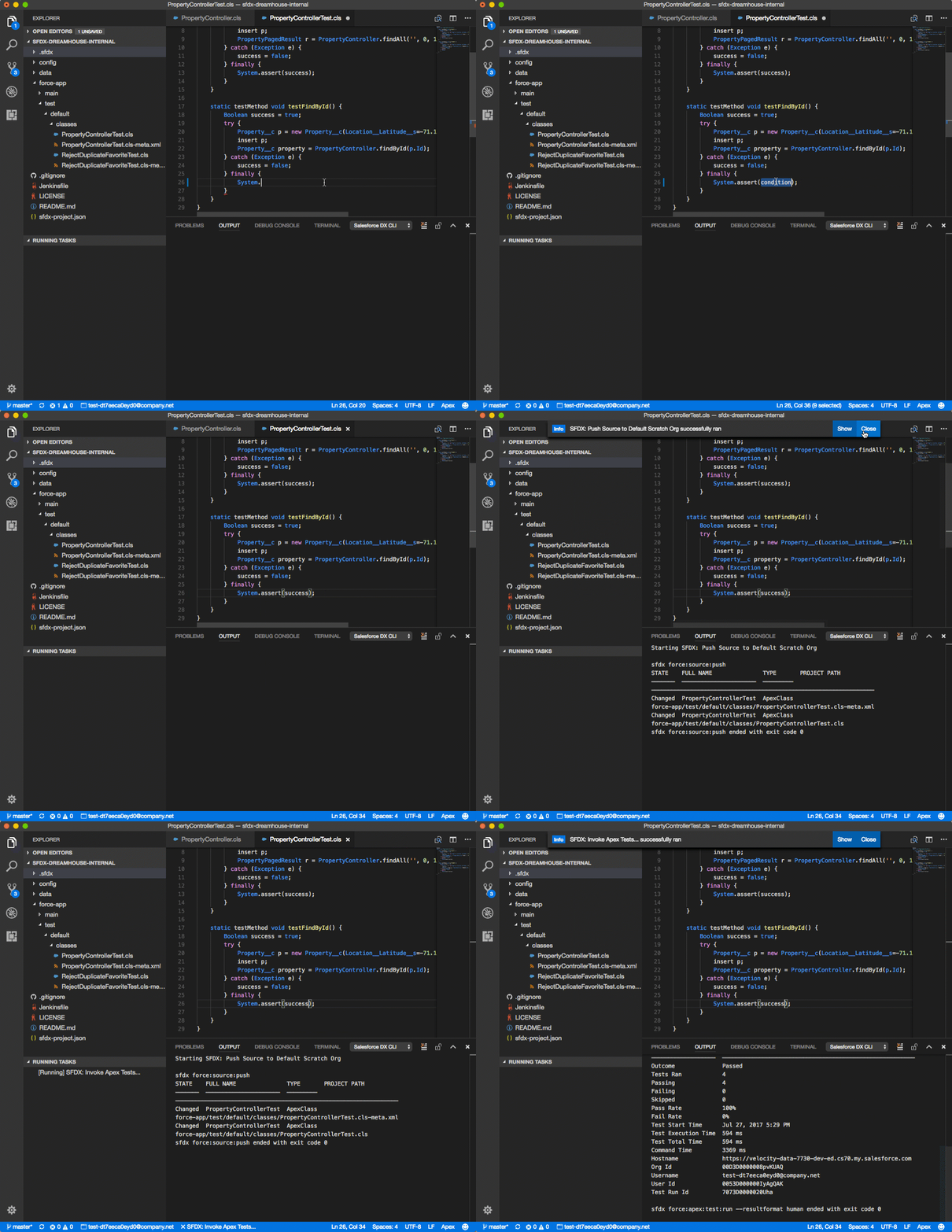
Prerequisites
Before you set up Salesforce Extensions for VS Code, make sure that you have these essentials.
-
Salesforce CLI Before you use Salesforce Extensions for VS Code, set up Salesforce CLI.
-
A Salesforce DX project Open your Salesforce DX project in a directory that contains an
sfdx-project.jsonfile. Otherwise, some features don't work. If you don't already have a Salesforce DX project, create one with the SFDX: Create Project command (for development against scratch orgs) or the SFDX: Create Project with Manifest command (for development against sandboxes or DE orgs). Or, see create a Salesforce DX project for information about setting up a project using Salesforce CLI. -
Java Platform, Standard Edition Development Kit Some features in Salesforce Extensions for VS Code depend upon the Java Platform, Standard Edition Development Kit (JDK). You need to have version 11 or higher of the JDK installed.
If you don't already have version 11 or higher of the JDK installed, we recommend you install Java 21 from Java 21 Downloads.
If you also use other versions of the JDK, set your VS Code user setting
salesforcedx-vscode-apex.java.hometo point to the location where you installed Java. -
Visual Studio Code (latest - 2) - You must be within 2 months of the latest VSCode version
Documentation
For documentation, visit the Salesforce Extensions for Visual Studio Code documentation site.
Open Source
Bugs and Feedback
To report issues with Salesforce Extensions for VS Code, open a bug on GitHub. If you would like to suggest a feature, create a feature request on GitHub.
Included Extensions
The Salesforce Extension Pack (Expanded) installs these Salesforce-developed extensions.
- Salesforce CLI
This extension (
salesforcedx-vscode-core) interacts with Salesforce CLI to provide core functionality. - Agentforce DX
This extension (
salesforcedx-vscode-agents) provides tools for developing Agentforce agents, including syntax highlighting. - Apex
This extension (
salesforcedx-vscode-apex) uses the Apex Language Server to provide features such as syntax highlighting and code completion. - Apex Testing
This extension (
salesforcedx-vscode-apex-testing) provides Apex test execution and management features for VS Code. - Apex OpenAPI Specification
This extension (
salesforcedx-vscode-apex-oas) provides OpenAPI spec support for Apex. - Salesforce Apex Log
This extension (
salesforcedx-vscode-apex-log) provides Apex debug log viewing and analysis. - Apex Replay Debugger
This extension (
salesforcedx-vscode-apex-replay-debugger) enables VS Code to replay Apex execution from Apex debug logs. - Lightning Web Components This extension supports Lightning web component bundles. It uses the HTML language server from VS Code.
- Aura Components
This extension (
salesforcedx-vscode-lightning) supports Aura component bundles. It uses the HTML language server from VS Code. - Salesforce Org Management
This extension (
salesforcedx-vscode-org) provides org management and switching features. - Visualforce
This extension (
salesforcedx-vscode-visualforce) supports Visualforce pages and components. It uses the Visualforce Language Server and the HTML language server from VS Code. - Salesforce Metadata
This extension (
salesforcedx-vscode-metadata) provides metadata operations…
Description from the VS Code Marketplace listing.
README badge
Show your rank in a README or on your website. The badge updates automatically.
Charts
Images: 30d · 1y · all time · 1600×900 dark
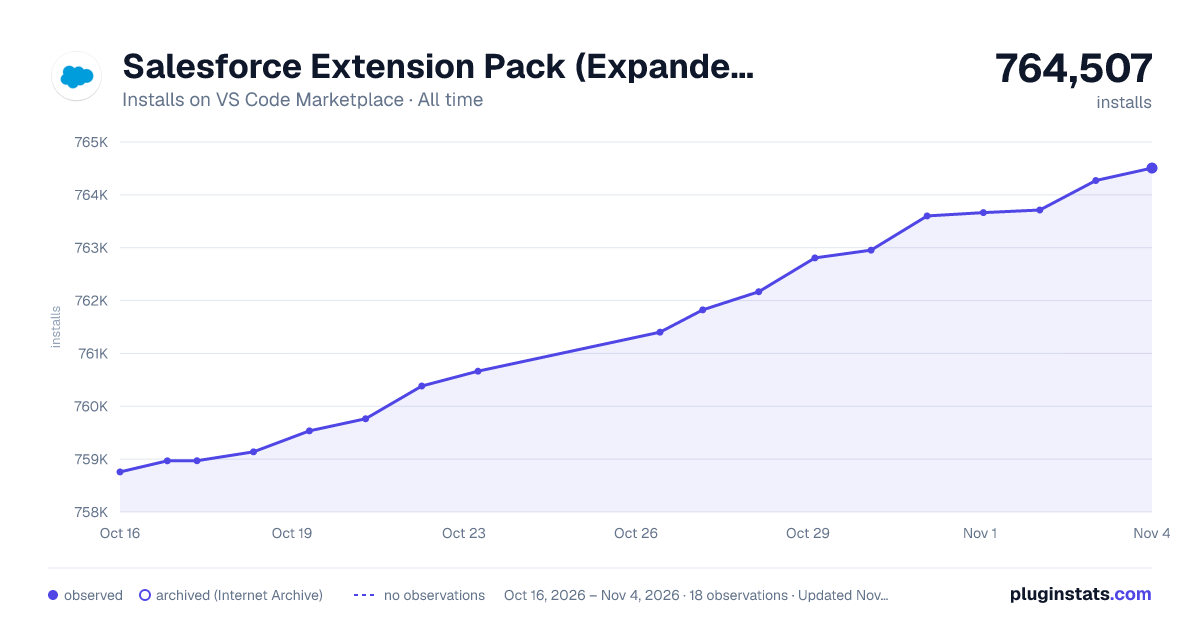
Adoption over time
7/30/90-day growth
Ranking history
Ratings over time
Listing placement
Listing placement
Filled points are observed values; hollow points come from Internet Archive snapshots of the listing page. Dashed segments span periods with no observations — values between points are not interpolated.
Each band is one page of 20. Installs on a linear scale. Placement is projected from installs, so it can differ from the marketplace's own sort order. Hover a dot to see the listing.
Recent observations
Full history (5)Similar VS Code Marketplace Extension Packs plugins
All 20 Salesforce Extension Pack (Expanded) alternatives



Data source
Install counts, average rating, and rating counts come from the public Visual Studio Marketplace gallery API. Installs are cumulative and exclude updates.
Listing: https://marketplace.visualstudio.com/items?itemName=salesforce.salesforcedx-vscode-expanded. First seen Oct 16, 2026; last successful collection Oct 20, 2026. See the methodology.