 PluginStats
Restore Terminals installs statistics
By Ethan Sarif-Kattan · VS Code Marketplace · Other
Spawn integrated terminals and run commands on startup
Restore Terminals has 118,157 recorded installs on VS Code Marketplace, ranking #2154 of 2,501 tracked listings.
Rating: 4.76 / 5 from 38 ratings
About Restore Terminals
Restore Terminals
Automatically spawn integrated terminal windows and split terminals, and run any shell commands when VSCode starts up!
How to use
Simply configure your VSCode settings JSON file to look something like this:
The outer array represents a integrated VSCode terminal window, and the splitTerminals array contains the information about how each terminal window should be split up.
Set cwd on a terminal window when its commands must start in a specific workspace folder. Use ${workspaceFolder} for a single-root workspace or ${workspaceFolder:folderName} for a named folder in a multi-root workspace. Restore Terminals fails instead of falling back to the active folder when the requested workspace folder is unavailable.
You can also use a custom config file. The file should be at .vscode/restore-terminals.json in any workspace you want. A sample config file is here. If this config file is present, Restore Terminals will try and load settings from it first, then use settings.json as a fallback. VSCode validates this file and provides the same descriptions and autocomplete as the Restore Terminals settings.
Multi-root workspaces and Git worktrees
Use .vscode/restore-terminals.json when the same VSCode window contains a repository's primary folder and one or more Git worktrees. Restore Terminals settings are currently window-scoped, so VSCode does not apply them from an individual folder's .vscode/settings.json in a multi-root workspace.
Set cwd on every terminal window to the named primary workspace folder so terminals do not follow whichever worktree or editor was active when they were restored:
my-project must match the primary folder's name in the VSCode workspace. Restore Terminals stops before closing existing terminals if that named folder is unavailable. If several workspace folders contain .vscode/restore-terminals.json, keep their contents identical because the last matching file in the workspace currently supplies the window's terminal layout.
Extra info
The order of split terminals from left to right is the order in the array.
You can manually trigger the restoration of terminals by running Restore Terminals in the command palette.
If you find the extension glitching out, try increasing the restoreTerminals.artificialDelayMilliseconds setting to a higher number, such as 1000.
If you do not want this extension to close the currently open terminal windows, you can simply set restoreTerminals.keepExistingTerminalsOpen to true.
If you do not want it to restore terminals on VSCode startup, but instead only run when you trigger it manually from the command palette, then set restoreTerminals.runOnStartup to false.
If you don't want the commands to actually run, just be pasted in the terminal, then set shouldRunCommands to false in each splitTerminals object.
If you don't like using split terminals, then just provide one object in each split terminal array, which should be the intuitive thing to do.
Contributions
Unless you can 100% prove your contribution fully works with a video, and the code is clean and makes sense, I am no longer accepting contributions. Too many contributions have been submitted that don't work, and the VSCode official API doesn't work in many cases, and this extension already uses a couple hacks to get around it.
Enjoy!
Description from the VS Code Marketplace listing.
- json
README badge
Show your rank in a README or on your website. The badge updates automatically.
Charts
Images: 30d · 1y · all time · 1600×900 dark


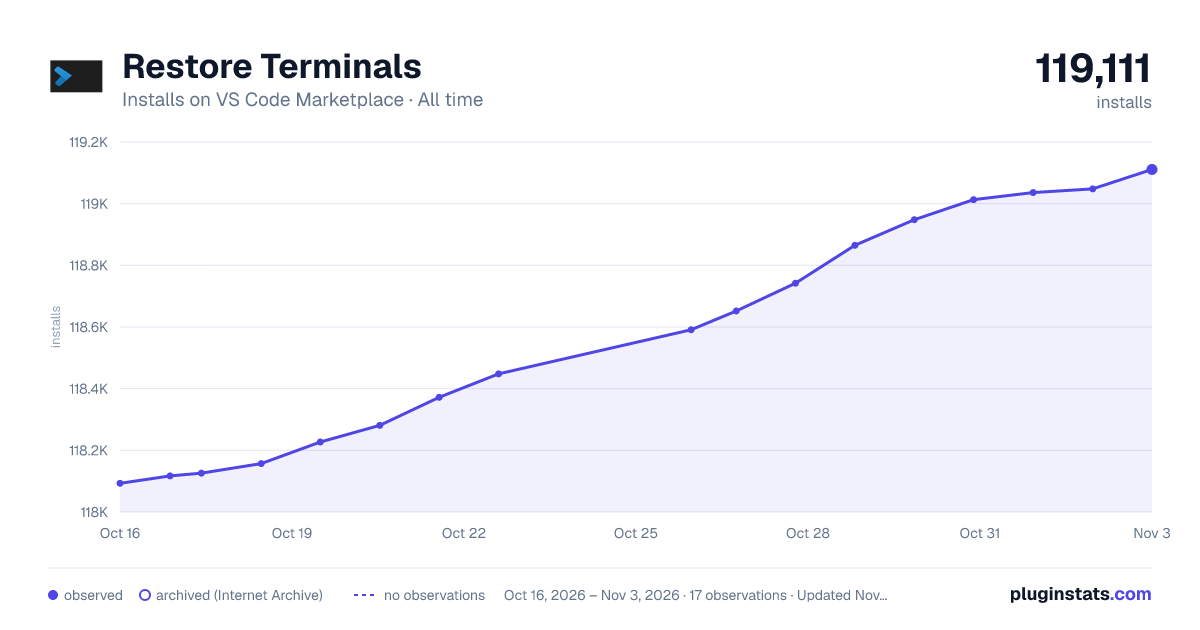

Adoption over time
7/30/90-day growth
Ranking history
Ratings over time
Listing placement
Listing placement
Filled points are observed values; hollow points come from Internet Archive snapshots of the listing page. Dashed segments span periods with no observations — values between points are not interpolated.
Each band is one page of 20. Installs on a linear scale. Placement is projected from installs, so it can differ from the marketplace's own sort order. Hover a dot to see the listing.
Recent observations
Full history (4)Similar VS Code Marketplace Other plugins
All 20 Restore Terminals alternativesData source
Install counts, average rating, and rating counts come from the public Visual Studio Marketplace gallery API. Installs are cumulative and exclude updates.
Listing: https://marketplace.visualstudio.com/items?itemName=EthanSK.restore-terminals. First seen Oct 16, 2026; last successful collection Oct 19, 2026. See the methodology.