 PluginStats
Preview installs statistics
By Haixin Chen · VS Code Marketplace · Programming Languages
A Markdown, ReStructured Text, HTML, Jade, Pug, Mermaid, Image previewer.
Preview has 788,667 recorded installs on VS Code Marketplace.
It ranks #624 of 2,501 tracked VS Code Marketplace listings by installs.
It is rated 3.2 out of 5 from 40 ratings.
PluginStats has 4 daily observations since Oct 16, 2026; the latest is from Oct 19, 2026.
Rating: 3.20 / 5 from 40 ratings
About Preview
preview-vscode
A Previewer of Markdown, ReStructured Text, HTML, Jade, Pug, Mermaid files, Image's URI for Visual Studio Code
README
An extension to preview Markdown, ReStructured Text, HTML, Jade, Pug or Mermaid files or Image's URI while editing them in VSCode
The extension can be activated in two ways
• Toggle Preview • Linux & Windows: ctrl+shift+v • MAC:cmd+shift+v or ctrl+shift+v • Open|Close Preview to the Side • Linux & Windows: ctrl+k v • MAC:cmd+k v or ctrl+k v
Just press the same key when you want to go back to the original view.
DETAIL
• If file type is Markdown, ReStructured Text, HTML, Jade, Pug or Mermaid • Just do as the operation as mentioned. • If file type is other • Just click on a • image URI (/http[s]{0,1}:\/\/|file:\/\/|\s[\.]{0,2}\//). • for example: http://, https://, file://, /, ./ • css properities ({}) • for example: {color: blue} • others as Markdown, ReStructured Text, HTML, Jade or Mermaid • Just do as the operation as mentioned and a showQuickPick will pop up to show choices. • With markdown.rst.esbonio.enabled (off by default), reStructuredText files of a Sphinx project (a conf.py in the directory of the file or above, up to the workspace folder) are previewed by Esbonio when it is installed and its language server is running, as it renders with Sphinx. Other files, or without Esbonio, are previewed by this extension. • Scripts in the previewed page, e.g. of an HTML file, only run when the preview security is Disable (Markdown: Change Preview Security Settings), do it only for files you trust. • Fenced code blocks of languages the built-in Markdown grammar doesn't know, e.g. desktop bash npm install npm run watch # or npm run compile once, then press F5 in VS Code to launch the Extension Development Host npm run lint npm test # npm run test:unit, builds, then compares the samples in test-workspace with test/snapshots UPDATE_SNAPSHOTS=1 npm run test:unit # rewrites the snapshots after an intended change, review them in git diff bash npm run dist # pre-release package, npm run dist:stable for stable npm run vscode:publish # pre-release publish, npm run vscode:publish:stable for stable, login by npx vsce login searKing npm run ovsx:publish # pre-release publish, npm run ovsx:publish:stable for stable, login by npx ovsx login searKing or pass -- -p ```
Thanks to
• html-preview-vscode. • vscode-imagepreview. • vscode-mermaid-preview.
Description from the VS Code Marketplace listing.
- css
- html
- jade
- keybindings
- markdown
- markdown-it
- mermaid
- MermaidFlowchart
- preview
- pug
- restructuredtext
- rst
Where Preview sits in the listing
Each band is one page of 20. Installs on a log scale. Placement is projected from installs, so it can differ from the marketplace's own sort order. Hover a dot to see the listing.


Charts
Images: 30d · 1y · all time · 1600×900 dark


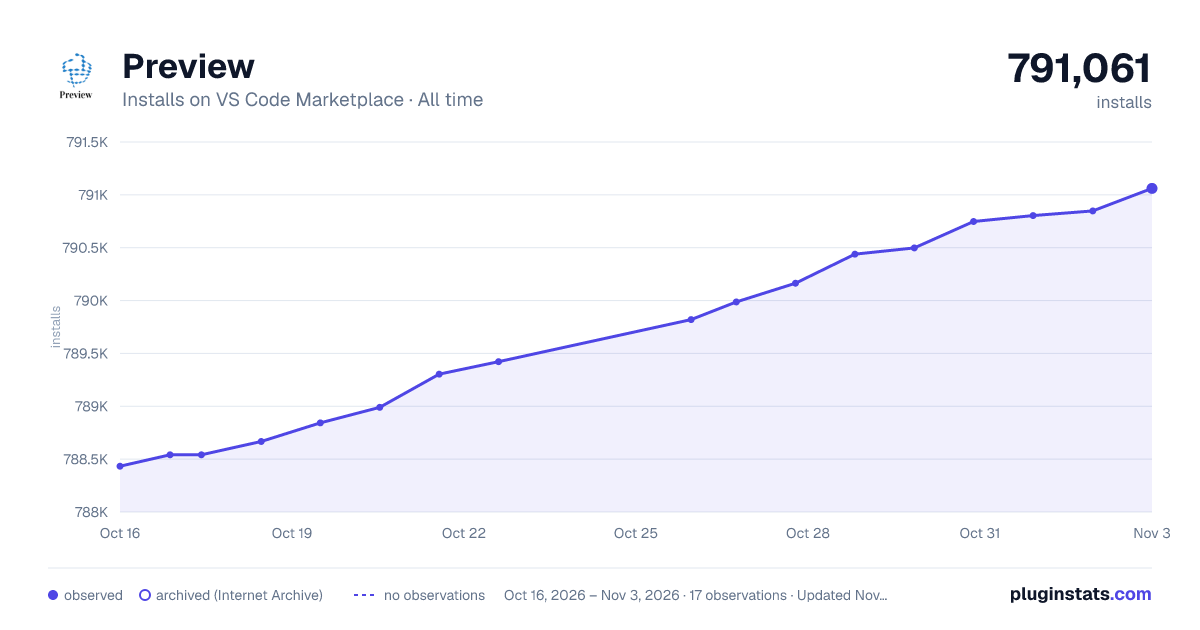

Adoption over time


7/30/90-day growth


Filled points are observed values; hollow points come from Internet Archive snapshots of the listing page. Dashed segments span periods with no observations — values between points are not interpolated.
Recent observations
Full history (4)Similar VS Code Marketplace Programming Languages plugins
Data source
Install counts, average rating, and rating counts come from the public Visual Studio Marketplace gallery API. Installs are cumulative and exclude updates.
Listing: https://marketplace.visualstudio.com/items?itemName=searKing.preview-vscode. First seen Oct 16, 2026; last successful collection Oct 19, 2026. See the methodology.