 PluginStats
Console Ninja installs statistics
By Wallaby.js (3 listings) · VS Code Marketplace · Debuggers
JavaScript console.log output and runtime errors right next to your code.
Console Ninja has 1,499,719 recorded installs on VS Code Marketplace.
It ranks #420 of 2,501 tracked VS Code Marketplace listings by installs.
It is rated 2.9 out of 5 from 93 ratings.
PluginStats has 4 daily observations since Oct 16, 2026; the latest is from Oct 19, 2026.
Rating: 2.90 / 5 from 93 ratings
About Console Ninja
Console Ninja
Console Ninja is a VS Code extension that displays console.log output and runtime errors directly in your editor from your running browser or node application. It's like your browser dev tools console tab or terminal output from your node app, but instead of having to context switch, values are connected to your code and displayed ergonomically in your editor.
Table of contents
• Current status • Supported technologies • Get started • Community Edition Features • console.log • console.trace • console.time • Network logging • Hover tooltip • Log viewer • Universal node applications • Runtime Log Capture Options • PRO Edition Features • Log Map • Logpoints • Network logging Pro • Function logpoints • File Code Coverage • Class logpoints • Predictive logging • Hover tooltip Pro • Log Viewer Pro • Filtering Pro • Quick Search Pro • Tracepoints • Timepoints • GitHub Copilot integration • MCP Server • Interactive Value Graphs • Troubleshooting • How does it work? • Differences between Console Ninja and other tools • Quokka.js • Wallaby.js • Error Lens extension
Current status
Console Ninja extension comes with 2 feature sets: Community and PRO.
Console Ninja Community feature set includes many fundamental features such as displaying console.log output and runtime errors directly in your editor, showing all recorded logs and errors in the log viewer, etc. Console Ninja Community feature set is free to use, and will always be free to use.
Console Ninja PRO (paid) feature set includes everything from the Community feature set as well as many additional advanced features that can be explored on our website Pro page and are documented in a separate doc section. Unless the feature is documented as being available in the PRO edition, it will always be available in the Community edition for free.
Console Ninja feature sets are designed and will be extended in future with the goal of providing you the best tool in the world for debugging your applications. Whether you are using the free or paid version - we will do our best to make you as productive as possible. With the PRO feature set, we are aiming to 10x your productivity, especially in more advanced debugging scenarios:
• with larger number of logs, • medium and large company projects, • realtime value watching and diff-ing, • zero config code coverage powered analysis, • and much more.
You may easily switch between feature sets in the extension settings, request a trial period for Console Ninja PRO feature set by using the "Console Ninja: Manage License" command in VS Code, and unlock the full Console Ninja PRO feature set by purchasing a subscription.
Supported technologies
Console Ninja currently supports the following tools:
• Vite, including • web applications that were generated by Vite CLI such the ones using React, Vue, Preact, Lit, Svelte, Vanilla, TypeScript or JavaScript; • web applications configured to use Vite; • web applications powered by app frameworks that are using Vite, such as Nuxt or SvelteKit. • Webpack, including • Create React App generated applications; • Angular CLI and Angular Nx generated applications; • Gatsby.js; • any web applications configured to use Webpack node module. • Next.js, including first class support for browser and server side (Node and Edge) logs (Next.js middleware is currently not supported). Turbopack (PRO feature) is also supported. • Nest.js, if using Nest.js 10+ with SWC as compiler, follow instructions of this comment. • Remix, including first class support for client and server side logs (no errors). • Nuxt. • Astro, including first class support for client and server side logs (no server side errors). • React Native with Expo, including first class support for logs in iOS and Android emulators (PRO feature), and Web simulator. • Shopify Hydrogen. • Qwik. • Serverless Offline. • Jest test runner (no errors). • Cypress.io end-to-end test runner. • http-server, live-server and serve static HTTP servers. • Live Server VS Code extension (off by default, can be turned on in the Console Ninja extension VS Code settings). • Live Preview VS Code extension (off by default, can be turned on in the Console Ninja extension VS Code settings).
In addition to the technologies above, Console Ninja also supports node app.js-like workflows including Express, Hapi, Fastify and other similar frameworks. Custom node applications are also supported. To learn more, please refer to the Universal Node applications section.
We have designed Console Ninja in such a way that adding support for new tools is fast and easy, so please let us know if there's another technology you want to use Console Ninja with.
Get started
Console Ninja is designed to fit seamlessly into most typical dev workflows. After you have installed the extension in VS Code and opened your project, you may perform the same steps you usually take:
• run npm/pnpm/yarn script or CLI command that starts/opens your app in dev/watch/hot-reload mode \*; • start making code changes, such as adding console.log to your code \*\*; • if required \*\*\*, perform the actions within your app that trigger the modified code, ie. click a button if you have added console.log to the button click handler;
\* _If your app is a custom nodejs application then you need to prefix your CLI command with console-ninja, please refer to Universal Node applications for more information._
\*\* _Most modern tools run in watch mode with hot reload enabled. If your tool doesn't have such mode, then, the same way as without Console Ninja, you need to refresh your app page to make it run your modified code._…
Description from the VS Code Marketplace listing.
- chat-participant
- debugger
- javascript
- keybindings
- language-model-tools
- typescript
Where Console Ninja sits in the listing
Each band is one page of 20. Installs on a log scale. Placement is projected from installs, so it can differ from the marketplace's own sort order. Hover a dot to see the listing.
Charts
Images: 30d · 1y · all time · 1600×900 dark
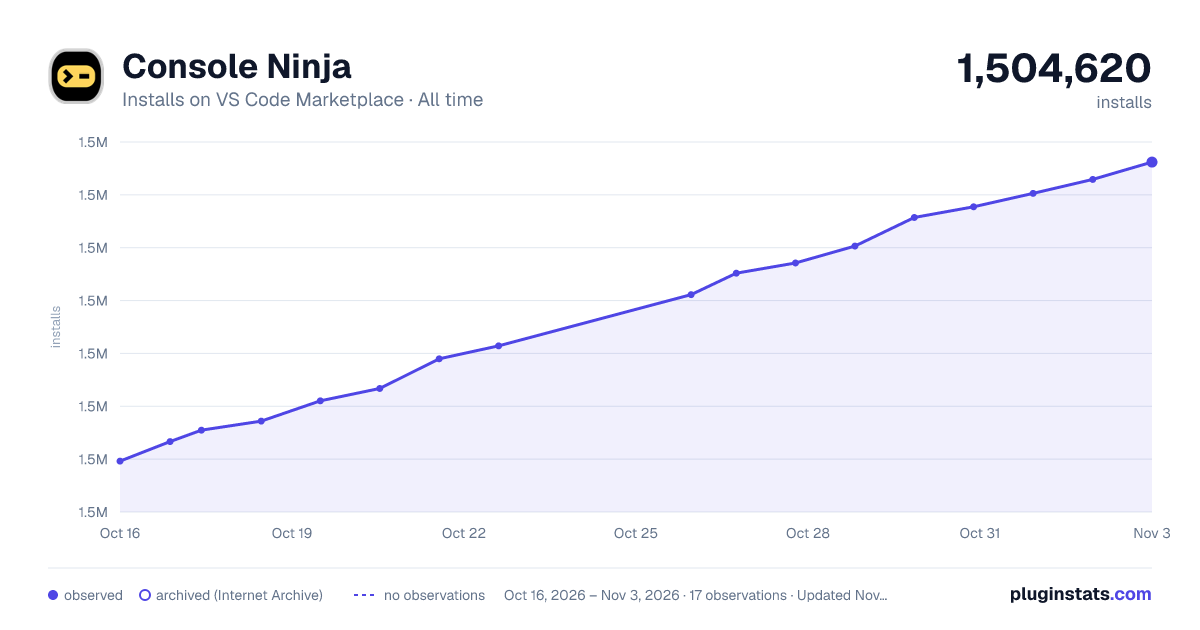
Adoption over time
7/30/90-day growth
Ranking history
Filled points are observed values; hollow points come from Internet Archive snapshots of the listing page. Dashed segments span periods with no observations — values between points are not interpolated.
Recent observations
Full history (4)Similar VS Code Marketplace Debuggers plugins




Data source
Install counts, average rating, and rating counts come from the public Visual Studio Marketplace gallery API. Installs are cumulative and exclude updates.
Listing: https://marketplace.visualstudio.com/items?itemName=WallabyJs.console-ninja. First seen Oct 16, 2026; last successful collection Oct 19, 2026. See the methodology.