 PluginStats
Hungry Delete installs statistics
By jasonlhy · VS Code Marketplace · Keymaps
To delete an entire block of whitespace or tab, and reduce the time programmers need to press backspace
Hungry Delete has 272,426 recorded installs on VS Code Marketplace, ranking #1230 of 2,501 tracked listings.
Rating: 4.84 / 5 from 32 ratings
About Hungry Delete
Hungry Delete Extension for Visual Studio Code
I find it very annoying to press backspace multiple times to remove the leading tabs or white spaces in order to return to the previous end of the line.
Therefore, I created this extension, it overrides ctrl+backspace key binding, once ctrl+backspace is pressed, a command is executed.
Later I found that sometimes I just want to delete the upper line and keep the indent (Personally I don't use backspace to adjust the indent, I use ctrl+), so I added the smart backspace feature which overrides backspace.
Features
Hungry Delete
To delete ALL tab or white spaces before the cursor, until it reaches a non-empty character.
• Windows and Linux : Press ctrl+backspace • Mac : Press alt+backspace
What you need to do before Hungry Delete :
Press ctrl+backspace multiple times to delete the leading spaces and tabs
What you need to do after Hungry Delete :
Press ctrl+backspace ONCE to delete the leading spaces and tabs until you reach a non-empty character
Hungry Delete also supports multiple cursors
Smart Backspace
To delete the upper empty line or delete all tabs or white spaces until the end of the previous line.
• Windows and Linux and Mac: Press backspace
What you need to do before Smart Backspace :
Press backspace multiple times to delete the leading tabs or space to upper line. (Or press the upper arrow and press ctrl+k)
What you need to do after Smart Backspace :
Press backspace once
Smart Backspace also support multiple cursor :
Keep One Space
Set to true to keep at least one space after the last word of the previous line with smart backspace. By default, this is false.
When you see some characters, don't use keep one space
Consider Increase Indent Pattern
Set to true to consider increase pattern. By default, this is false.
It tries to "guess" the indentation of cursor line, and compute the expected indentation of cursor line. If the indentation is not right, it just deletes whitespace to fit the indentation level, but not deleting the line break.
In the gif below:
ul match the increase pattern rule so li have one more indent level. However, li is too deep, smart backspace just deletes the whitespace before li to fit the indentation level it expected.
For detail, please see.
This feature only supports [a few languages
Follow Above Line Indent
Set to true to follow above line indent. By default, this is false.
1st li doesn't match the increase pattern rule, but 2nd li follow the indent of 1st li.
Setting
Change the key binding
By default, hungry delete command maps to ctrl+backspace on windows and Linux, alt+backspace on mac. The following snippet can be placed inside keybings.json file to override the default key binding, it sets ctrl+shift+backspace for the command.
Disable smart backspace
To disable smart backspace, just set hungryDelete.enableSmartBackspace to be false in the setting.
Language Configuration
In order to power consider-increase-pattern, it needs language configuration. However, VSCode doesn't provide API to retrieve the language configuration, therefore I copied the following configuration from vscode source code, and embedded it in the extension. If you need to support another language, you need to adjust the following setting.
Conflict With Vim Extension
Because Vim extension define its own vim_backspace. In order to work with Vim extension in insert mode, normal mode and visual mode, add the following setting in keybindings.json
Steps
-
Click "No" if VSCode detected that this extension has a conflict with Vim extension
-
Add setting into keybindings.json
Development
- git clone https://github.com/Jasonlhy/VSCode-Hungry-Delete.git 2. npm install 3. Edit src/extension.ts
Testing: Run Extension Test on vscode, make such all test cases are passed Note: CLI test is not support at this moment ... (no idea why)
Implementation
Please refer to implementation.md for detail.
Reference
The term Hungry Delete comes from Emacs
The term Smart Backspace comes from PhpStorm
Description from the VS Code Marketplace listing.
- keybindings
README badge
Show your rank in a README or on your website. The badge updates automatically.
Charts
Images: 30d · 1y · all time · 1600×900 dark


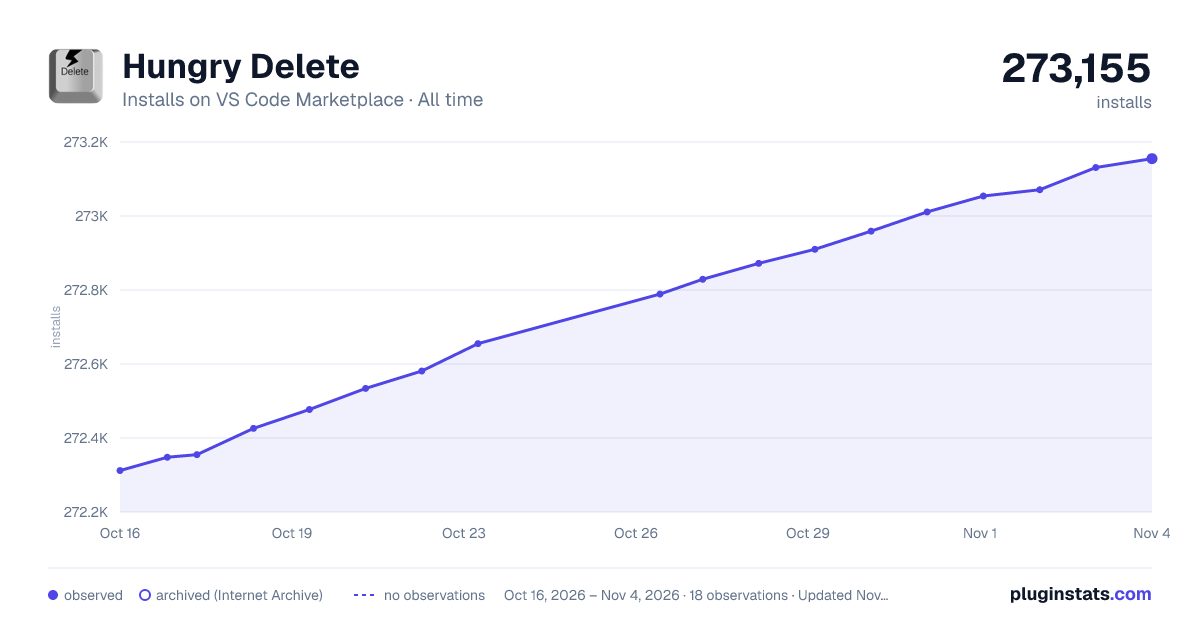

Adoption over time
7/30/90-day growth
Ranking history
Ratings over time
Listing placement
Listing placement
Filled points are observed values; hollow points come from Internet Archive snapshots of the listing page. Dashed segments span periods with no observations — values between points are not interpolated.
Each band is one page of 20. Installs on a linear scale. Placement is projected from installs, so it can differ from the marketplace's own sort order. Hover a dot to see the listing.
Recent observations
Full history (4)Similar VS Code Marketplace Keymaps plugins
All 20 Hungry Delete alternativesData source
Install counts, average rating, and rating counts come from the public Visual Studio Marketplace gallery API. Installs are cumulative and exclude updates.
Listing: https://marketplace.visualstudio.com/items?itemName=jasonlhy.hungry-delete. First seen Oct 16, 2026; last successful collection Oct 19, 2026. See the methodology.