 PluginStats
ElixirLS: Elixir support and debugger installs statistics
By ElixirLS · VS Code Marketplace · Programming Languages
Elixir support with debugger, autocomplete, and more - Powered by ElixirLS.
ElixirLS: Elixir support and debugger has 739,749 recorded installs on VS Code Marketplace.
It ranks #664 of 2,501 tracked VS Code Marketplace listings by installs.
It is rated 4.3 out of 5 from 45 ratings.
PluginStats has 4 daily observations since Oct 16, 2026; the latest is from Oct 19, 2026.
Rating: 4.33 / 5 from 45 ratings
About ElixirLS: Elixir support and debugger
ElixirLS: Elixir support and debugger for VS Code
Provides Elixir language server and debug adapter. This extension is powered by the Elixir Language Server (ElixirLS), an Elixir implementation of Microsoft's IDE-agnostic Language Server Protocol and Debug Adapter Protocol. Visit its page for more information. For a guide to debugger usage in Elixir, read this blog post.
Features include:
• Code completion • Debugger support VSCode debugging docs • Test discovery, running and debugging via Test Explorer VSCode test API announcement • Automatic, incremental Dialyzer analysis • Automatic suggestion for @spec annotations based on Dialyzer's inferred success typings • Diagnostic reporting of build warnings and errors • Go-to-definition and Go-to-implementation • Task provider with collection of mix tasks VSCode tasks • Smart automatic closing of code blocks • Documentation lookup on hover • Function signature provider • Code formatter (Triggered by Alt + Shift + F hotkey or enabling editor.formatOnSave) • Find references to functions and modules • Document and Workspace symbols provider • Multi-root workspaces
This is the main vscode-elixir-ls repo
The elixir-lsp/vscode-elixir-ls repo began as a fork when the original repo at JakeBecker/vscode-elixir-ls became inactive for an extended period of time. So we decided to start an active fork to merge dormant PRs and fix issues where possible. We also believe in an open and shared governance model to share the work instead of relying on one person to shoulder the whole burden.
The original repository has now been deprecated in favor of this one. Future updates to the original VS Code ElixirLS extension will come from this repo.
Default settings
ElixirLS is opinionated and sets the following default settings for Elixir files:
You can, of course, change these in your user settings, or on a per project basis in .vscode/settings.json.
Advanced Configuration
Customizing launch config for test runner
The test runner builds a launch configuration dynamically basing on hardcoded default values:
The default launch config can be customized by providing a project launch configuration named mix test. If found, this launch config is used as the default for running and debugging tests.
Example:
Add support for emmet
emmet is a plugin that makes it easier to write HTML: https://code.visualstudio.com/docs/editor/emmet
Open VSCode and hit Ctrl+Shift+P (or Cmd+Shift+P) and type "Preference: Open Settings (JSON)" Add or edit your emmet.includedLanguages to include the new Language ID:
Supported versions
See ElixirLS for details on the supported Elixir and Erlang versions.
Using ElixirLS with Dev Containers
You can run ElixirLS inside a VS Code dev container for a consistent development environment. An example configuration is provided in the elixir-ls-devcontainer-example repository. Copy its .devcontainer folder into your project (or use it as a starting point), then select Remote-Containers: Reopen in Container from the command palette. After the container builds, the extension will run in the container just as it does locally.
Troubleshooting
If you run into issues with the extension, try these debugging steps:
• Make sure you have hex and git installed. • Make sure github.com and hex.pm are accessible. You may need to configure your HTTPS proxy. If your setup uses TLS man-in-the-middle inspection, you may need to set HEX_UNSAFE_HTTPS=1. • If ElixirLS fails to start, you can try cleaning the Mix.install directory. (The location on your system can be obtained by calling Path.join(Mix.Utils.mix_cache(), "installs") from an iex session.) • Restart ElixirLS with a custom command restart • Run mix clean or mix clean --deps in ElixirLS with the custom command mixClean. • Restart your editor (which will restart ElixirLS). • After stopping your editor, remove the entire .elixir_ls directory, then restart your editor. • NOTE: This will cause you to have to re-run the entire dialyzer build
You may need to set elixirLS.mixEnv, elixirLS.mixTarget, elixirLS.projectDir and/or elixirLS.useCurrentRootFolderAsProjectDir if your project requires it. By default, ElixirLS compiles code with MIX_ENV=test, MIX_TARGET=host, and assumes that mix.exs is located in the workspace root directory.
If you get an error like the following immediately on startup:
and you installed Elixir and Erlang from the Erlang Solutions repository, you may not have a full installation of Erlang. This can be solved with sudo apt-get install esl-erlang. (This was originally reported in #208).
On fedora if you only install the elixir package you will not have a full erlang installation, this can be fixed by running sudo dnf install erlang (This was reported in #231).
Check ElixirLS Output
Check the output log by opening View > Output and selecting "ElixirLS" in the dropdown.
Check the Developer Tools
Check the developer console by opening Help > Toggle Developer Tools and include any errors that look relevant.
Contributing
Installation
To launch the extension from VS Code, run the "Launch Extension local" launch configuration from Run and Debug view or press F5.
Alternatively, you can build and install the extension locally using the vsce command and the code CLI.
Note that if you have the extension installed from the Visual Studio Marketplace and are also installing a locally built package, you may need to disable the Extensions: Auto Check Updates setting to prevent your local install from being replaced with the Marketplace version.
elixir-ls submodule
Most of the functionality of this extension comes from ElixirLS, which is included as a Git submodule in the elixir-ls folder. Make sure you clone the repo using git clone --recursive or run git submodule init && git submodule update after cloning.…
Description from the VS Code Marketplace listing.
- debuggers
- dialyzer
- Eex
- elixir
- Embedded Elixir
- HTML (Eex)
- HTML (Embedded Elixir)
- html-eex
- mix
- multi-root ready
- phoenix-heex
- surface
Charts
Images: 30d · 1y · all time · 1600×900 dark


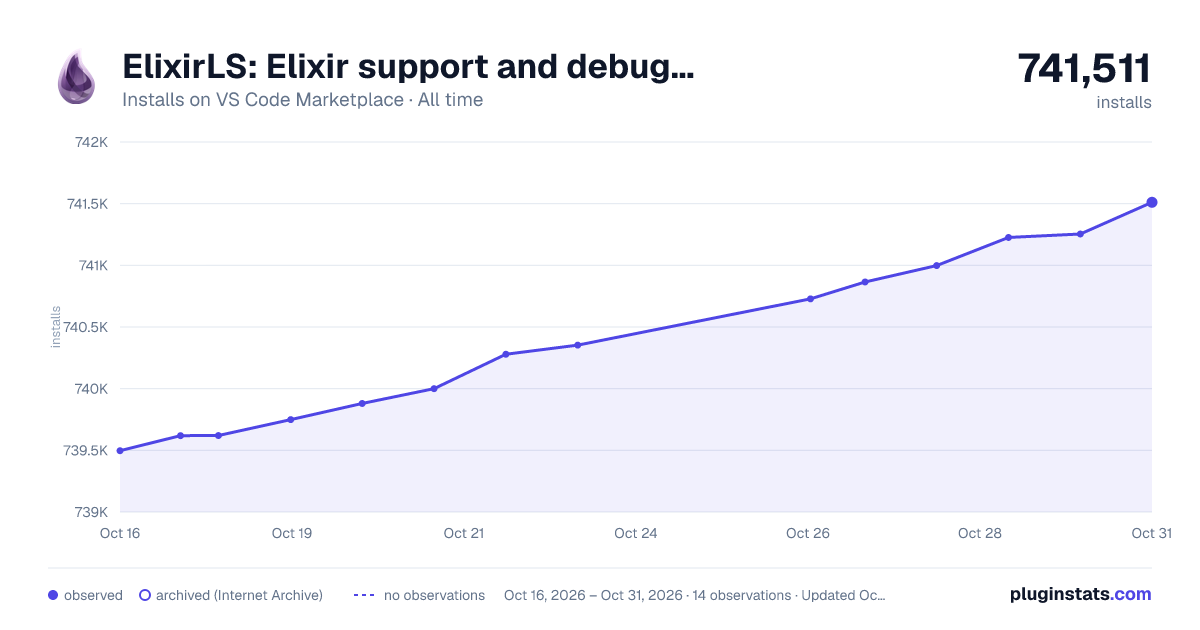

Adoption over time


7/30/90-day growth


Ranking history


Ratings over time


Listing placement


Listing placement


Listing placement


Filled points are observed values; hollow points come from Internet Archive snapshots of the listing page. Dashed segments span periods with no observations — values between points are not interpolated.
Each band is one page of 20. Installs on a log scale. Placement is projected from installs, so it can differ from the marketplace's own sort order. Hover a dot to see the listing.
Recent observations
Full history (4)Similar VS Code Marketplace Programming Languages plugins
All 20 ElixirLS: Elixir support and debugger alternativesData source
Install counts, average rating, and rating counts come from the public Visual Studio Marketplace gallery API. Installs are cumulative and exclude updates.
Listing: https://marketplace.visualstudio.com/items?itemName=JakeBecker.elixir-ls. First seen Oct 16, 2026; last successful collection Oct 19, 2026. See the methodology.