 PluginStats
Doki Theme installs statistics
By Unthrottled · VS Code Marketplace · Themes
Cute anime character themes!
Doki Theme has 673,367 recorded installs on VS Code Marketplace, ranking #705 of 2,501 tracked listings.
Rating: 4.93 / 5 from 72 ratings
About Doki Theme
Theme Preview
Code Font Victor Mono
Feature Preview
Steps demonstrated: 1. Choose Ryuko's Color Theme 1. Enable Ryuko's wallpaper 1. Reload/Restart VSCode 1. Demonstrate glass pane feature
Screen Samples!
Complete Theme Album.
About!
Cute themes based on cute anime characters. With over 60 themes, the one you like the best is probably here.
You can choose themes based on characters from these various Anime, Manga, or Visual Novels:
All Featured Titles
• AzurLane • Blend S • Charlotte • Chuunibyou, Love, & Other Delusions • Code Geass • Daily life with a monster girl • DanganRonpa • Darling in the Franxx • Doki-Doki Literature Club • Don't Toy With Me, Miss Nagatoro • EroManga Sensei • Fate • Future Diary • Gate • Guilty Crown • Haikyu!! • High School DxD • Jahy-sama Will Not Be Discouraged! • Kakegurui • Kill La Kill • KonoSuba • Love Live! • Lucky Star • Miss Kobayashi's Dragon Maid • Monogatari • NekoPara • Neon Genesis Evangelion • One Punch Man • OreGairu • OreImo • Quintessential Quintuplets • Rascal does not dream of bunny girl senpai • Re:Zero • Rising of the Shield Hero • Sewayaki Kitsune no Senko-san • Shokugeki no Soma • Steins Gate • Sword Art Online • That Time I Got Reincarnated as a Slime • Toaru Majutsu no Index • Yuru Camp
Documentation
• Configuration • Background Images • Hide VSCode Watermark • Stickers • Custom Assets • Asset Restoration • Suggestive Content • Asset Removal • Show Changelog • Miscellaneous • Contributing • Theme Requests • Helping the community • Feature Requests • More Doki Theme!
Configuration
Background Images
Background Wallpaper is probably one of the best features of the plugin. This feature will set the background image to the current theme's official wallpaper.
Important!! Installing theme assets requires me to corrupt VS-Code by modifying CSS. You will have to use the "Remove Sticker/Background" command to restore VS Code back to supported status before uninstalling. You can close VSCode and start it back up remove the annoying Unsupported warning. The plugin automatically fixes VSCode's checksums.
Glass Pane effect
Settings
For convenience, the wallpaper & background image are both installed when you run the Install Wallpaper command. If you want the background image on and the wallpaper off, then you can adjust it using the settings listed below.
• doki.background.enabled: Whether you want an image in your empty editor background when running the 'Install Wallpaper' command. • doki.wallpaper.enabled: Whether you want an image on top of your code editor, when running the 'Install Wallpaper' command.
You'll have to put these changes in the settings.json in your VSCode.
You can also use the settings UI just search for Doki and you should find the relevant settings.
Hide Watermark
Tired of the the VSCode watermark cramping your style? You have the ability to hide it using Hide VSCode Watermark, so you can fully enjoy your art.
Important!! Hiding the watermark requires me to corrupt VS-Code by modifying CSS. You will have to use the "Remove Sticker/Background" command to restore VS Code back to supported status before uninstalling. You can close VSCode and start it back up remove the annoying Unsupported warning. The plugin automatically fixes VSCode's checksums.
Stickers
Show sticker allows you to control the presence of the cute sticker in the bottom right-hand corner of your IDE.
Important!! Installing theme assets requires me to corrupt VS-Code by modifying CSS. You will have to use the "Remove Sticker/Background" command to restore VS Code back to supported status before uninstalling. You can close VSCode and start it back up remove the annoying Unsupported warning. The plugin automatically fixes VSCode's checksums.
Custom Assets
Hey alright, you have the ability to set the image to be used for all the doki-themes. Allowed image types: jpg, png, gif. You'll have to put these changes in the settings.json in your VSCode.
You can also use the settings UI just search for Doki and you should find the relevant settings.
Note: All path values must be an absolute path that resolves to a file on the machine running VSCode. Assets will not be installed until the configuration references a file on your system.
Custom Sticker
Custom Sticker Positioning
Any valid CSS that you can use to modify the position of the sticker. As an FYI, stickers are displayed on a psuedo element the size of the window & applied as the background of that element. So you'll probably want to play around with background-position & background-size, or whatever your heart desires!
Custom Background
This is the empty editor screen (all tabs closed), the one with the VS Code watermark.
Custom Wallpaper
This shows up on your editor and other places. Note: you'll want to make your image partially transparent. Cus I was too lazy to play make all the backgrounds partially transparent to show the opaque background image. Didn't feel like peeling that onion and deviating from my color schemes.
This is what happens when you don't make your custom wallpaper transparent.
You cannot see anything!
Custom Wallpaper/Background Anchor
Value to be used for css 'background-position' for both the background & wallpaper (eg: center, right, left, etc.)
Custom Status Bar Name
I can't get every theme build, so I suppose you want to customize and make your own. I get that, so you have the ability to change the name that shows up next to the heart in the status bar.
Asset Restoration
Unfortunately, every time VSCode updates, you will lose your installed asset changes. Thankfully, this plugin will remember what assets you installed, and attempt to restore them on the first detection of a VSCode update.
If the restoration does not work the first time, you can fix the issue then run the Restore Assets command to quickly get you back to coding!…
Description from the VS Code Marketplace listing.
- Anime
- color-theme
- Otaku
- theme
README badge
Show your rank in a README or on your website. The badge updates automatically.
Charts
Images: 30d · 1y · all time · 1600×900 dark


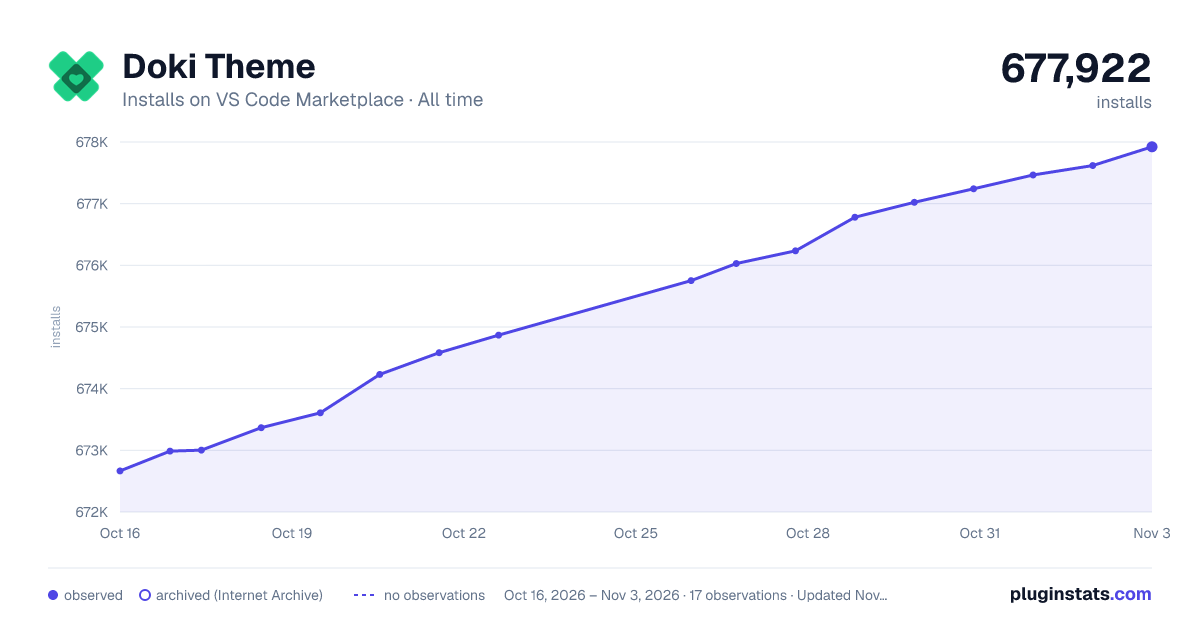

Adoption over time
7/30/90-day growth
Ranking history
Ratings over time
Listing placement
Listing placement
Filled points are observed values; hollow points come from Internet Archive snapshots of the listing page. Dashed segments span periods with no observations — values between points are not interpolated.
Each band is one page of 20. Installs on a linear scale. Placement is projected from installs, so it can differ from the marketplace's own sort order. Hover a dot to see the listing.
Recent observations
Full history (4)Similar VS Code Marketplace Themes plugins
All 20 Doki Theme alternativesDoki Theme on other marketplaces
Data source
Install counts, average rating, and rating counts come from the public Visual Studio Marketplace gallery API. Installs are cumulative and exclude updates.
Listing: https://marketplace.visualstudio.com/items?itemName=unthrottled.doki-theme. First seen Oct 16, 2026; last successful collection Oct 19, 2026. See the methodology.