 PluginStats
Jupyter PowerToys installs statistics
By Microsoft (224 listings) · VS Code Marketplace · Data Science
Experimental features for Jupyter notebook support in VS Code.
Jupyter PowerToys has 996,371 recorded installs on VS Code Marketplace, a change of +0.3% over the past 7 days, ranking #540 of 2,502 tracked listings.
Rating: 4.67 / 5 from 6 ratings
About Jupyter PowerToys
Project
This Visual Studio Code extension provides experimental features to extend the Jupyter notebook experience in VS Code.
This extension is intended to supplement the features provided by the main Jupyter extension. As this extension is providing experimental features, there is no set roadmap for how features will be added or removed from it. Features may be added or removed at any time and there is no guarantee of future support by virtue of inclusion in the extension now. Features in this extension that see high usage may be considered for removal from this extension and inclusion in the main Jupyter VS Code extension. In that case, best efforts will be made to notify of the change and migrate settings if possible.
If these tools aren't quite satisfying your need for something new and cool, also be sure to checkout these other standalone Jupyter Extension addons:
- Gather - Quickly extract tidy scripts or notebooks from your mess of experimentation.
- Pyodide Kernel - Yes, you can run Python in the browser without the need to install or configure any Jupyter server!
Contributing
This project uses GitHub Issues to track bugs and feature requests. Please search the existing issues before filing new issues to avoid duplicates. For new issues, file your bug or feature request as a new Issue.
For help and questions about using this project, please start a Discussion on our GitHub Discussions page.
For those interested in contributing to the code of this project please see the contributing guide.
These are experimental features, so support for help and bug fixing regarding them may be limited.
Trademarks
This project may contain trademarks or logos for projects, products, or services. Authorized use of Microsoft trademarks or logos is subject to and must follow Microsoft's Trademark & Brand Guidelines. Use of Microsoft trademarks or logos in modified versions of this project must not cause confusion or imply Microsoft sponsorship. Any use of third-party trademarks or logos are subject to those third-party's policies.
Features
General Feature Usage
All features provided by the Jupyter PowerToys extension can be enabled or disabled via settings. Search for
Jupyter PowerToys from the VS Code settings UI and change the enabled setting to add or remove any of the
individual features provided by this extension.
Notebook Run Groups
The notebook run groups feature provides the ability to group notebook cells into a sets of cells which can be
executed as a group together. The Jupyter > Notebook Run Groups > Group Count setting controls the number of these groups available, from one to three. Icons to add or remove cells from groups are added to the toolbar of each notebook cell. Cell groups can be executed via the command palette, optional icons in the cell toolbar, or from the dropdown on the cell run button.
Contextual Help
Contextual help provides help text returned by the kernel when changing cursor position in a notebook. <img src=https://raw.githubusercontent.com/microsoft/vscode-jupyter-powertoys/main/images/README/contextualHelp.gif?>
The amount of help text can be controlled with the jupyter.contextualHelp.detailLevel setting.
Kernel Management panel
List, start, stop, reset, kernels all from a new convenient Jupyter sidebar.

Description from the VS Code Marketplace listing.
- execution
- ipynb
- json
- jupyter
- notebook
- notebookKernelJupyterNotebook
README badge
Show your rank in a README or on your website. The badge updates automatically.
Charts
Images: 30d · 1y · all time · 1600×900 dark


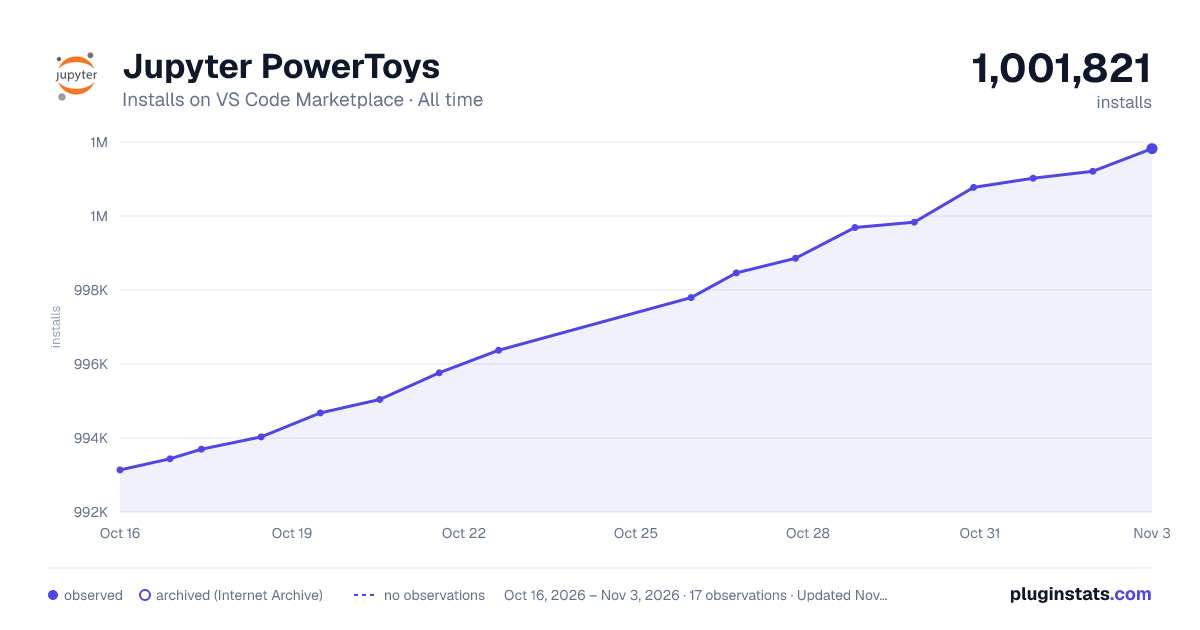

Adoption over time
7/30/90-day growth
Ranking history
Ratings over time
Listing placement
Listing placement
Listing placement
Listing placement
Filled points are observed values; hollow points come from Internet Archive snapshots of the listing page. Dashed segments span periods with no observations — values between points are not interpolated.
Each band is one page of 20. Installs on a linear scale. Placement is projected from installs, so it can differ from the marketplace's own sort order. Hover a dot to see the listing.
Recent observations
Full history (8)Similar VS Code Marketplace Data Science plugins
All 20 Jupyter PowerToys alternativesData source
Install counts, average rating, and rating counts come from the public Visual Studio Marketplace gallery API. Installs are cumulative and exclude updates.
Listing: https://marketplace.visualstudio.com/items?itemName=ms-toolsai.vscode-jupyter-powertoys. First seen Oct 16, 2026; last successful collection Oct 23, 2026. See the methodology.