 PluginStats
Highlight installs statistics
By Fabio Spampinato (5 listings) · VS Code Marketplace · Other
Advanced text highlighter based on regexes. Useful for todos, annotations, colors etc.
Highlight has 300,502 recorded installs on VS Code Marketplace, ranking #1158 of 2,501 tracked listings.
Rating: 4.73 / 5 from 41 ratings
About Highlight
Highlight
<p align="center"> <img src="https://raw.githubusercontent.com/fabiospampinato/vscode-highlight/master/resources/logo.png" width="128" alt="Logo"> </p>Advanced text highlighter based on regexes. Useful for todos, annotations, colors etc.
There are alternative extensions that you may be considering, like TODO Highlight, but this is more generic, this can apply different styles to different capturing groups within the same regex, and this is focused on doing only one thing and doing it well.
This extension has been optimized for "intraline" regexes, i.e. regexes that can never possibly match a newline character at any point inside them, which when editing a file enables the extension to redecorate only the parts of the file that changed, caching everything else, for a massive speedup.
Install
Follow the instructions in the Marketplace, or run the following in the command palette:
ext install fabiospampinato.vscode-highlight
Commands
It adds 3 commands to the command palette:
'Highlight: Enable Highlights' // Enable all highlights
'Highlight: Disable Highlights' // Disable all highlights
'Highlight: Toggle Highlights' // Toggle all highlights on/off
Settings
{
  "highlight.decorations": { "rangeBehavior": 3 }, // Default decorations from which all others inherit from
  "highlight.regexFlags": "gi", // Default flags used when building the regexes
  "highlight.regexes": {}, // Object mapping regexes to options or an array of decorations to apply to the capturing groups
}
An example configuration could be:
"highlight.regexes": {
  "(//TODO)(:)": [ // A regex will be created from this string, don't forget to double escape it
    { "color": "yellow" }, // Decoration options to apply to the first capturing group, in this case "//TODO"
    { "color": "red" } // Decoration options to apply to the second capturing group, in this case ":"
  ]
}
If you want to have different regex flags for different regexes, or if you want to apply the decorations on a per-language/file basis you'll have to express your configuration like this:
"highlight.regexes": {
  "(//TODO)(:)": { // A regex will be created from this string, don't forget to double escape it
    "regexFlags": "g", // Flags used when building this regex
    "filterFileRegex": ".*\\.ext", // Apply only if the current file's path matches this regex. Requires double escaping
    "filterLanguageRegex": "markdown", // Apply only if current file's language matches this regex. Requires double escaping
    "filterThemeRegex": ".*Dark.*", // Apply only if the current theme matches this regex. Requires double escaping
    "decorations": [ // Decoration options to apply to the capturing groups
      { "color": "yellow" }, // Decoration options to apply to the first capturing group, in this case "//TODO"
      { "color": "red" } // Decoration options to apply to the second capturing group, in this case ":"
    ]
  }
}
You can also express regex flags within the regex itself, but writing it like this:
"highlight.regexes": {
  "/(//TODO)(:)/g": [...] // By wrapping the regex in forward slashes it's parsed as a regex with explicit flags
}
You can also use theme color identifiers, prefixed with theme., to use a color from the current theme, which changes automatically depending on the active theme:
"highlight.regexes": {
  "(//TODO)": [
    {
      "backgroundColor": "theme.badge.background",
      "color": "theme.badge.foreground"
    }
  ]
}
Decoration values can also include placeholders like $1 or $2 that will be replaced with the content of the respective capturing group, enabling complex use cases like CSS colors highlighting.
All the supported decoration options are defined here.
Warnings
- Regexes need to be double-escaped, once for JSON and the second time for the regex itself. For example if you want to match a literal asterisk you should write
\\*, not just\*. - For each capturing group a decorations options object must be provided (empty decorations are allowed:
{}), otherwise the actual decorations will be misaligned. - If you want to match the start/end of a line make sure the regex has the "m" (multiline) flag.
Demo
Basic
The following configuration:
<details> <summary>Show configuration...</summary>"highlight.regexes": {
"(// ?TODO:?)(.*)": [
{
"overviewRulerColor": "#FFF484",
"backgroundColor": "#FFF484",
"color": "#1F1F1F",
"fontWeight": "bold"
},
{
"backgroundColor": "#FFF484",
"color": "#1F1F1F"
}
],
"(// ?FIXME:?)(.*)": [
{
"overviewRulerColor": "#FF8C92",
"backgroundColor": "#FF8C92",
"color": "#1F1F1F",
"fontWeight": "bold"
},
{
"backgroundColor": "#FF8C92",
"color": "#1F1F1F"
}
],
"// (@\\w+)": [
{
"color": "#4DE0FF"
}
]
}
Transforms this:
<img src="https://github.com/fabiospampinato/vscode-highlight/raw/HEAD/resources/demo/basic_before.png" alt="Before" width="570px" />Into this:
<img src="https://github.com/fabiospampinato/vscode-highlight/raw/HEAD/resources/demo/basic_after.png" alt="After" width="570px" />Advanced Todos
The following is the configuration I'm currently using for highlighting todos, it's much more robust than the previous demo configuration, and it supports JavaScript/HTML-style comments, urls, multiple todos in a single line, common templating languages, and Todo+-style tags.…
Description from the VS Code Marketplace listing.
- extension
- vsc
- vscode
README badge
Show your rank in a README or on your website. The badge updates automatically.
Charts
Images: 30d · 1y · all time · 1600×900 dark


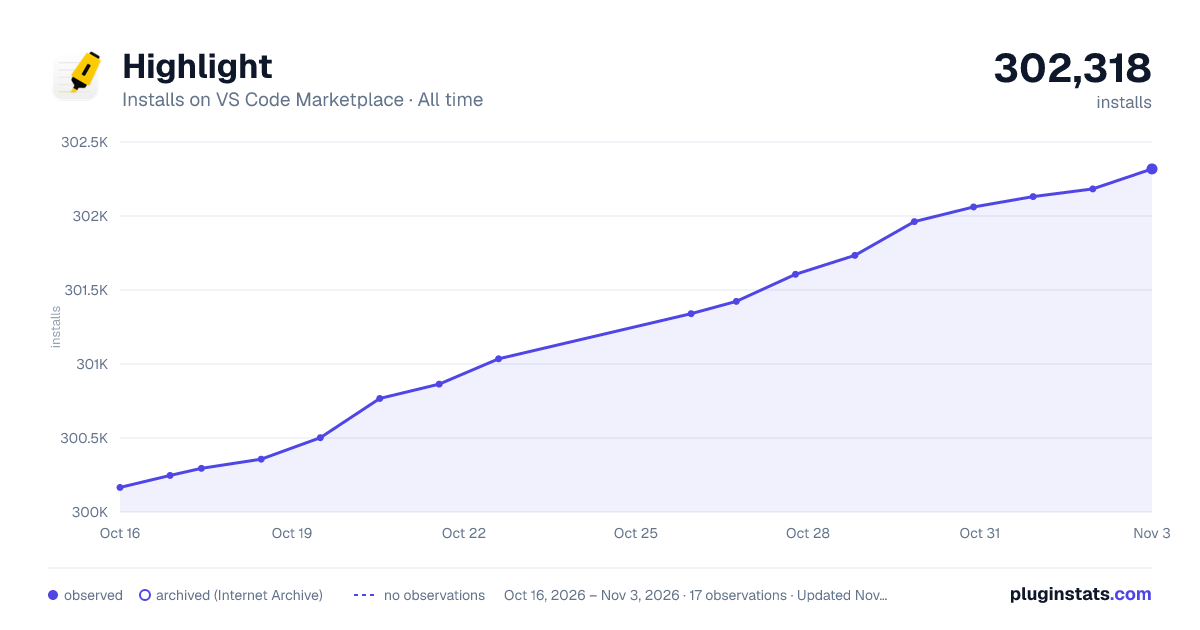

Adoption over time
7/30/90-day growth
Ranking history
Ratings over time
Listing placement
Listing placement
Filled points are observed values; hollow points come from Internet Archive snapshots of the listing page. Dashed segments span periods with no observations — values between points are not interpolated.
Each band is one page of 20. Installs on a linear scale. Placement is projected from installs, so it can differ from the marketplace's own sort order. Hover a dot to see the listing.
Recent observations
Full history (5)Similar VS Code Marketplace Other plugins
All 20 Highlight alternativesHighlight on other marketplaces
Data source
Install counts, average rating, and rating counts come from the public Visual Studio Marketplace gallery API. Installs are cumulative and exclude updates.
Listing: https://marketplace.visualstudio.com/items?itemName=fabiospampinato.vscode-highlight. First seen Oct 16, 2026; last successful collection Oct 20, 2026. See the methodology.