 PluginStats
Mypy installs statistics
By Matan Gover · VS Code Marketplace · Programming Languages
Type checking for Python using mypy
Mypy has 375,121 recorded installs on VS Code Marketplace.
It ranks #1002 of 2,500 tracked VS Code Marketplace listings by installs.
It is rated 4.3 out of 5 from 25 ratings.
PluginStats has 3 daily observations since Oct 16, 2026; the latest is from Oct 18, 2026.
Rating: 4.32 / 5 from 25 ratings
About Mypy
Mypy extension for VS Code
Runs mypy on Python code to provide type checking.
• Runs on your entire workspace. (This is different from Microsoft's Python extension's mypy functionality which only lints each file separately, leading to incomplete type checking.) • Uses the mypy daemon to keep the analysis state in memory so that only changed files are rechecked. • Respects the active Python interpreter (set in the Python extension) and the mypy.ini configuration file. • Supports multi-root workspaces: will launch a separate mypy daemon for each workspace folder.
Installing mypy
This extension requires mypy to be installed on your system. To install mypy, run pip install mypy. There are other ways to install mypy, such as using pipx or your system's package manager.
By default, this extension relies on having the dmypy executable available on your PATH. This should be the case if you installed mypy globally. To use a different mypy installation, set the mypy.dmypyExecutable setting.
Some people prefer to have mypy installed in each project's virtual environment rather than in a global location. To do this, enable mypy.runUsingActiveInterpreter (either globally or for a specific workspace).
Using the extension
The extension automatically checks the workspace with Mypy if there are Python files in it. Diagnostics generated by Mypy are shown in the editor and in the Problems panel.
Every time you save a Python file, the extension will re-run Mypy. Only the changed files (and their dependents) will be re-analyzed.
The extension also provides the following commands:
• Mypy: Recheck Workspace: Re-run mypy on the workspace. This is not normally necessary, but useful if you change Python files outside of VS Code or after you checkout a different Git branch. • Mypy: Restart Daemon and Recheck Workspace: Restart the mypy daemon and recheck. This is not normally necessary, but useful if mypy is behaving unexpectedly.
Configuration
To configure mypy, you can create a mypy.ini file in your workspace folder (or any of the default locations). See mypy configuration file. You can also specify a custom path to mypy.ini using the mypy.configFile setting.
To configure the mypy-vscode extension, use the following VS Code settings:
• mypy.targets: specify a list of target files or folders for mypy to analyze. By default the entire workspace folder is checked. You may prefer to use the files option in mypy.ini to specify which files mypy should analyze. In that case, you should set mypy.targets to an empty array ([]). • mypy.dmypyExecutable: Path to dmypy (the mypy daemon). Either a full path or just a name (which must exist in your PATH). You can use substitutions: ${workspaceFolder} and ~ (home directory). • mypy.runUsingActiveInterpreter: Use the active Python interpreter (selected in the Python extension) to run dmypy itself, instead of the mypy.dmypyExecutable setting. Note: your code is always checked against the active interpreter – this setting only controls the interpreter used to run dmypy itself. • mypy.configFile: Mypy config file, relative to the workspace folder. If empty, search in the default locations. See https://mypy.readthedocs.io/en/latest/config_file.html. • mypy.extraArguments: A list of extra command-line arguments to append to the dmypy run command. For a list of options, see mypy's documentation. • mypy.enabled: Enable or disable Mypy checking. For example, you can disable Mypy for a specific workspace or folder. • mypy.env: Environment variables to set when running mypy. • mypy.envFile: Path to an env file (relative to the workspace folder) containing environment variables to set when running mypy. Used in addition to the env setting. Ignored if the file doesn't exist. • mypy.debugLogging: Enable debug logging for the extension. (Reload the window after changing this setting.) • mypy.statusFile: Path to status file used by dmypy, relative to the workspace folder. By default, the status file is stored in a temporary location. Specify a name such as .dmypy.json to use a fixed location for the status file, so that you can reuse the daemon outside of VS Code. Reusing the daemon might cause issues, but can be useful for large codebases.
Experimental: Type checking in notebooks
This extension can also run mypy on Python code cells in Jupyter notebooks. To enable this feature, set mypy.checkNotebooks to true. Notebooks are type checked when they're opened or saved.
For notebooks, we use mypy rather than dmypy. Use the mypy.mypyExecutable setting to control the mypy executable path. Most settings like mypy.runUsingActiveInterpreter, mypy.configFile, mypy.extraArguments are honored for notebooks too.
There are a couple of known issues: • Notebook checking works by concatenating all code cells into a single document. This means that some errors may be reported on the wrong line, or that invalid code could appear valid or vice versa. It also means that if one cell has a syntax error, the rest of the notebook won't be checked. • The extension can't access the Python interpreter selected for a notebook, so it uses the interpreter selected in the workspace instead. This may cause wrong type checking, e.g. a package will appear to be missing even though it is installed in the notebook's environment.
License
This project is made available under the MIT License.
Description from the VS Code Marketplace listing.
- python
Where Mypy sits in the listing
Each band is one page of 20. Installs on a log scale. Placement is projected from installs, so it can differ from the marketplace's own sort order. Hover a dot to see the listing.


Charts
Images: 30d · 1y · all time · 1600×900 dark


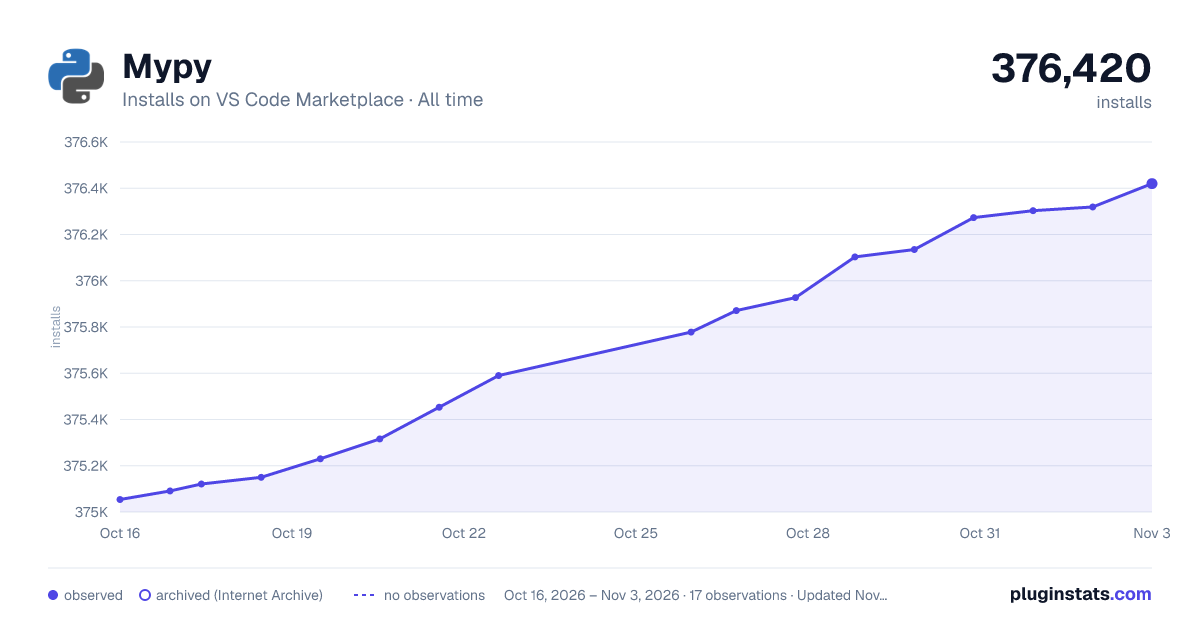

Adoption over time


7/30/90-day growth


Filled points are observed values; hollow points come from Internet Archive snapshots of the listing page. Dashed segments span periods with no observations — values between points are not interpolated.
Recent observations
Full history (3)Similar VS Code Marketplace Programming Languages plugins
Data source
Install counts, average rating, and rating counts come from the public Visual Studio Marketplace gallery API. Installs are cumulative and exclude updates.
Listing: https://marketplace.visualstudio.com/items?itemName=matangover.mypy. First seen Oct 16, 2026; last successful collection Oct 18, 2026. See the methodology.