 PluginStats
Prettify TypeScript: Better Type Previews installs statistics
By Myles Murphy · VS Code Marketplace · Programming Languages
View "prettified" and nested types in hover tooltips.
Prettify TypeScript: Better Type Previews has 99,185 recorded installs on VS Code Marketplace, ranking #2372 of 2,501 tracked listings.
Rating: 4.67 / 5 from 21 ratings
About Prettify TypeScript: Better Type Previews
Prettify TypeScript
Get useful type information where you need it.
Prettify TS replaces hard-to-read TypeScript hovers with fully resolved, nicely formatted types. Hover over a type, interface, class, function, or variable to see what it actually is, without chasing through intersections, mapped types, and generics.
<img src="https://github.com/mylesmmurphy/prettify-ts/raw/HEAD/assets/example.png" width="300" alt="Prettified hover preview" />Watch This
<a href="https://www.youtube.com/shorts/9GRzNXKVa2o" target="_blank"> <img src="https://raw.githubusercontent.com/mylesmmurphy/prettify-ts/refs/heads/main/assets/demo-preview.png" alt="Watch the demo video" width="500" /> </a>Features
- Prettified hovers for interfaces, type aliases, classes, functions, unions, arrays, and more.
- Copy as TypeScript: copy any prettified type to your clipboard as valid, paste-ready TypeScript.
- Toggle Preview: run Prettify TS: Toggle Preview from the Command Palette to switch prettified hovers on or off.
- Configurable: control depth, indentation, how much is shown, and which types are left as-is.
- TypeScript, JavaScript, and Vue: works in
.ts,.tsx,.js,.jsx, and.vuefiles.
Requirements
- VS Code 1.100.0 or newer.
- Works with the editor's bundled TypeScript or your workspace TypeScript.
JavaScript projects
Hovers use TypeScript's inferred types and JSDoc annotations. For configured projects, include JavaScript files with allowJs in tsconfig.json, or use a jsconfig.json.
Vue projects
- Install the Vue - Official extension, version 3.1.1 or newer. No extra configuration is needed.
Extension Settings
All settings are under prettify-ts.* and can be overridden per language.
| Setting | Default | Description |
|---|---|---|
enabled | true | Turns prettified hovers on or off. Toggle Preview flips this. |
typeIndentation | 4 | Spaces used to indent nested types. |
maxDepth | 1 | How many levels of nested types to expand. |
maxProperties | 1000 | Maximum properties shown in total, including nested ones. |
maxSubProperties | 10 | Maximum properties shown on each nested object. |
maxUnionMembers | 15 | Maximum members shown per union. |
maxFunctionSignatures | 5 | Maximum overloads shown per function. |
unwrapFunctions | true | Expands function parameter and return types. |
unwrapArrays | true | Expands array element types. |
unwrapGenericArgumentsTypeNames | Promise, Set, Map, Observable | Generic types whose arguments are expanded instead of the type itself. |
skippedTypeNames | Array, Date, Map, Set, … | Types that are never expanded. Hovers show generics as ZodObject<...>; copies keep the arguments. |
hidePrivateProperties | true | Hides private and protected members and JavaScript #private fields. |
treatUnderscoreAsPrivate | true | Also hides _underscore members when hidePrivateProperties is on. |
maxCharacters | 20000 | Maximum characters in a preview before it is cut off. Higher values are slower. |
To show public _underscore members while still hiding private and protected ones:
{
  "prettify-ts.hidePrivateProperties": true,
  "prettify-ts.treatUnderscoreAsPrivate": false
}
Copy as TypeScript
Right-click a type and choose Prettify → Copy Prettified Type to copy what the hover shows, or Copy Fully Prettified Type to expand every level. Either way, the clipboard gets valid TypeScript you can paste straight into your code: omitted members become comments like /* ... 3 more */, and skipped types keep their generic arguments.
Related Projects
Want to explore types in a sidebar tree? Check out:
Contributing
Bug reports, suggestions, and pull requests are welcome on GitHub. If something isn't working, the Prettify TS output channel usually has details worth including.
Acknowledgements
- @mattpocock: original inspiration via Prettify Type
- @willbattel: early beta testing and feedback
- @mattiamanzati: TypeScript compiler insights
License
Description from the VS Code Marketplace listing.
- javascript
- javascriptreact
- typescript
- typescriptreact
- vue
README badge
Show your rank in a README or on your website. The badge updates automatically.
Charts
Images: 30d · 1y · all time · 1600×900 dark


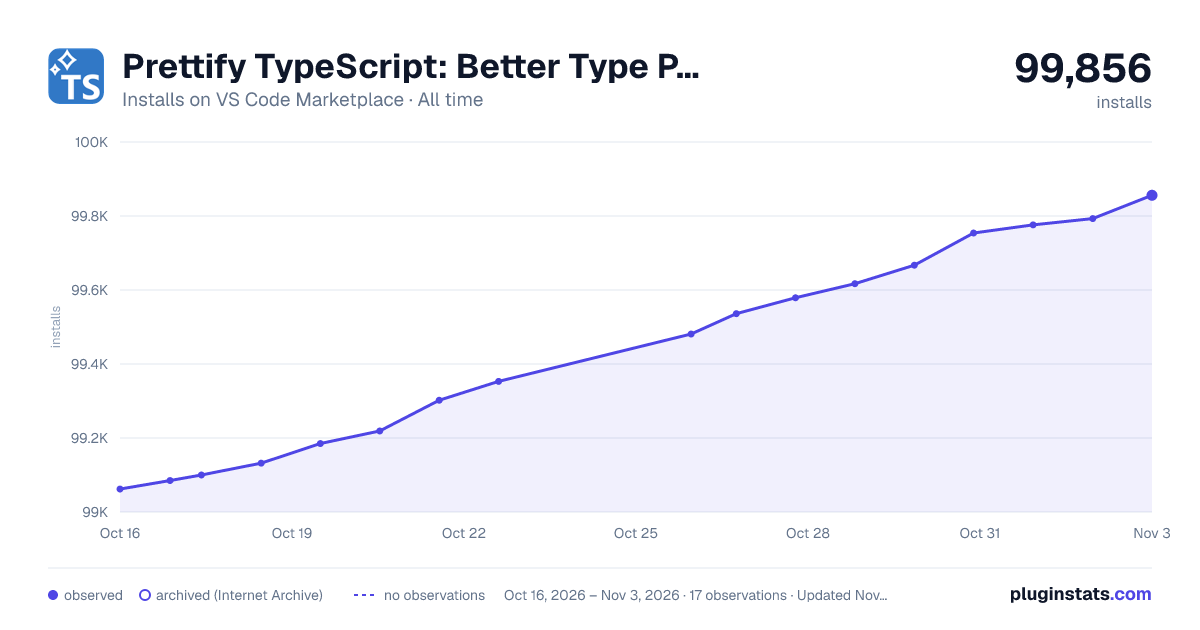

Adoption over time
7/30/90-day growth
Ranking history
Ratings over time
Listing placement
Listing placement
Listing placement
Listing placement
Filled points are observed values; hollow points come from Internet Archive snapshots of the listing page. Dashed segments span periods with no observations — values between points are not interpolated.
Each band is one page of 20. Installs on a linear scale. Placement is projected from installs, so it can differ from the marketplace's own sort order. Hover a dot to see the listing.
Recent observations
Full history (5)Similar VS Code Marketplace Programming Languages plugins
All 20 Prettify TypeScript: Better Type Previews alternativesData source
Install counts, average rating, and rating counts come from the public Visual Studio Marketplace gallery API. Installs are cumulative and exclude updates.
Listing: https://marketplace.visualstudio.com/items?itemName=MylesMurphy.prettify-ts. First seen Oct 16, 2026; last successful collection Oct 20, 2026. See the methodology.